Windows 11 on Unsupported Hardware

Windows 11

How to upgrade Windows 10 to latest build (21H2 build 19044 –> build 21364)
In need of Windows 10 ISO Build 21359 or later
Official Windows 11 ISOs will not hard block most PCs with CPUs that aren’t officially supported, TPM 1.2 enabled, 64GB minimum storage, 4GB RAM, and a dual-core CPU
Herunterladen von Windows 11

Windows 11 — How to Change TPM 1.2 to TPM 2.0 BIOS Fix Solution

BIOS -> Security menu -> Security Chip -> Discrete TPM or Intel PTT... 
Intel PTT supports all Microsoft’s requirements for firmware Trusted Platform Module (fTPM) 2.0 specification.

github.com/rcmaehl/WhyNotWin11, Detection Script to help identify why your PC is not Windows 11 Release Ready. Now Supporting Update Checks!

Umgehen

Ways to install Windows 11

Windows 11 installieren – OHNE TPM- und CPU-Sperre!
Windows 11 ohne TPM-2.0-Chip installieren – so geht´s

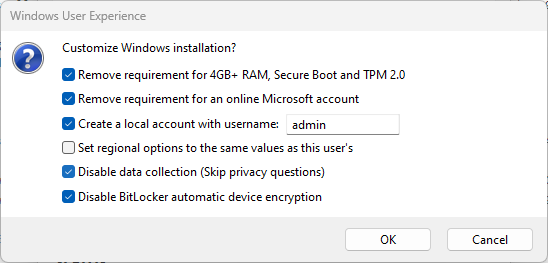
HKEY_LOCAL_MACHINE\SYSTEM\Setup\LabConfig

DWORD (32-Bit)
BypassTPMCheck = 1
BypassSecureBootCheck = 1
BypassRAMCheck = 1

Windows 11: Microsoft erklärt Knacken der Hardware-Sperre

HKEY_LOCAL_MACHINE\SYSTEM\Setup\MoSetup

DWORD (32-Bit)
AllowUpgradesWithUnsupportedTPMOrCPU = 1

Windows 11 ohne Mindestanforderungen – wie es geht und ob’s eine gute Idee ist
Folgende Mindestanforderungen lassen sich mit wenig Aufwand umgehen:

  • Kompatibler Prozessor mit 64-Bit-Unterstützung, zwei Kernen, 1 GHz Taktfrequenz
  • 4 GB RAM
  • Secure Boot
  • Aktiviertes Trusted Platform Module (TPM) der Version 2.0

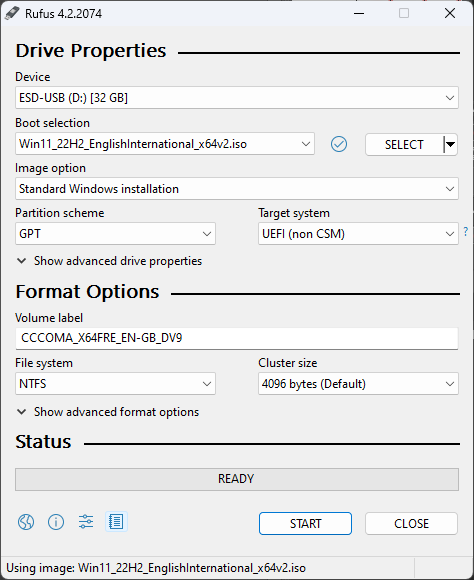
Rufus
Blender: Motion Tracking

[CTRL] + Left-Click        Add Marker
[CTRL] + [T]               Track Markers forward
[CTRL] + [SHIFT] + [T]     Track Markers backward
[ALT]  + [S]               Visible Search Box

YouTube

Blender 2.8 Motion tracking #1: Everything you need to know (tutorial)
Blender 2.8 Motion tracking #2: Even more to go over (tutorial)
Blender 2.8 Motion tracking #3: Camera tracking in depth (tutorial)
Blender 2.8 Motion tracking #4: Camera tracking examples (tutorial)
How to Stabilize footage in Blender! (Blender VFX)
Camera Tracking with Blender for Beginners! (VFX Tutorial)

Presentations

UZH Lecture 11: Tracking, Prof. Dr. Davide Scaramuzza
Penn State Lecture 30: Video Tracking: Lucas-Kanade, Robert Collins

Paper

Lucas-Kanade in a Nutshell

ImageJ plugin

TurboReg
StackReg

Partition MBR/msdos or GPT/EFI/UEFI

$ sudo parted -l
Model: ATA WDC WDS240G2G0A- (scsi)
Disk /dev/sda: 240GB
Sector size (logical/physical): 512B/512B
Partition Table: msdos
Disk Flags: 

Number  Start   End     Size    Type     File system  Flags
 1      1049kB  53.5MB  52.4MB  primary  ntfs
 2      53.5MB  223GB   223GB   primary  ntfs
 3      223GB   223GB   549MB   primary  ntfs         msftres
 4      223GB   240GB   16.8GB  primary  ext4         boot
$ sudo parted -l
Model: ATA Samsung SSD 850 (scsi)
Disk /dev/sda: 120GB
Sector size (logical/physical): 512B/512B
Partition Table: gpt
Disk Flags: 
 
Number  Start   End    Size    File system     Name        Flags
 3      1049kB  269MB  268MB                   gpt-boot
 4      269MB   286MB  16.8MB  fat16           gpt-grub    msftdata
 1      108GB   119GB  10.5GB  ext4            linux-root
 2      119GB   120GB  1074MB  linux-swap(v1)  linux-swap

Microsoft Azure


Tutorials

Solutions

  • Infrastructure as a Service (IaaS)
  • Platform as a Service (PaaS)
  • Software as a Service (SaaS)

Services

  • analytics
  • virtual computing
  • storage
  • networking

Quick facts to Microsoft Azure

  • Flexible – Move compute resources up and down as needed
  • Open – Supports almost any OS, language, tool, or framework
  • Reliable – 99.95% availability SLA and 24×7 tech support
  • Global – Data housed in geo-synchronous data centers
  • Economical – Only pay for what you use

Microsoft Azure Explained: What It Is and Why It Matters
What is Microsoft Azure: How Does It Work and Services
10 reasons why to choose Azure for your Enterprise


YouTube

Microsoft

Cloud Computing in der Praxis: Wir erklären Cloud Computing
Build your first Web App with Microsoft Azure

Tobias Wrzal

Azure Tutorial Teil 1 – Azure Grundlagen
Azure Tutorial Teil 2 – Azure Active Directory, Dynamische Gruppen, Conditional Access
Azure Tutorial Teil 3 – Virtuelle Maschinen
Azure Tutorial Teil 4 – Netzwerk
Azure Tutorial Teil 5 – hochverfügbarer Webserver (IaaS)
Azure Tutorial Teil 6 – hochverfügbarer Webserver (PaaS)

CloudPingPong

Microsoft Azure Überblick, 08.12.2020
Microsoft Azure Update 2022: Konzepte, Dienste und Hintergründe, 22.12.2021

edureka!

Azure Full Course – Learn Microsoft Azure in 8 Hours | Azure Tutorial For Beginners | Edureka

freeCodeCamp.org

Microsoft Azure Fundamentals Certification Course (AZ-900) – Pass the exam in 3 hours!

TechWorld with Nana

Azure DevOps Tutorial for Beginners | CI/CD with Azure Pipelines

Raspberry Pi Bare-Metal


Low Level Learning

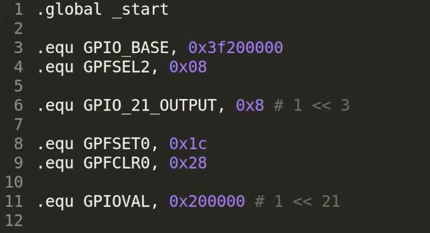
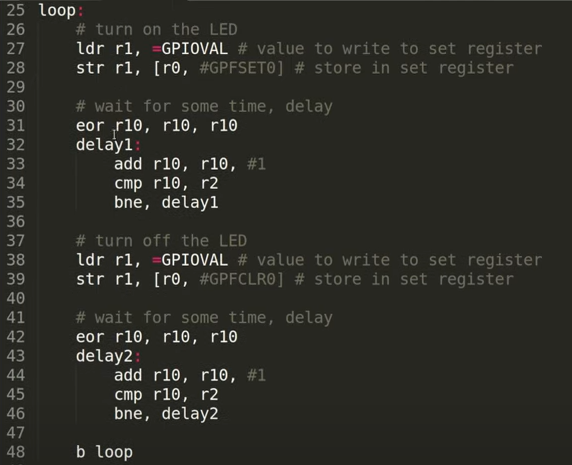
EORccS Rn, Rm, Op2 Logically Exclusive OR Op2 with Rm and store the result in Rn. EOR R0,R0,#4

EOR keeps dependencies, so it can’t be executed out of order on a CPU that can OoO execute the mov from xzr

arm-none-eabi-as start.s -o start.o
arm-none-eabi-ld start.o -o kernel.elf
arm-none-eabi-objcopy kernel.elf -O binary kernel7.img
default:
  arm-none-eabi-as -o start.o start.s
  arm-none-eabi-gcc -c -o main.o main.c -I ./include
  arm-none-eabi-gcc -T linker.ld -o kernel7.elf start.o main.o -ffreestanding -O2 -nostdlib -lgcc
  arm-none-eabi-objcopy kernel7.elf -O binary kernel7.img

github.com/lowlevellearning/raspberry-pi-baremetal
github.com/lowlevellearning/raspberry-pi-baremetal-c

The TWO Programming Languages EVERY Beginner Should Start With (to learn how to code fast), C and Python
Baremetal Assembly Raspberry Pi Programming | Direct to Register Blink LED, No Operating System
Raspberry Pi C/C++ Baremetal Programming | Using C to Direct-Register Control Your Raspberry Pi
BAREMETAL RUST Runs on EVERYTHING, Including the Raspberry Pi | Embedded Rust Tutorial


Azeria Labs

LinkedIn

ARM Assembly Basics

  1. Writing ARM Assembly
  2. ARM Data Types and Registers
  3. ARM Instruction set
  4. Memory Instructions: Load and Store
  5. Load and Store Multiple
  6. Conditional Execution and Branching
  7. Stack and Functions
  8. Assembly Basics Cheatsheet

INTRODUCTION TO ARM ASSEMBLY BASICS
DATA TYPES
ARM & THUMB
MEMORY INSTRUCTIONS: LOAD AND STORE
LOAD/STORE MULTIPLE
CONDITIONAL EXECUTION
STACK AND FUNCTIONS/a>
ARM ASSEMBLY BASICS CHEATSHEET

ARM Exploit Development

  1. Writing ARM Shellcode
  2. TCP Bind Shell (ARM 32-bit)
  3. TCP Reverse Shell (ARM 32-bit)
  4. Process Memory and Memory Corruption
  5. Stack Overflows (Arm32)
  6. Return Oriented Programming (Arm32)
  7. Stack Overflow Challenges
  8. Process Continuation Shellcode
  9. Introduction to Glibc Heap (malloc)
  10. Introduction to Glibc Heap (free, bins)
  11. Heap Exploit Development (Part 1)
  12. Heap Overflows and iOS Kernel (Part 2)
  13. Grooming the iOS Kernel Heap (Part 3)

INTRODUCTION TO WRITING ARM SHELLCODE