Visio Hits&Tips

Change Grid Origin / Ändern des Gitterursprungs: CTRL auf zusammenstoss von den Linealen (Kreuz), ziehen auf neue Position
ALT-F6: Zoom in
SHIFT-ALT-F6: Zoom out

Text mit Hintergrund versehen:
Schriftart -> Textblock -> Texthintergrund

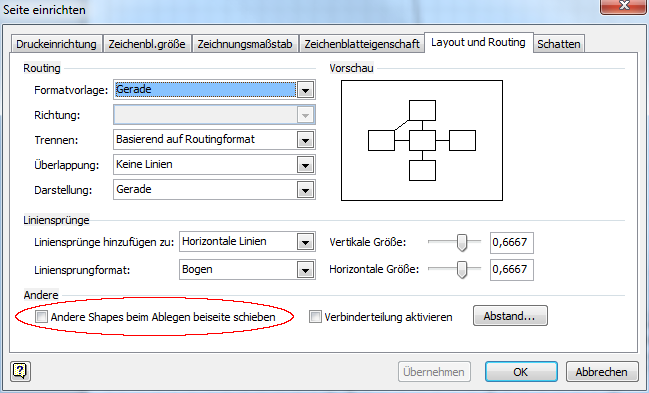
Automatisches Verschieben verhindern

visio_wegschieben_1

visio_wegschieben_2

visio_wegschieben_3

3D shapes erstellen (Visio 2013)

Learn to create 3-D shapes in Visio

Shape-Schutz

Verhindern oder Zulassen von Änderungen an Shape-Attributen
Markieren Sie ein Shape.
Klicken Sie auf der Registerkarte Entwickler in der Gruppe Shape-Design auf Schutz.

Verhindern oder Zulassen von Änderungen an Shapes

Connectors for 3D Diagrams

Oblique Connectors For Your 3D Diagrams

Ändern des Massstabes

Ändern des Maßstabs der Zeichnung
Festlegen des Zeichnungsmaßstabs für ein Zeichenblatt

Messen von Shapes

Messen von Shapes in Visio
Einfügen von Höhen- und Breitenbemaßungsfeldern in ein Shape

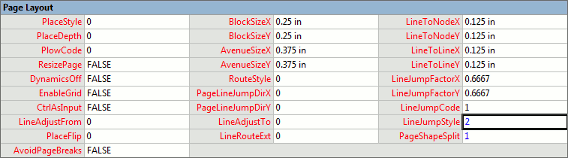
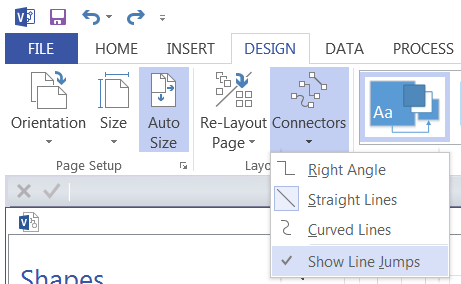
Line Jump: Wenn zwei Linien sich schneiden

Visio Connector Tips: Set the Line Jump Style to GAP

visio_line_jump

visio_page_line_jumpvisio_design_connectors

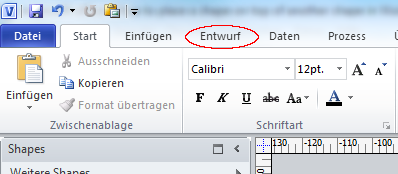
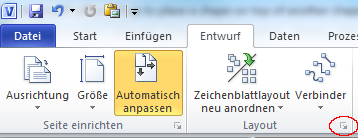
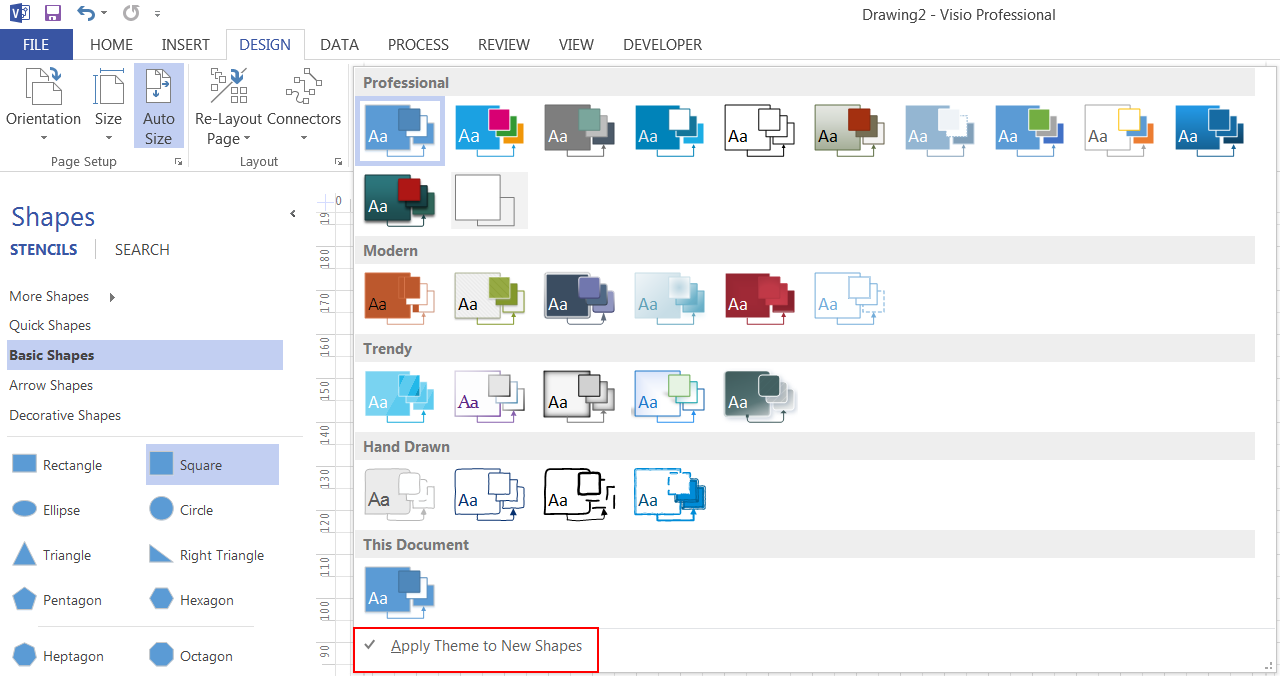
Disable Themes

visio_disable_themes_1
visio_disable_themes_2

Developer Mode

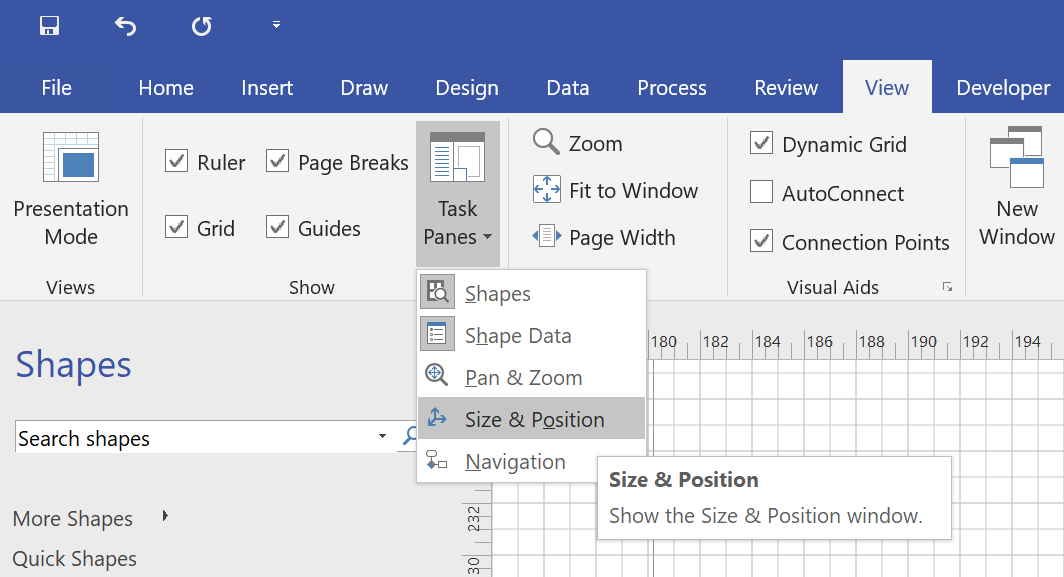
Size & Position

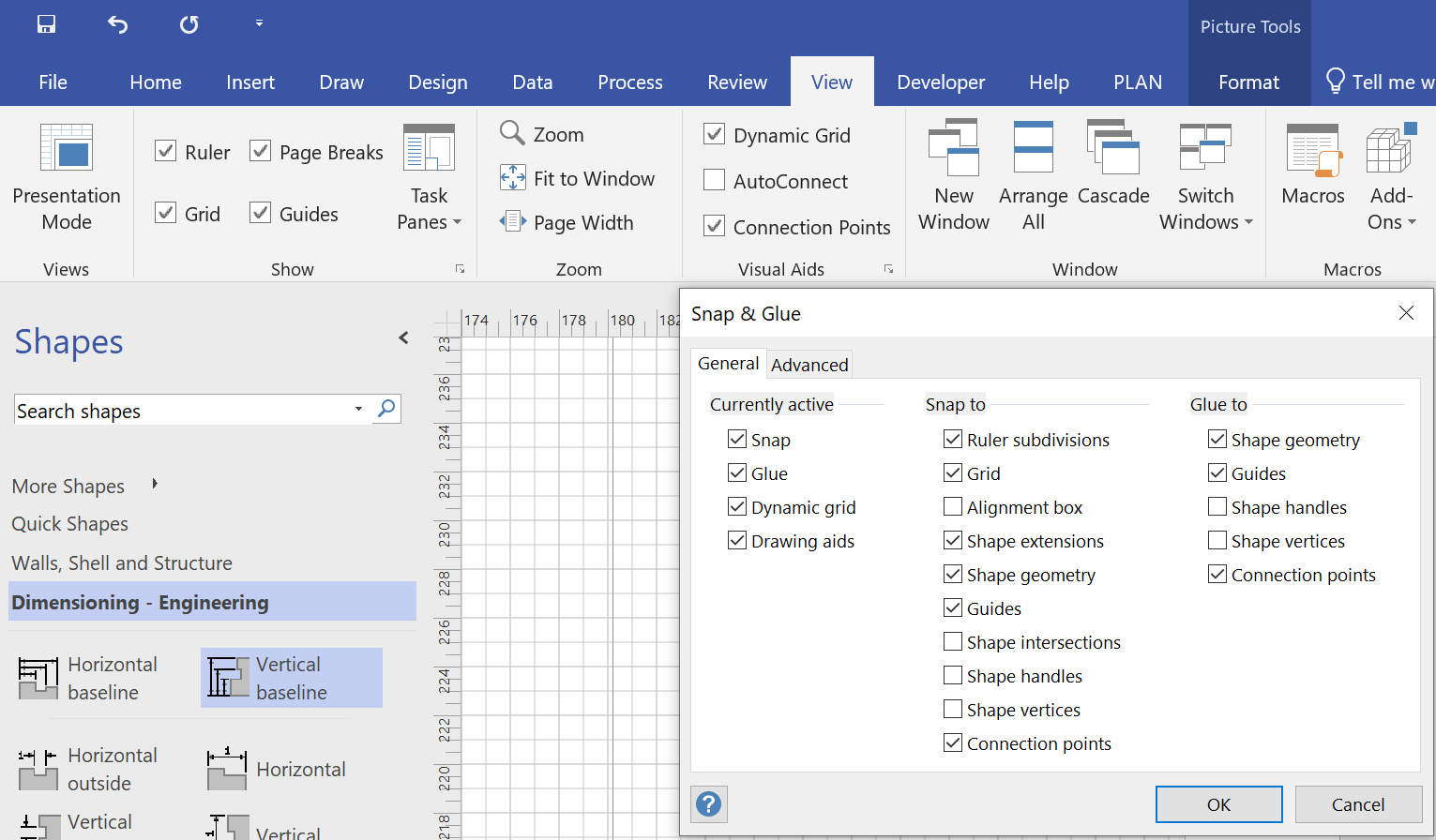
Snap & Glue

AVR Tools

avrdude

AVRDUDE – AVR Downloader/UploaDEr
Mikrocontroller.net – AVRDUDE
AVR Tutorial – Starting out with avrdude
Using the avrdude program

Installation

Windows

WinAVR

Linux

# apt-get install avr-libc binutils-avr gcc-avr
# apt-get install arduino arduino-core extra-xdg-menus libjna-java librxtx-java

binutils

C -> Object -> ELF Executable -> HEX
CC                      = avr-g++
DEVICE                  = atmega168
CPU_FREQ                = 16000000L

#  Use MCU name (atmega2560), not Architecture (avr6)
# Source: http://www.nongnu.org/avr-libc/user-manual/using_tools.html
GLOBAL_CFLAGS           = -O0 -DF_CPU=$(CPU_FREQ) -mmcu=$(DEVICE)
GLOBAL_LDFLAGS          = -mmcu=$(DEVICE)
$ sudo apt-get install gcc-avr
$ sudo apt-get install avr-libc
$ readelf.exe -S arduino_test
There are 3 section headers, starting at offset 0xb0:

Section Headers:
  [Nr] Name              Type            Addr     Off    Size   ES Flg Lk Inf Al
  [ 0]                   NULL            00000000 000000 000000 00      0   0  0     Offset address + size can be seen in Hex-Editor
  [ 1] .data             PROGBITS        00800200 0001ac 000006 00  WA  0   0  1 <== Data
  [ 2] .text             PROGBITS        00000000 000074 000138 00  AX  0   0  2 <== Program Code
  [ 3] .shstrtab         STRTAB          00000000 0001b2 000027 00      0   0  1 <== Section Header String Table
  [ 4] .symtab           SYMTAB          00000000 0002cc 0005c0 10      5  12  4 <== Symbol Table
  [ 5] .strtab           STRTAB          00000000 00088c 000412 00      0   0  1 <== String Table
Key to Flags:
  W (write), A (alloc), X (execute), M (merge), S (strings)
  I (info), L (link order), G (group), T (TLS), E (exclude), x (unknown)
  O (extra OS processing required) o (OS specific), p (processor specific)
$ avr-readelf.exe -s arduino_test 

Symbol table '.symtab' contains 92 entries:
   Num:    Value  Size Type    Bind   Vis      Ndx Name
     0: 00000000     0 NOTYPE  LOCAL  DEFAULT  UND 
     1: 00800200     0 SECTION LOCAL  DEFAULT    1 
     2: 00000000     0 SECTION LOCAL  DEFAULT    2 
     3: 00000000     0 FILE    LOCAL  DEFAULT  ABS ArduinoTestMain.c
  [...]
    10: 00800200     6 OBJECT  LOCAL  DEFAULT    1 TEST
    11: 00000136     0 NOTYPE  LOCAL  DEFAULT    2 __stop_program
  [...]
    39: 000000e4     0 NOTYPE  WEAK   DEFAULT    2 __init
    55: 00000116     0 NOTYPE  WEAK   DEFAULT    2 __vector_33
  [...]
    60: 000000f4     0 NOTYPE  GLOBAL DEFAULT    2 __do_copy_data
    61: 0000011a    26 FUNC    GLOBAL DEFAULT    2 main
    62: 00000116     0 NOTYPE  WEAK   DEFAULT    2 __vector_4
  [...]
avr-objdump -s -m avr6 arduino_test
arduino_test:     file format elf32-avr

Contents of section .data:
 800200 48616c6c 6f00                        Hallo.          
Contents of section .text:
 0000 0c947200 0c948b00 0c948b00 0c948b00  ..r.............
 0010 0c948b00 0c948b00 0c948b00 0c948b00  ................
 0020 0c948b00 0c948b00 0c948b00 0c948b00  ................
 0030 0c948b00 0c948b00 0c948b00 0c948b00  ................
 0040 0c948b00 0c948b00 0c948b00 0c948b00  ................
 0050 0c948b00 0c948b00 0c948b00 0c948b00  ................
 0060 0c948b00 0c948b00 0c948b00 0c948b00  ................
 0070 0c948b00 0c948b00 0c948b00 0c948b00  ................
 0080 0c948b00 0c948b00 0c948b00 0c948b00  ................
 0090 0c948b00 0c948b00 0c948b00 0c948b00  ................
 00a0 0c948b00 0c948b00 0c948b00 0c948b00  ................
 00b0 0c948b00 0c948b00 0c948b00 0c948b00  ................
 00c0 0c948b00 0c948b00 0c948b00 0c948b00  ................
 00d0 0c948b00 0c948b00 0c948b00 0c948b00  ................
 00e0 0c948b00 11241fbe cfefd1e2 debfcdbf  .....$..........
 00f0 00e00cbf 12e0a0e0 b2e0e8e3 f1e000e0  ................
 0100 0bbf02c0 07900d92 a630b107 d9f70e94  .........0......
 0110 8d000c94 9a000c94 0000df93 cf93cdb7  ................
 0120 deb7e4e2 f0e08fef 8083e5e2 f0e083e0  ................
 0130 8083ffcf f894ffcf                    ........
$ avr-objcopy -j .text -j .data -O ihex arduino_test arduino_test.hex
$ avr-objdump -m avr6 -s arduino_test.hex

arduino_test.hex:     file format ihex

Contents of section .sec1:
 0000 0c947200 0c948b00 0c948b00 0c948b00  ..r.............
 0010 0c948b00 0c948b00 0c948b00 0c948b00  ................
 0020 0c948b00 0c948b00 0c948b00 0c948b00  ................
 0030 0c94ab00 0c94e500 0c948b00 0c948b00  ................
 0040 0c948b00 0c948b00 0c948b00 0c948b00  ................
 0050 0c948b00 0c948b00 0c948b00 0c948b00  ................
 0060 0c948b00 0c948b00 0c948b00 0c948b00  ................
 0070 0c948b00 0c94c800 0c948b00 0c948b00  ................
 0080 0c948b00 0c948b00 0c948b00 0c948b00  ................
 0090 0c948b00 0c948b00 0c948b00 0c948b00  ................
 00a0 0c948b00 0c948b00 0c948b00 0c948b00  ................
 00b0 0c948b00 0c948b00 0c948b00 0c948b00  ................
 00c0 0c948b00 0c948b00 0c948b00 0c948b00  ................
 00d0 0c948b00 0c948b00 0c948b00 0c948b00  ................
 00e0 0c948b00 11241fbe cfefd1e2 debfcdbf  .....$..........
 00f0 00e00cbf 12e0a0e0 b2e0e8e0 f2e000e0  ................
 0100 0bbf02c0 07900d92 a630b107 d9f70e94  .........0......
 0110 8d000c94 02010c94 0000df93 cf93cdb7  ................
 0120 deb7e4e2 f0e08fef 8083e5e2 f0e083e0  ................
 0130 80830e94 9c00ffcf df93cf93 cdb7deb7  ................
 0140 e8e6f0e0 82e08083 ece6f0e0 82e08083  ................
 0150 cf91df91 08951f92 0f920fb6 0f920090  ................
 0160 5b000f92 1124ef93 ff93df93 cf93cdb7  [....$..........
 0170 deb7e8e2 f0e01082 cf91df91 ff91ef91  ................
 0180 0f900092 5b000f90 0fbe0f90 1f901895  ....[...........
 0190 1f920f92 0fb60f92 00905b00 0f921124  ..........[....$
 01a0 ef93ff93 df93cf93 cdb7deb7 e8e2f0e0  ................
 01b0 1082cf91 df91ff91 ef910f90 00925b00  ..............[.
 01c0 0f900fbe 0f901f90 18951f92 0f920fb6  ................
 01d0 0f920090 5b000f92 1124ef93 ff93df93  ....[....$......
 01e0 cf93cdb7 deb7e8e2 f0e01082 cf91df91  ................
 01f0 ff91ef91 0f900092 5b000f90 0fbe0f90  ........[.......
 0200 1f901895 f894ffcf 48616c6c 6f00      ........Hallo.
$ avr-objdump -d -m avr6 arduino_test

arduino_test:     file format elf32-avr

Disassembly of section .text:

00000000 <__vectors>:
   0:   0c 94 72 00     jmp     0xe4    ; 0xe4 <__ctors_end>
   4:   0c 94 8b 00     jmp     0x116   ; 0x116 <__bad_interrupt>
   8:   0c 94 8b 00     jmp     0x116   ; 0x116 <__bad_interrupt>
   c:   0c 94 8b 00     jmp     0x116   ; 0x116 <__bad_interrupt>
  10:   0c 94 8b 00     jmp     0x116   ; 0x116 <__bad_interrupt>
  14:   0c 94 8b 00     jmp     0x116   ; 0x116 <__bad_interrupt>
  18:   0c 94 8b 00     jmp     0x116   ; 0x116 <__bad_interrupt>
  1c:   0c 94 8b 00     jmp     0x116   ; 0x116 <__bad_interrupt>
  20:   0c 94 8b 00     jmp     0x116   ; 0x116 <__bad_interrupt>
  24:   0c 94 8b 00     jmp     0x116   ; 0x116 <__bad_interrupt>
  28:   0c 94 8b 00     jmp     0x116   ; 0x116 <__bad_interrupt>
  2c:   0c 94 8b 00     jmp     0x116   ; 0x116 <__bad_interrupt>
  30:   0c 94 8b 00     jmp     0x116   ; 0x116 <__bad_interrupt>
  34:   0c 94 8b 00     jmp     0x116   ; 0x116 <__bad_interrupt>
  38:   0c 94 8b 00     jmp     0x116   ; 0x116 <__bad_interrupt>
  3c:   0c 94 8b 00     jmp     0x116   ; 0x116 <__bad_interrupt>
  40:   0c 94 8b 00     jmp     0x116   ; 0x116 <__bad_interrupt>
  44:   0c 94 8b 00     jmp     0x116   ; 0x116 <__bad_interrupt>
  48:   0c 94 8b 00     jmp     0x116   ; 0x116 <__bad_interrupt>
  4c:   0c 94 8b 00     jmp     0x116   ; 0x116 <__bad_interrupt>
  50:   0c 94 8b 00     jmp     0x116   ; 0x116 <__bad_interrupt>
  54:   0c 94 8b 00     jmp     0x116   ; 0x116 <__bad_interrupt>
  58:   0c 94 8b 00     jmp     0x116   ; 0x116 <__bad_interrupt>
  5c:   0c 94 8b 00     jmp     0x116   ; 0x116 <__bad_interrupt>
  60:   0c 94 8b 00     jmp     0x116   ; 0x116 <__bad_interrupt>
  64:   0c 94 8b 00     jmp     0x116   ; 0x116 <__bad_interrupt>
  68:   0c 94 8b 00     jmp     0x116   ; 0x116 <__bad_interrupt>
  6c:   0c 94 8b 00     jmp     0x116   ; 0x116 <__bad_interrupt>
  70:   0c 94 8b 00     jmp     0x116   ; 0x116 <__bad_interrupt>
  74:   0c 94 8b 00     jmp     0x116   ; 0x116 <__bad_interrupt>
  78:   0c 94 8b 00     jmp     0x116   ; 0x116 <__bad_interrupt>
  7c:   0c 94 8b 00     jmp     0x116   ; 0x116 <__bad_interrupt>
  80:   0c 94 8b 00     jmp     0x116   ; 0x116 <__bad_interrupt>
  84:   0c 94 8b 00     jmp     0x116   ; 0x116 <__bad_interrupt>
  88:   0c 94 8b 00     jmp     0x116   ; 0x116 <__bad_interrupt>
  8c:   0c 94 8b 00     jmp     0x116   ; 0x116 <__bad_interrupt>
  90:   0c 94 8b 00     jmp     0x116   ; 0x116 <__bad_interrupt>
  94:   0c 94 8b 00     jmp     0x116   ; 0x116 <__bad_interrupt>
  98:   0c 94 8b 00     jmp     0x116   ; 0x116 <__bad_interrupt>
  9c:   0c 94 8b 00     jmp     0x116   ; 0x116 <__bad_interrupt>
  a0:   0c 94 8b 00     jmp     0x116   ; 0x116 <__bad_interrupt>
  a4:   0c 94 8b 00     jmp     0x116   ; 0x116 <__bad_interrupt>
  a8:   0c 94 8b 00     jmp     0x116   ; 0x116 <__bad_interrupt>
  ac:   0c 94 8b 00     jmp     0x116   ; 0x116 <__bad_interrupt>
  b0:   0c 94 8b 00     jmp     0x116   ; 0x116 <__bad_interrupt>
  b4:   0c 94 8b 00     jmp     0x116   ; 0x116 <__bad_interrupt>
  b8:   0c 94 8b 00     jmp     0x116   ; 0x116 <__bad_interrupt>
  bc:   0c 94 8b 00     jmp     0x116   ; 0x116 <__bad_interrupt>
  c0:   0c 94 8b 00     jmp     0x116   ; 0x116 <__bad_interrupt>
  c4:   0c 94 8b 00     jmp     0x116   ; 0x116 <__bad_interrupt>
  c8:   0c 94 8b 00     jmp     0x116   ; 0x116 <__bad_interrupt>
  cc:   0c 94 8b 00     jmp     0x116   ; 0x116 <__bad_interrupt>
  d0:   0c 94 8b 00     jmp     0x116   ; 0x116 <__bad_interrupt>
  d4:   0c 94 8b 00     jmp     0x116   ; 0x116 <__bad_interrupt>
  d8:   0c 94 8b 00     jmp     0x116   ; 0x116 <__bad_interrupt>
  dc:   0c 94 8b 00     jmp     0x116   ; 0x116 <__bad_interrupt>
  e0:   0c 94 8b 00     jmp     0x116   ; 0x116 <__bad_interrupt>
000000e4 <__ctors_end>:
  e4:   11 24           eor     r1, r1
  e6:   1f be           out     0x3f, r1        ; 63
  e8:   cf ef           ldi     r28, 0xFF       ; 255
  ea:   d1 e2           ldi     r29, 0x21       ; 33
  ec:   de bf           out     0x3e, r29       ; 62
  ee:   cd bf           out     0x3d, r28       ; 61
  f0:   00 e0           ldi     r16, 0x00       ; 0
  f2:   0c bf           out     0x3c, r16       ; 60

000000f4 <__do_copy_data>:
  f4:   12 e0           ldi     r17, 0x02       ; 2
  f6:   a0 e0           ldi     r26, 0x00       ; 0
  f8:   b2 e0           ldi     r27, 0x02       ; 2
  fa:   e8 e3           ldi     r30, 0x38       ; 56
  fc:   f1 e0           ldi     r31, 0x01       ; 1
  fe:   00 e0           ldi     r16, 0x00       ; 0
 100:   0b bf           out     0x3b, r16       ; 59
 102:   02 c0           rjmp    .+4             ; 0x108 <__do_copy_data+0x14>
 104:   07 90           elpm    r0, Z+
 106:   0d 92           st      X+, r0
 108:   a6 30           cpi     r26, 0x06       ; 6
 10a:   b1 07           cpc     r27, r17
 10c:   d9 f7           brne    .-10            ; 0x104 <__do_copy_data+0x10>
 10e:   0e 94 8d 00     call    0x11a   ; 0x11a <main>
 112:   0c 94 9a 00     jmp     0x134   ; 0x134 <_exit>

00000116 <__bad_interrupt>:
 116:   0c 94 00 00     jmp     0       ; 0x0 <__vectors>

0000011a <main>:
 11a:   df 93           push    r29
 11c:   cf 93           push    r28
 11e:   cd b7           in      r28, 0x3d       ; 61
 120:   de b7           in      r29, 0x3e       ; 62
 122:   e4 e2           ldi     r30, 0x24       ; 36
 124:   f0 e0           ldi     r31, 0x00       ; 0
 126:   8f ef           ldi     r24, 0xFF       ; 255
 128:   80 83           st      Z, r24
 12a:   e5 e2           ldi     r30, 0x25       ; 37
 12c:   f0 e0           ldi     r31, 0x00       ; 0
 12e:   83 e0           ldi     r24, 0x03       ; 3
 130:   80 83           st      Z, r24
 132:   ff cf           rjmp    .-2             ; 0x132 <main+0x18>

00000134 <_exit>:
 134:   f8 94           cli

00000136 <__stop_program>:
 136:   ff cf           rjmp    .-2             ; 0x136 <__stop_program>

Use Architecture (avr6), not MCU name (atmega2560)
Source: http://www.nongnu.org/avr-libc/user-manual/using_tools.html

$ avr-objdump -d -m atmega2560 arduino_test

arduino_test:     file format elf32-avr

avr-objdump.exe: Can't use supplied machine atmega2560

Bug in GCC Version 4.3.3 (WinAVR 20100110): no -mmcu in linking-stage doesn’t exit but gives bad result:

$ avr-objdump -d -m avr6 arduino_test

arduino_test:     file format elf32-avr

Disassembly of section .text:

00000000 <__vectors>:
   0:   0c c0           rjmp    .+24            ; 0x1a <__ctors_end>
   2:   1f c0           rjmp    .+62            ; 0x42 <__bad_interrupt>
   4:   1e c0           rjmp    .+60            ; 0x42 <__bad_interrupt>
   6:   1d c0           rjmp    .+58            ; 0x42 <__bad_interrupt>
   8:   1c c0           rjmp    .+56            ; 0x42 <__bad_interrupt>
   a:   1b c0           rjmp    .+54            ; 0x42 <__bad_interrupt>
   c:   1a c0           rjmp    .+52            ; 0x42 <__bad_interrupt>
   e:   19 c0           rjmp    .+50            ; 0x42 <__bad_interrupt>
  10:   18 c0           rjmp    .+48            ; 0x42 <__bad_interrupt>
  12:   17 c0           rjmp    .+46            ; 0x42 <__bad_interrupt>
  14:   16 c0           rjmp    .+44            ; 0x42 <__bad_interrupt>
  16:   15 c0           rjmp    .+42            ; 0x42 <__bad_interrupt>
  18:   14 c0           rjmp    .+40            ; 0x42 <__bad_interrupt>

0000001a <__ctors_end>:
  1a:   11 24           eor     r1, r1
  1c:   1f be           out     0x3f, r1        ; 63
  1e:   cf e5           ldi     r28, 0x5F       ; 95
  20:   d2 e0           ldi     r29, 0x02       ; 2
  22:   de bf           out     0x3e, r29       ; 62
  [...]

Falscher Port ausgewählt

avrdude: Send: 0 [30]   [20] 
avrdude: ser_recv(): programmer is not responding
avrdude: stk500_recv(): programmer is not responding
avrdude: stk500_getsync() attempt 1 of 10: not in sync: resp=0x00
avrdude: Send: 0 [30]   [20] 

Publickey auf SSH-Target: Login ohne Passwort

Anleitung

user@notebook $ ssh-keygen -t rsa
user@notebook $ cat .ssh/id_rsa.pub | \
                ssh user@server 'cat >> .ssh/authorized_keys'

Now without password
user@notebook $ ssh user@server
user@server $

Diverses

Ursache:

root@target:~ /etc/rc.d/S16openssh stop
root@target:~ /usr/sbin/sshd -d
[...]
Connection from 192.168.1.1 port 59187
[...]
debug1: trying public key file /home/.ssh/authorized_keys
Authentication refused: bad ownership or modes for directory /home

Lösung:
Im beiliegenden Script ändert sich in der Benutzerverwaltung der Benutzer “root”:
Home-Verzeichnis: /root
Shell: /bin/bash

andreas@host:~ ssh-keygen -t rsa
andreas@host:~ ssh-keygen -t dsa
andreas@host:~ ssh-copy-id -i ~/.ssh/id_rsa.pub root@target
andreas@host:~ ssh-copy-id -i ~/.ssh/id_dsa.pub root@target

Kopiert die zwei Publickeys aufs Target ins ~/.ssh/authorized_keys

Da das Verzeichnis /root die Berechtigung “drwx——” hat (nur User-Berechtigt), erlaubt OpenSSH nun über ein Publickey einzuloggen.

Wenn es noch nicht funktioniert, geh über die Serial-Console, stoppe den OpenSSH-Server und starte ihn im Debug-Modus:

root@target:~ /etc/rc.d/S16openssh stop
root@target:~ /usr/sbin/sshd -d

Das gleiche Spiel auf Client-Seite (mit Verbose-Flag!!):

andreas@host:~ ssh -v root@target

SSH ohne Passwort — Kurze Anleitung zur Nutzung
SSH login without password
SSH Without a Password
SSH/OpenSSH/Keys

Doxygen

Installation

$ sudo apt-get install doxygen doxygen-gui doxygen-doc graphviz

Ubuntu User Wiki: Doxygen

Konfiguration

MACRO_EXPANSION        = YES
EXPAND_ONLY_PREDEF     = NO

Dokumentation

Hauptseite

/** @mainpage XCTL 
 *  
 *  @section sec1 Einleitung 
 *  Hier folgt eine kurze Einleitung... 
 * 
 *  @section sec2 Subsysteme 
 *  @subsection sec2_1 Motorsteuerung 
 *  @subsection sec2_2 Ablaufsteuerung  
 */

Klassen

/** Klasse realisiert Beispiel2.  
 *   
 *  @author David Damm  
 *  @date 2.7.2004 
 * 
 *  @version 0.2 
 *  Toten Code entfernt. 
 * 
 *  @version 0.1 
 *  Kommentare hinzugefügt (Doxygen). 
 */
class Beispiel2
{
} 

Funktionen

/** Klasse realisiert Beispiel3.  
 *  
 *  @author David Damm 
 *  @date 2.7.2004 
 */
class Beispiel3
{
  public:
  /** Addiert zwei ganze Zahlen.  
   *  @param[in] a Die erste Zahl. 
   *  @param[in] b Die zweite Zahl.  
   *  @return Die Summe der beiden Zahlen a und b.  
   *  @see Addiere(double,double)  
   */
  int Addiere(int a, int b);
  double Addiere(double a, double b);
}

Strukturen

/**
 * @brief Use brief, otherwise the index won't have a brief explanation.
 *
 * Detailed explanation.
 */
typedef struct BoxStruct_struct {
  int a;    /**< Some documentation for the member BoxStruct#a. */
  int b;    /**< Some documentation for the member BoxStruct#b. */
  double c; /**< Etc. */
} BoxStruct;

oder

/**
 * @struct BoxStruct_struct
 * @brief  brief explanation
 *
 * @var    BoxStruct_struct::a
 * @brief  Some documentation for the member
 */

Links

Doxygen
David Damm: Dokumentationswerkzeug Doxygen
Doxygen usage example (for C)
Document the code with Doxygen

Subversion

Video-Tutorial

Software Carpentry – Version Control with Subversion

General

What do “branch”, “tag” and “trunk” mean in Subversion repositories?
What is trunk, branch and tag in Subversion?

Externals

Externals Definitions
Adding an External Repository to an SVN Project

Properties / Eigenschaften

Eigenschaften

$ svn proplist -v .
$ svn propset <name> <value>
$ svn propedit
$ svn propdel

Branch and Merge

Versionskontrolle nach Art von Subversion
Verwenden von Zweigen
Subversion Howto Branch, Merge, Reintegrate

How do I make Subversion use a third-party diff tool?

Problems with Merging

Reintegrate can only be used if revisions X through Y were previously merged from to reintegrate the source, but this is not the case
svn merge with –reintegrate complains about missing ranges but mergeinfo seems correct
Subversion 1.5 Mergeinfo – Understanding the Internals
svn mergeinfo
Grundlegendes Zusammenführen – Mergeinfo und Vorschauen

# Get
$ svn propget -R svn:mergeinfo .

# Delete
$ svn propdel -R svn:mergeinfo .

# Commit
$ svn commit -m "removed property svn:mergeinfo from all files"

Fedora askpassword/pinentry GUI

How to disable pinentry-qt in fedora 20 for git-svn ?
Disable the pinentry GUI window (for ssh, svn+ssh, gpg, …) under Linux

$ ps aux | grep pinentry-gtk-2
andreas  15078 91.0  0.0 249508  2780 ?        RL   11:13  22:19 /usr/bin/pinentry-gtk-2
$ export PINENTRY_USER_DATA="USE_CURSES=1"
$ unset GPG_AGENT_INFO
$ export | grep ask
declare -x SSH_ASKPASS="/usr/libexec/openssh/gnome-ssh-askpass"
$ unset SSH_ASKPASS

Migration

Subversion

$ svnadmin dump http://projectname.googlecode.com/svn > repodump
svnadmin: 'http://projectname.googlecode.com/svn' is an URL when it should be a path

> svnadmin create c:/rep_new
$ svnadmin create /home/svn/repo_new

> echo > c:\rep_new\hooks\pre-revprop-change.cmd
$ echo ‘#!/bin/sh’ > /home/svn/repo_new/hooks/pre-revprop-change
$ chmod +x /home/svn/repo_new/hooks/pre-revprop-change

> svnsync init file:///c:/repository https://example.googlecode.com/svn
$ svnsync init file:///home/svn/repo_new https://example.googlecode.com/svn

> svnsync sync file:///c:/repository
$ svnsync sync file:///home/svn/repo_new

git

How to migrate svn to another repository
Migrate to Git from SVN
SVN copy between repositories with history

1. Get a git svn clone of each repository:
    git svn clone <SVN-REPOSITORY-FROM> source-repo
    git svn clone <SVN-REPOSITORY-TO> dest-repo

 2. Create patches to be imported:
    cd source-repo/
    export commitFrom=`git log --pretty=%H | tail -1`
    git format-patch -o /tmp/mergepatchs ${commitFrom}..HEAD .

 3. Import the patches
    cd dest-repo/
    git am /tmp/mergepatchs/*.patch

 4. Check difference (= svn status)
    git diff --name-status remotes/git-svn
  
 5. Commit to remote repository
    git svn dcommit

pitfalls svn -> git migration
After “git svn clone”, I still don’t have fantastic branch-merging commit?
Fixing SVN Merge History in Git Repositories

External Diff Program

Send your svn diff to meld

$ svn diff --diff-cmd='meld' file.c

How to make svn diff produce file that patch would apply, when svn cp or svn mv was used?

$ svn diff --diff-cmd /usr/bin/diff -x "-i -b -U" > mypatch

Unversioned Files

$ svn status --no-ignore | grep '^\?' | sed 's/^\?      //'
$ svn status --no-ignore | grep '^\?' | sed 's/^\?      //'  | xargs -Ixx rm -rf xx

Delete Unversioned Files Under SVN

Keywords

Subversion Keywords: Id Rev Author Date


[miscellany]
enable-auto-props = yes

[auto-props]
*.c = svn:keywords=Author Date Id Rev URL;svn:eol-style=native
*.h = svn:keywords=Author Date Id Rev URL;svn:eol-style=native

Undo / revert commit

How do I return to an older version of our code in Subversion?
subversion: How to revert a bad commit
Reverting a Commit in Subversion

svn merge -r [current_version]:[previous_version] [repository_url]
svn commit -m “Reverting previous commit and going back to revision [previous_version].”

Add folder without included files

$ svn add --depth=empty <directory>

Add directory structure to SVN, without files

Undo added files

$ svn revert --recursive <file/directory>
or
$ svn delete --keep-local <file/directory>

“unadd” a file to svn before commit
Undo svn add without reverting local edits

Remove .svn folders

find -type d -name .svn | xargs rm -rf

Remove .svn folders

Ignore files/directories

Individual:

$ svn propset svn:ignore <file to ignore> <folder to set>
$ svn propset svn:ignore -F file_list.txt <folder to set>

svn propset — Den Wert von PROPNAME für Dateien, Verzeichnisse oder Revisionen auf PROPVAL setzen

Global

[miscellany]
global-ignores = <files to ignore>

Resolve conflicts

# Use manually solved files, recursively
$ svn resolve --accept working -R <directory>
base Auswahl der Datei, die die BASE-Revision gewesen war, bevor Sie Ihre Arbeitskopie aktualisierten. Das heißt, die Datei, die Sie ausgecheckt hatten, bevor Sie Ihre letzten Änderungen vornahmen.
working Auswahl der aktuellen Datei in Ihrer Arbeitskopie unter der Annahme, dass Sie Konflikte manuell aufgelöst haben.
mine-full Auswahl der Kopien konfliktbehafteter Dateien, mit dem Inhalt zum Zeitpunkt unmittelbar vor Ihrem Aufruf von svn update.
theirs-full Auswahl der Kopien konfliktbehafteter Dateien, mit dem Inhalt der Revisionen, die Sie durch den Aufruf von svn update vom Server geholt haben.

svn resolve — Konflikte in Dateien und Verzeichnissen der Arbeitskopie auflösen

E160013: ‘/svn/XXX/!svn/me’ path not found

$ dpkg -l | grep subversion
ii  subversion                             1.7.5-1ubuntu2                             amd64        Advanced version control system

Server:
Powered by Apache Subversion version 1.7.4 (r1295709)
$ svn commit -m "add [...]"
svn: E160013: Commit failed (details follow):
svn: E160013: '/svn/XXX/!svn/me' path not found

Connection reset by peer

Solving checkout problems with svn repositories
Timeouts/connection reset using SVN 1.6.11/Apache 2.2.15
Laufzeit-Konfigurationsbereich
SVN Operations Taking Longer than an Hour Time Out
SVN commit doesn’t complete

Client:
%APPDATA%\Subversion\servers: http-timeout = 900
%LOCALAPPDATA%\Subversion\servers: http-timeout = 900
"~/.subversion/servers: http-timeout = 900

Server:
apache2/httpd.conf: TimeOut 900

TortoiseSVN

How do I configure TortoiseSVN’s external merge behavior?

%base   - the original file without your or the others changes
%bname  - The window title for the base file
%mine   - your own file, with your changes
%yname  - The window title for your file
%theirs - the file as it is in the repository
%tname  - The window title for the file in the repository
%merged - the conflicted file, the result of the merge operation
%mname  - The window title for the merged file 

WinMerge

C:\Program Files (x86)\WinMerge\WinMergeU.exe -e -ub -dl %bname -dr %yname %base %mine

Meld

Meld (official)
GNOME: Meld
Meld Installer for Windows (inactive)
Using Meld as external diff tool with Tortoise SVN
How to set up svn conflict resolution with meld?

merge-tool-cmd = /opt/svn-merge-meld
C:\Program Files (x86)\Meld\meld\meld.exe %theirs %merged %mine
C:\Program Files (x86)\Meld\meld\meld.exe --auto-merge --output %merged %mine %base %theirs

Filter

meld_text_filter_freebsd

SvnMapper

SvnMapper
Graphical representation of SVN branch/merge activity [closed]
Visualising Subversion branching/merging history
Anyone use SvnMapper? please help me!
Download the Corflags.exe

C:\Program Files (x86)\SvnMapper>corflags.exe SvnMapper.exe
Microsoft (R) .NET Framework CorFlags Conversion Tool.  Version  2.0.50727.42
Copyright (c) Microsoft Corporation.  All rights reserved.

Version   : v2.0.50727
CLR Header: 2.5
PE        : PE32
CorFlags  : 1
ILONLY    : 1
32BIT     : 0
Signed    : 0

C:\Program Files (x86)\SvnMapper>corflags.exe SvnMapper.exe /32bit+
Microsoft (R) .NET Framework CorFlags Conversion Tool.  Version  2.0.50727.42
Copyright (c) Microsoft Corporation.  All rights reserved.

corflags : error CF001 : Could not open file for writing
C:\Program Files (x86)\SvnMapper>corflags.exe SvnMapper.exe /32bit+
Microsoft (R) .NET Framework CorFlags Conversion Tool.  Version  2.0.50727.42
Copyright (c) Microsoft Corporation.  All rights reserved.


C:\Program Files (x86)\SvnMapper>corflags.exe SvnMapper.exe
Microsoft (R) .NET Framework CorFlags Conversion Tool.  Version  2.0.50727.42
Copyright (c) Microsoft Corporation.  All rights reserved.

Version   : v2.0.50727
CLR Header: 2.5
PE        : PE32
CorFlags  : 3
ILONLY    : 1
32BIT     : 1
Signed    : 0

Linux Zip/Unzip

Compress

$ zip -r <file>.zip <directory>
  adding: <directory>/ (stored 0%)
  adding: <directory>/<file> (deflated 3%)

  [...]

Extract

PKv6.3

Problem:

$ unzip file.zip 
Archive:  file.zip
   skipping: file/special.txt  need PK compat. v6.3 (can do v4.6)

Lösung:

$ sudo apt-get install p7zip-full
$ 7z x file.zip