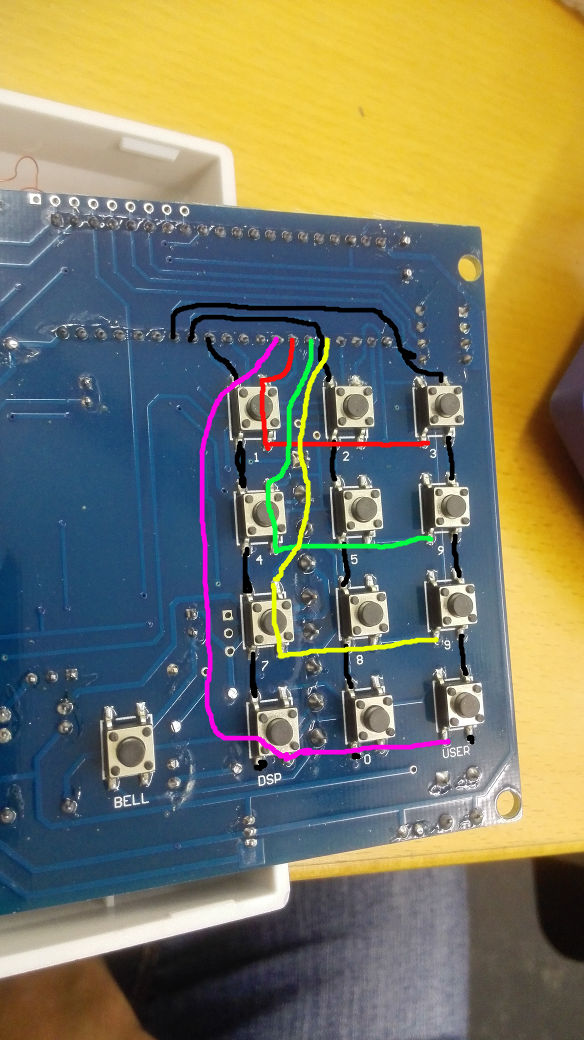
RFID Keypad
Leave a reply
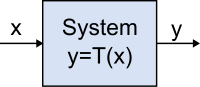
Systemtheorie
Systemtheorie (Ingenieurwissenschaften)
Lineares System (Systemtheorie)
Nichtlineares System
Lineare Abbildung
Lineares zeitinvariantes System (LZI) (LTI-System linear time-invariant system)
RC-Glied
Funktionsgraphen verschieben
Funktionsgraphen stauchen und strecken
Digitale Rechenanlagen: Grundlagen / Schaltungstechnik / Arbeitsweise, Seite 172: Quadratwurzel/Nullstelle/Reziprokwert, Ambros P. Speiser, Springer
OpenSSL Command Line Utilities
OpenSSL Quick Reference Guide
OpenSSL Quick Reference Guide
The Most Common OpenSSL Commands
How to use OpenSSL and the Internet PKI on Linux systems
OpenSSL PKI Tutorial
Privacy Enhanced Mail (PEM) => Historical container format, used now for BASE64 translation of the x509 ASN.1 key
DER vs. CRT vs. CER vs. PEM Certificates and How To Convert Them
What is a Pem file and how does it differ from other OpenSSL Generated Key File Formats?
The first thing we have to understand is what each type of file extension is. There is a lot of confusion about what DER, PEM, CRT, and CER are and many have incorrectly said that they are all interchangeable. While in certain cases some can be interchanged the best practice is to identify how your certificate is encoded and then label it correctly. Correctly labeled certificates will be much easier to manipulat
How to view certificate chain using openssl
How to extract the Root CA and Subordinate CA from a certificate chain in Linux?
Creating a CA
IBM: SSL mit nicht vertrauenswürdigen Zertifikaten konfigurieren
IBM: Stammzertifizierungsstelle unter iOS installieren
$ openssl req \
-new \
-x509 \
-days 1095 \
-extensions v3_ca \
-keyout ca.key \
-out ca.crt \
-subj "/C=CH/ST=Zurich/L=Winterthur/O=FabLab Winti CA/CN=www.fablabwinti.ch/emailAddress=info@fablabwinti.ch"
Enter PEM pass phrase:
Verifying - Enter PEM pass phrase:

ca.key:     ASCII text      => encrypted private key of the certificate (with PEM password)
ca.crt/pem: PEM certificate => public certificate (which includes the public key but NOT the private key)
ca.srl:     ASCII text      => CA serial number

$ openssl genrsa \
-out rfid.key 2048

$ openssl genrsa \
-out doorlock.key 2048

$ openssl req \
-out rfid.csr \
-key rfid.key \
-new \
-subj "/C=CH/ST=Zurich/L=Winterthur/O=FabLab Winti/CN=RFID"

$ openssl req \
-out doorlock.csr \
-key doorlock.key \
-new \
-subj "/C=CH/ST=Zurich/L=Winterthur/O=FabLab Winti/CN=Door Lock"

$ openssl x509 \
-req \
-in rfid.csr \
-CA ca.crt \
-CAkey ca.key \
-CAcreateserial \
-out rfid.crt \
-days 1095

$ openssl x509 \
-req \
-in doorlock.csr \
-CA ca.crt \
-CAkey ca.key \
-CAcreateserial \
-out doorlock.crt \
-days 1095

rfid.key:     PEM RSA private key     => private key of the certificate
rfid.csr:     PEM certificate request => PKCS10 format: subject + public key of the certificate
rfid.crt/pem: PEM certificate         => public certificate (which includes the public key but NOT the private key)

Convert to Binary
$ openssl x509 -in rfid.crt -out rfid.bin.crt -outform DER
$ openssl rsa -in rfid.key -out rfid.bin.key -outform DER

Binary to C Array
$ xxd.exe -i rfid.bin.key > rfid.bin.key.h
$ xxd.exe -i rfid.bin.crt > rfid.bin.crt.h

-newkey arg
  rsa:nbits          generates an RSA key nbits in size
  dsa:filename       generates a DSA key using the parameters in the file filename
  ec:filename        generates EC key (usable both with ECDSA or ECDH algorithms)
  gost2001:filename  generates GOST R 34.10-2001 key (requires ccgost engine configured in the configuration file)
Aussteller:
E = info@fablabwinti.ch
CN = www.fablabwinti.ch
O = FabLab Winti
L = Winterthur
S = Zurich
C = CH

Antragsteller:
E = info@fablabwinti.ch
CN = www.fablabwinti.ch
OU = RFID
O = FabLab Winti
L = Winterthur
S = Zurich
C = CH

$ openssl x509 -in doorlock.crt -noout -text
Certificate:
    Data:
        Version: 1 (0x0)
        Serial Number:
            bd:ee:65:f3:e8:39:38:af
    Signature Algorithm: sha256WithRSAEncryption
        Issuer: C=CH, ST=Zurich, L=Winterthur, O=FabLab Winti CA, CN=www.fablabwinti.ch/emailAddress=info@fablabwinti.ch
        Validity
            Not Before: Sep 15 13:38:25 2016 GMT
            Not After : Sep 15 13:38:25 2019 GMT
        Subject: C=CH, ST=Zurich, L=Winterthur, O=FabLab Winti, CN=Door Lock
        Subject Public Key Info:
            Public Key Algorithm: rsaEncryption
                Public-Key: (2048 bit)
                Modulus:
                    00:b3:1c:33:74:3b:53:40:7e:be:0e:96:e8:77:e3:
                    [...]
                Exponent: 65537 (0x10001)
    Signature Algorithm: sha256WithRSAEncryption
         10:55:c7:0d:18:be:52:fb:bc:18:1f:c4:94:82:11:e0:f8:d5:
         [...]

$ openssl x509 -in server.crt -noout -fingerprint -sha1
SHA1 Fingerprint=26:86:55:5A:F9:00:FF:67:AC:57:55:2D:A6:7A:2E:A1:39:42:A4:2C

$ openssl x509 -in server.crt -noout -fingerprint -sha256
SHA256 Fingerprint=CA:C3:F8:37:53:43:31:C6:B9:01:FC:62:85:2E:0D:70:F4:24:62:B7:A6:C4:17:3C:11:D2:4D:B9:62:5B:F2:C3
Guide to Deploying Diffie-Hellman for TLS
Making the Key Exchange stronger
Which elliptic curve should I use?
$ openssl ecparam -list_curves
[...]
prime256v1
[...]
secp384r1
[...]
qmail:
  $ cd /var/qmail/control/

  # Request
  $ openssl req -new -nodes -out req.pem -keyout servercert.pem

  # Sign
  $ openssl req -new -x509 -nodes -out servercert.pem -days 366 -keyout servercert.pem
  $ openssl ciphers > tlsclientciphers
  $ openssl ciphers > tlsserverciphers

  # Display certification request
  $ openssl req -text -noout -in req.pem

  # Display certificate information
  $ openssl x509 -text -noout -in servercert.pem

  # Change permission
  $ chown vpopmail:vchkpw /var/qmail/control/servercert.pem

Dovecot:
  mkdir /usr/local/etc/dovecot/ssl
  mkdir /usr/local/etc/dovecot/ssl/private
  mkdir /usr/local/etc/dovecot/ssl/certs
  cd  /usr/local/share/examples/dovecot/
  env SSLDIR=/usr/local/etc/dovecot/ssl /usr/local/share/examples/dovecot/mkcert.sh

Convert PEM to DER
  $ cd /var/qmail/control
  $ openssl x509 -in servercert.pem -outform der -out servercert.crt

  $ cd /usr/local/etc/dovecot/ssl/certs
  $ openssl x509 -in dovecot.pem -outform der -out dovecot.crt

  # Copy / Install DER certificate to iPhone
  $ cp servercert.crt [...]
  $ cp dovecot.crt [...]

  /usr/local/etc/dovecot/ssl/certs/dovecot.crt
  /var/qmail/control/servercert.crt
OPENSSL=${OPENSSL-openssl}
SSLDIR=${SSLDIR-/etc/ssl}
OPENSSLCONFIG=${OPENSSLCONFIG-dovecot-openssl.cnf}

CERTDIR=$SSLDIR/certs
KEYDIR=$SSLDIR/private

CERTFILE=$CERTDIR/dovecot.pem
KEYFILE=$KEYDIR/dovecot.pem

$OPENSSL req -new -x509 -nodes -config $OPENSSLCONFIG -out $CERTFILE -keyout $KEYFILE -days 365 || exit 2
chmod 0600 $KEYFILE
echo
$OPENSSL x509 -subject -fingerprint -noout -in $CERTFILE || exit 2
[ req ]
default_bits = 1024
encrypt_key = yes
distinguished_name = req_dn
x509_extensions = cert_type
prompt = no

[ req_dn ]
# country (2 letter code)
C=CH

# State or Province Name (full name)
ST=Zurich

# Locality Name (eg. city)
L=Winterthur

# Organization (eg. company)
O=tE-clan Server

# Organizational Unit Name (eg. section)
OU=IMAP server

# Common Name (*.example.com is also possible)
CN=imap.te-clan.ch

# E-mail contact
emailAddress=bachi@te-clan.ch

[ cert_type ]
nsCertType = server
include "/etc/bind/ddns.key";
include "/etc/bind/named.conf.options";
include "/etc/bind/named.conf.local";
include "/etc/bind/named.conf.default-zones";
key DHCP_UPDATER {
         algorithm hmac-md5;
         secret "uFj0b3YjnGGVOxpjvmpVqQ==";
};
zone "intra.fablabwinti.ch"  {
        type master ;
        file "/var/lib/bind/db.intra.fablabwinti.ch" ;
        allow-update { key "DHCP_UPDATER"; };
};

zone "1.168.192.in-addr.arpa" {
        type master ;
        file "/var/lib/bind/db.192.168.1" ;
        allow-update { key "DHCP_UPDATER"; };
};
$ORIGIN .
$TTL 60	; 1 minute
intra.fablabwinti.ch	IN SOA	ns1.intra.fablabwinti.ch. info.intra.fablabwinti.ch. (
				2014082358 ; serial
				43200      ; refresh (12 hours)
				10         ; retry (10 seconds)
				1814400    ; expire (3 weeks)
				7200       ; minimum (2 hours)
				)
			NS	ns1.intra.fablabwinti.ch.
			NS	ns2.intra.fablabwinti.ch.
			A	192.168.1.2

$ORIGIN intra.fablabwinti.ch.
auth			A	192.168.1.2
ftp			A	192.168.1.2
mail			A	192.168.1.2
ns1			A	192.168.1.2
ns2			A	192.168.1.2
www			A	192.168.1.2
$ORIGIN .
$TTL 60	; 1 minute
1.168.192.in-addr.arpa	IN SOA	ns1.intra.fablabwinti.ch. info.intra.fablabwinti.ch. (
				2014076095 ; serial
				43200      ; refresh (12 hours)
				10         ; retry (10 seconds)
				1814400    ; expire (3 weeks)
				7200       ; minimum (2 hours)
				)
			NS	ns1.intra.fablabwinti.ch.
			NS	ns2.intra.fablabwinti.ch.
$ORIGIN 1.168.192.in-addr.arpa.
2			PTR	ns1.intra.fablabwinti.ch.
key DHCP_UPDATER {
         algorithm HMAC-MD5.SIG-ALG.REG.INT;
         secret "uFj0b3YjnGGVOxpjvmpVqQ==";
};
authoritative;

default-lease-time      600;
max-lease-time          7200;

# DDNS statements
include "/etc/dhcp/ddns.key";
ddns-updates            on;                 # default but good practice
ddns-update-style       interim;            # only supported active option
allow                   client-updates;     # default but good practice
update-static-leases    on;

zone 1.168.192.in-addr.arpa {
  primary localhost;
  key DHCP_UPDATER;
}

zone intra.fablabwinti.ch {
  primary localhost;
  key DHCP_UPDATER;
}

subnet 192.168.1.0 netmask 255.255.255.0 {
    range 192.168.1.100 192.168.1.250;

    option domain-name "intra.fablabwinti.ch";
    option domain-name-servers ns1.intra.fablabwinti.ch, ns2.intra.fablabwinti.ch;

    option routers 192.168.1.1;
    option broadcast-address 192.168.1.255;

    default-lease-time 600;
    max-lease-time 7200;
}
Intel Core i5-2450M 2.50 GHz
4 GB RAM
Intel HD Graphics 3000
NVIDIA GeForce GT 520MX
Display/Screen: LTN156AT19-001
$ sudo inxi -Fzxn
System:    Host: NP300E4A Kernel: 4.15.0-42-generic x86_64 bits: 64 gcc: 7.3.0
           Desktop: Cinnamon 3.8.9 (Gtk 3.22.30-1ubuntu1) Distro: Linux Mint 19 Tara
Machine:   Device: laptop System: SAMSUNG product: 300E4A/300E5A/300E7A v: 0.1 serial: <filter>
           Mobo: SAMSUNG model: 300E4A/300E5A/300E7A v: FAB1 serial: <filter>
           UEFI: Phoenix v: 02QA date: 11/11/2011
Battery    BAT1: charge: 47.7 Wh 100.0% condition: 47.7/48.8 Wh (98%) model: SAMSUNG status: Full
           hidpp__0: charge: N/A condition: NA/NA Wh
           model: Logitech Wireless Mobile Mouse MX Anywhere 2S status: Discharging
CPU:       Dual core Intel Core i5-2450M (-MT-MCP-) arch: Sandy Bridge rev.7 cache: 3072 KB
           flags: (lm nx sse sse2 sse3 sse4_1 sse4_2 ssse3 vmx) bmips: 9978
           clock speeds: max: 3100 MHz 1: 798 MHz 2: 798 MHz 3: 798 MHz 4: 798 MHz
Graphics:  Card-1: Intel 2nd Generation Core Processor Family Integrated Graphics Controller bus-ID: 00:02.0
           Card-2: NVIDIA GF119M [GeForce GT 520MX] bus-ID: 01:00.0
           Display Server: X.Org 1.19.6 drivers: modesetting,nouveau (unloaded: fbdev,vesa)
           Resolution: 1366x768@60.07hz, 1024x768@60.00hz
           OpenGL: renderer: Mesa DRI Intel Sandybridge Mobile version: 3.3 Mesa 18.0.5 Direct Render: Yes
Audio:     Card Intel 6 Series/C200 Series Family High Definition Audio Controller
           driver: snd_hda_intel bus-ID: 00:1b.0
           Sound: Advanced Linux Sound Architecture v: k4.15.0-42-generic
Network:   Card-1: Intel Centrino Wireless-N 130 driver: iwlwifi bus-ID: 02:00.0
           IF: wlp2s0 state: up mac: <filter>
           Card-2: Realtek RTL8111/8168/8411 PCI Express Gigabit Ethernet Controller
           driver: r8169 v: 2.3LK-NAPI port: 2000 bus-ID: 03:00.0
           IF: enp3s0 state: down mac: <filter>
Drives:    HDD Total Size: 240.1GB (3.6% used)
           ID-1: /dev/sda model: WDC_WDS240G2G0A size: 240.1GB temp: 40C
Partition: ID-1: / size: 58G used: 7.2G (14%) fs: ext4 dev: /dev/sda4
           ID-2: swap-1 size: 1.07GB used: 0.00GB (0%) fs: swap dev: /dev/sda5
RAID:      No RAID devices: /proc/mdstat, md_mod kernel module present
Sensors:   System Temperatures: cpu: 65.0C mobo: 29.8C gpu: 60.0
           Fan Speeds (in rpm): cpu: N/A
Info:      Processes: 226 Uptime: 14 min Memory: 1324.6/3858.0MB Init: systemd runlevel: 5 Gcc sys: 7.3.0
           Client: Shell (sudo) inxi: 2.3.56
$ hciconfig --all
hci0:	Type: Primary  Bus: USB
	BD Address: DC:A9:71:90:19:A5  ACL MTU: 310:10  SCO MTU: 64:8
	UP RUNNING PSCAN ISCAN
	RX bytes:685 acl:0 sco:0 events:52 errors:0
	TX bytes:5303 acl:0 sco:0 commands:53 errors:0
	Features: 0xff 0xff 0x8f 0xfe 0x9b 0xff 0x59 0x87
	Packet type: DM1 DM3 DM5 DH1 DH3 DH5 HV1 HV2 HV3
	Link policy: RSWITCH HOLD SNIFF PARK
	Link mode: SLAVE ACCEPT
	Name: 'NP300E4A'
	Class: 0x1c010c
	Service Classes: Rendering, Capturing, Object Transfer
	Device Class: Computer, Laptop
	HCI Version: 3.0 (0x5)  Revision: 0x1b07
	LMP Version: 3.0 (0x5)  Subversion: 0xfc00
	Manufacturer: Intel Corp. (2)

$ rfkill list
0: phy0: Wireless LAN
	Soft blocked: no
	Hard blocked: no
1: hci0: Bluetooth
	Soft blocked: no
	Hard blocked: no

$ lspci -nnk | grep -i net -A2
02:00.0 Network controller [0280]: Intel Corporation Centrino Wireless-N 130 [8086:0896] (rev 34)
	Subsystem: Intel Corporation Centrino Wireless-N 130 BGN [8086:5005]
	Kernel driver in use: iwlwifi
--
03:00.0 Ethernet controller [0200]: Realtek Semiconductor Co., Ltd. RTL8111/8168/8411 PCI Express Gigabit Ethernet Controller [10ec:8168] (rev 06)
	Subsystem: Samsung Electronics Co Ltd RTL8111/8168/8411 PCI Express Gigabit Ethernet Controller [144d:c606]
	Kernel driver in use: r8169
	Kernel modules: r8169
Additional Board Manager URL: http://arduino.esp8266.com/stable/package_esp8266com_index.json
/home/andreas/.arduino15/packages/esp8266/hardware/esp8266/2.3.0
/home/andreas/Arduino/
void setup() {
    pinMode(D4, OUTPUT);

    Serial.begin(9600);
}

void loop() {
    Serial.println("HIGH");
    digitalWrite(D4, HIGH);
    delay(1000);

    Serial.println("LOW");
    digitalWrite(D4, LOW);
    delay(1000);
}
ESP8266-MFRC522
Arduino RFID Library for MFRC522
Mifare MFRC522 RFID Reader/Writer
Installing Additional Arduino Libraries
Firmware Version: 0x11 = (unknown)
Card UID: 82 8B C9 55
Card SAK: 08
PICC type: MIFARE 1KB
Sector Block   0  1  2  3   4  5  6  7   8  9 10 11  12 13 14 15  AccessBits
  15     63   00 00 00 00  00 00 FF 07  80 69 FF FF  FF FF FF FF  [ 0 0 1 ]
         62   00 00 00 00  00 00 00 00  00 00 00 00  00 00 00 00  [ 0 0 0 ]
         61   00 00 00 00  00 00 00 00  00 00 00 00  00 00 00 00  [ 0 0 0 ]
         60   00 00 00 00  00 00 00 00  00 00 00 00  00 00 00 00  [ 0 0 0 ]
  14     59   00 00 00 00  00 00 FF 07  80 69 FF FF  FF FF FF FF  [ 0 0 1 ]
         58   00 00 00 00  00 00 00 00  00 00 00 00  00 00 00 00  [ 0 0 0 ]
         57   00 00 00 00  00 00 00 00  00 00 00 00  00 00 00 00  [ 0 0 0 ]
         56   00 00 00 00  00 00 00 00  00 00 00 00  00 00 00 00  [ 0 0 0 ]
  13     55   00 00 00 00  00 00 FF 07  80 69 FF FF  FF FF FF FF  [ 0 0 1 ]
         54   00 00 00 00  00 00 00 00  00 00 00 00  00 00 00 00  [ 0 0 0 ]
         53   00 00 00 00  00 00 00 00  00 00 00 00  00 00 00 00  [ 0 0 0 ]
         52   00 00 00 00  00 00 00 00  00 00 00 00  00 00 00 00  [ 0 0 0 ]
  12     51   00 00 00 00  00 00 FF 07  80 69 FF FF  FF FF FF FF  [ 0 0 1 ]
         50   00 00 00 00  00 00 00 00  00 00 00 00  00 00 00 00  [ 0 0 0 ]
         49   00 00 00 00  00 00 00 00  00 00 00 00  00 00 00 00  [ 0 0 0 ]
         48   00 00 00 00  00 00 00 00  00 00 00 00  00 00 00 00  [ 0 0 0 ]
  11     47   00 00 00 00  00 00 FF 07  80 69 FF FF  FF FF FF FF  [ 0 0 1 ]
         46   00 00 00 00  00 00 00 00  00 00 00 00  00 00 00 00  [ 0 0 0 ]
         45   00 00 00 00  00 00 00 00  00 00 00 00  00 00 00 00  [ 0 0 0 ]
         44   00 00 00 00  00 00 00 00  00 00 00 00  00 00 00 00  [ 0 0 0 ]
  10     43   00 00 00 00  00 00 FF 07  80 69 FF FF  FF FF FF FF  [ 0 0 1 ]
         42   00 00 00 00  00 00 00 00  00 00 00 00  00 00 00 00  [ 0 0 0 ]
         41   00 00 00 00  00 00 00 00  00 00 00 00  00 00 00 00  [ 0 0 0 ]
         40   00 00 00 00  00 00 00 00  00 00 00 00  00 00 00 00  [ 0 0 0 ]
   9     39   00 00 00 00  00 00 FF 07  80 69 FF FF  FF FF FF FF  [ 0 0 1 ]
         38   00 00 00 00  00 00 00 00  00 00 00 00  00 00 00 00  [ 0 0 0 ]
         37   00 00 00 00  00 00 00 00  00 00 00 00  00 00 00 00  [ 0 0 0 ]
         36   00 00 00 00  00 00 00 00  00 00 00 00  00 00 00 00  [ 0 0 0 ]
   8     35   00 00 00 00  00 00 FF 07  80 69 FF FF  FF FF FF FF  [ 0 0 1 ]
         34   00 00 00 00  00 00 00 00  00 00 00 00  00 00 00 00  [ 0 0 0 ]
         33   00 00 00 00  00 00 00 00  00 00 00 00  00 00 00 00  [ 0 0 0 ]
         32   00
Soft WDT reset

ctx: cont
sp: 3ffef130 end: 3ffef3e0 offset: 01b0

>>>stack>>>
3ffef2e0:  3ffef316 00000006 00000006 40203746
3ffef2f0:  00000000 00000000 40230314 40203b69
3ffef300:  3ffef317 00000007 00000007 40202f71
3ffef310:  00000000 00000000 00000000 00000000
3ffef320:  00004937 00120100 3ffe84a9 3ffef3a0
3ffef330:  00000000 00000000 0000001c 00000004
3ffef340:  00000000 00000000 3ffee2a8 3ffee2a8
3ffef350:  3ffef3a0 0000004b 3ffee394 402035ec
3ffef360:  3ffee2a8 00000010 3ffee394 3ffef3a0
3ffef370:  3ffee2a8 00000007 3ffee2a8 402031bc
3ffef380:  3ffe84a8 3ffee394 3ffee394 3ffee3b8
3ffef390:  3ffee394 3ffee2a8 3ffee2a8 40203354
3ffef3a0:  ffffffff 3ffeffff 3ffee394 40203638
3ffef3b0:  3ffe8425 3ffee394 3ffee2a8 40201c64
3ffef3c0:  3fffdad0 00000000 3ffee3b0 40203910
3ffef3d0:  feefeffe feefeffe 3ffee3c0 40100114
<<<stack<<<

EspExceptionDecoder
===================

Decoding 11 results
0x40203746: Print::print(unsigned long, int) at /home/andreas/.arduino15/packages/esp8266/hardware/esp8266/2.3.0/cores/esp8266/Print.cpp line 84
0x40230314: rijndaelKeySetupEnc at ?? line ?
0x40203b69: Print::print(__FlashStringHelper const*) at /home/andreas/.arduino15/packages/esp8266/hardware/esp8266/2.3.0/cores/esp8266/Print.cpp line 84
0x40202f71: MFRC522::PICC_DumpMifareClassicSectorToSerial(MFRC522::Uid*, MFRC522::MIFARE_Key*, unsigned char) at /home/andreas/Arduino/libraries/MFRC522/MFRC522.cpp line 35
0x402035ec: Print::println() at /home/andreas/.arduino15/packages/esp8266/hardware/esp8266/2.3.0/cores/esp8266/Print.cpp line 84
0x402031bc: MFRC522::PICC_DumpMifareClassicToSerial(MFRC522::Uid*, MFRC522::PICC_Type, MFRC522::MIFARE_Key*) at /home/andreas/Arduino/libraries/MFRC522/MFRC522.cpp line 35
0x40203354: MFRC522::PICC_DumpToSerial(MFRC522::Uid*) at /home/andreas/Arduino/libraries/MFRC522/MFRC522.cpp line 35
0x40203638: Print::println(char const*) at /home/andreas/.arduino15/packages/esp8266/hardware/esp8266/2.3.0/cores/esp8266/Print.cpp line 84
0x40201c64: loop at /home/andreas/Arduino/esp8266_rfid/esp8266_rfid.ino line 45
0x40203910: loop_wrapper at /home/andreas/.arduino15/packages/esp8266/hardware/esp8266/2.3.0/cores/esp8266/core_esp8266_main.cpp line 56
0x40100114: cont_norm at /home/andreas/.arduino15/packages/esp8266/hardware/esp8266/2.3.0/cores/esp8266/cont.S line 109
Use a delay in MFRC522.cpp
[...]
/**
 * Dumps memory contents of a sector of a MIFARE Classic PICC.
 * Uses PCD_Authenticate(), MIFARE_Read() and PCD_StopCrypto1.
 * Always uses PICC_CMD_MF_AUTH_KEY_A because only Key A can always read the sector trailer access bits.
 */
void MFRC522::PICC_DumpMifareClassicSectorToSerial([...]) {
  [...]

    Serial.println();
    //delay(50);
  }

  return;
} // End PICC_DumpMifareClassicSectorToSerial()
[...]
WDT fires if setup() takes more than 1 sec #34
cores/esp8266/Esp.h
cores/esp8266/cont.S
NodeMCU (ESP8266) Soft WDT reset
Automatic reboot after wdt reset #1017
SoftwareSerial: wdt reset #1426
Uploads and runs ok, but does not run after power cycle #1074
Making an ESP8266 Web-Accessible
Slack Integration using Arduino IDE and ESP8266 Adafruit Feather HUZZAH
Secure Sensor Streaming over HTTPS to Azure IoT Hub
IoT Security: Connecting Your ESP8266 to Adafruit IO with SSL/TLS
Python 2.7: TLS/SSL wrapper for socket objects
Python 3.3: TLS/SSL wrapper for socket objects
Fedora Documentation: Transport Layer Security
Fedora Documentation: Implementing TLS Clients With Python
/home/andreas/.arduino15/packages/esp8266/hardware/esp8266/2.3.0/cores/esp8266/debug.h
Before:
#ifndef DEBUGV
#define DEBUGV(...)
#endif

After:
#ifndef DEBUGV
#define DEBUGV(...) ets_printf(__VA_ARGS__)
#endif

Sketch:
void setup() {
    Serial.begin(115200);
    Serial.setDebugOutput(1);
}
connected with BACHI.NET, channel 6
dhcp client start...
ip:10.0.0.84,mask:255.0.0.0,gw:10.0.0.1
WiFi connected
IP address:
10.0.0.84
Card UID: D9 F8 D0 B5
:ref 1
please start sntp first !
:wr
:sent 72
:ww
:rn 1460
:rd 5, 1460, 0
:rdi 1460, 5
:rd 74, 1460, 5
:rdi 1455, 74
:rd 5, 1460, 79
:rdi 1381, 5
:rd 1376, 1460, 84
:rdi 1376, 1376
:c0 1376, 1460
:rn 543
:rd 524, 543, 0
:rdi 543, 524
:rd 5, 543, 524
:rdi 19, 5
:rd 14, 543, 529
:rdi 14, 14
:c0 14, 543
:wr
:sent 887
:ww
:wr
:sent 267
:ww
:wr
:sent 267
:ww
:wr
:sent 6
:ww
:wr
:sent 69
:ww
:rn 75
:rd 5, 75, 0
:rdi 75, 5
:rd 1, 75, 5
:rdi 70, 1
:rd 5, 75, 6
:rdi 69, 5
:rd 64, 75, 11
:rdi 64, 64
:c0 64, 75
connection successfully
Verify certificate...

verify!!!
domain name: '10.0.0.89'
CN: 'Server', no match
certificate doesn't match

verify!!!
domain name: 'Server'
CN: 'Server', no match
certificate doesn't match

:wr
:sent 53
:rn 53
:ww
:wr
:sent 53
:rch 53, 53
:ww
:ur 1
:close
:del
DEBUGV(":abort\r\n");
DEBUGV(":close\r\n");
DEBUGV(":tc err %d\r\n", err);
DEBUGV(":ref %d\r\n", _refcnt);
DEBUGV(":ur %d\r\n", _refcnt);
DEBUGV(":del\r\n");
DEBUGV(":rd %d, %d, %d\r\n", size, _rx_buf->tot_len, _rx_buf_offset);
DEBUGV(":rdi %d, %d\r\n", buf_size, copy_size);
DEBUGV(":pd %d, %d, %d\r\n", size, _rx_buf->tot_len, _rx_buf_offset);
DEBUGV(":rpi %d, %d\r\n", buf_size, copy_size);
DEBUGV(":wr !_pcb\r\n");
DEBUGV(":wr !ERR_OK\r\n");
DEBUGV(":wr\r\n");
DEBUGV(":ww\r\n");
DEBUGV(":sent %d\r\n", len);
DEBUGV(":c0 %d, %d\r\n", size, _rx_buf->tot_len);
DEBUGV(":c %d, %d, %d\r\n", size, _rx_buf->len, _rx_buf->tot_len);
DEBUGV(":rcl\r\n");
DEBUGV(":rch %d, %d\r\n", _rx_buf->tot_len, pb->tot_len);
DEBUGV(":rn %d\r\n", pb->tot_len);
DEBUGV(":er %d %d %d\r\n", err, _size_sent, _send_waiting);
C/C++ => LLVM => Emscripten => JavaScript
How to run C++ code in browser using asm.js?
Compiling C/C++ to JavaScript
Asm.js: The JavaScript Compile Target
asm.js
Emscripten
Wikipedia: LLVM
The LLVM Compiler Infrastructure Project