Category Archives: Uncategorized

Subversion Server

FreeBSD

Installing Subversion server on FreeBSD using svnserve
Subversion verwenden

$ pkg search subversion
subversion-1.8.10_3
subversion16-1.6.23_8
subversion17-1.7.18
[...]

$ pkg install subversion-1.8.10_3

$ pw groupadd svn;
$ pw adduser svn -g svn -s /usr/sbin/nologin
$ mkdir -p /usr/home/svn/repos
$ chown -R svn:svn /usr/home/svn

$ vi /etc/rc.conf
svnserve_enable="YES"
svnserve_data="/usr/home/svn/repos"

$ service svnserve start
Starting svnserve.

$ ps aux | grep svn
svn     1988   0.0  0.1  54360  4216  -  Ss   11:00AM  0:00.00 /usr/local/bin/svnserve -d --listen-port=3690 --listen-host 0.0.0.0 -r /usr/home/svn/repos

$ sockstat | grep svnserve
svn      svnserve   1988  3  tcp4   *:3690                *:*

$ svnadmin create /usr/home/svn/repos/myfirstrepo
$ cd /home/svn/repos/myfirstrepo/conf

$ vi passwd
andreas = andreas-secret

$ vi authz
[/]
andreas = rw

$ vi svnserve.conf
[general]
anon-access = none
auth-access = write
password-db = passwd
authz-db = authz
realm = My First Repository
[...]

FAQ

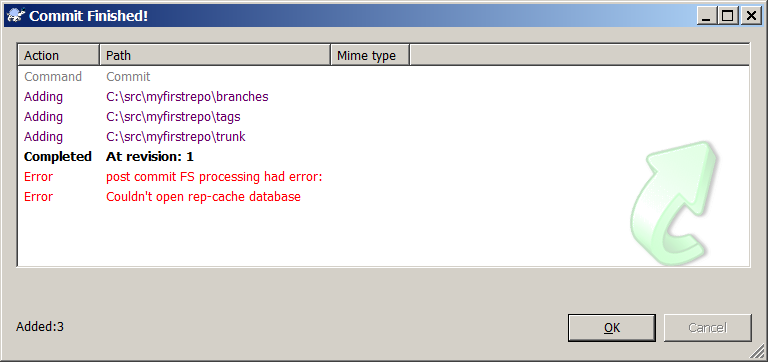
Couldn’t open rep-cache database

Compiling Subversion 1.8

tortoise_svn_commit_rep-cache
$ svn checkout file:///usr/home/svn/repos/myfirstrepo
svn: E200029: Couldn't perform atomic initialization
svn: E200030: SQLite compiled for 3.8.7.2, but running with 3.8.5

$ pkg info subversion | grep Version
Version        : 1.8.10_3

$ pkg info sqlite3 | grep Version
Version        : 3.8.5_1

$ pkg upgrade
Updating FreeBSD repository catalogue...
FreeBSD repository is up-to-date.
All repositories are up-to-date.
Checking for upgrades (31 candidates): 100%
The following 30 packages will be affected (of 0 checked):

New packages to be INSTALLED:
        [...]

Installed packages to be UPGRADED:
        sqlite3: 3.8.5_1 -> 3.8.7.2
        [...]

Installed packages to be REINSTALLED:
        [...]

Proceed with this action? [y/N]: y
[...]
Fetching sqlite3-3.8.7.2.txz: 100%  685 KB 701.0k/s    00:01
[...]
[27/30] Upgrading sqlite3 from 3.8.5_1 to 3.8.7.2: 100%
[...]

$ svn checkout file:///usr/home/svn/repos/myfirstrepo
A    myfirstrepo/tags
A    myfirstrepo/trunk
A    myfirstrepo/branches
Checked out revision 1.

txn-current-lock: Permission denied

$ svn checkout file:///home/svn/repos/project_2015_08_31_a
$ mkdir test
$ cd project_2015_08_31_a
$ echo "hallo" > test/welt
$ svn add test
A         test
A         test/welt

$ svn commit -m "add test"
svn: E000013: Commit failed (details follow):
svn: E000013: Can't open file '/home/svn/repos/project_2015_08_31_a/db/txn-current-lock': Permission denied

$ cd /home/svn/repos
$ ls -la
drwxr-xr-x  6 root  svn  512 Aug 31 10:46 project_2015_08_31_a

$ chown -R svn:svn project_2015_08_31_a
$ /usr/local/etc/rc.d/svnserve restart
=> use sockets (--listen-port=3690 --listen-host 0.0.0.0)
$ svn checkout svn://localhost/project_2015_08_31_a/
$ mkdir test
$ cd project_2015_08_31_a
$ echo "hallo" > test/welt
$ svn add test
A         test
A         test/welt

$ svn commit -m "add test"
svn: E170001: Commit failed (details follow):
svn: E170001: Authorization failed

Use username/password.
Edit repository configuration.

$ svn checkout svn://localhost/project_2015_08_31_a/
Authentication realm: <svn://localhost:3690> My First Repository
Username: andreas
Password for 'andreas': ********
Checked out revision 0.

$  cd project_2015_08_31_a
$  mkdir test
$  echo "hallo" > test/welt
$  svn add test
A         test
A         test/welt
$ svn commit -m "add test"
Adding         test
Adding         test/welt
Transmitting file data .
Committed revision 1.

$  echo "welt" > test/hallo
$ svn add test/welt
$ svn add test/hallo
A         test/hallo
$ svn commit -m "add test"
Adding         test/hallo
Transmitting file data .
Committed revision 2.

FabLab Arduino Starter Kit

Photoresistor 5528
Temperature Sensors TMP36

    1 x Arduino Projects Buch (170 Seiten)
    1 x Arduino UNO board rev.3
    1 x USB Kabel
    1 x Breadboard
    1 x Leicht zu assemblierender Holz-Rahmen
    1 x 9V Batterie-Adapter
    70 x Jumper-Kabel, Draht
    2 x Jumper-Kabel, Litze
    6 xPhotowiderstand[VT90N2 LDR]
    3 xPotentiometer 10kilohm
    10 xPushbuttons
    1 x Temperatur-Sensor [TMP36]
    1 x Neige-Sensor
    1 x Alphanumerisches LCD (16x2 Zeichen)
    1 x LED (Weiss, hell)
    1 x LED (RGB)
    8 x LEDs (Rot)
    8 x LEDs (Grün)
    8 x LEDs (Gelb)
    3 x LEDs (Blau)
    1 x DC motor 6/9V
    1 x Servo motor
    1 x Piezo Capsule [PKM17EPP-4001-B0]
    1 x H-bridge Motor Treiber [L293D]
    2 x Optokoppler [4N35]
    5 x Transistor [BC547]
    2 x Mosfet Transistor [IRF520]
    5 x Kondensator 100nF
    3 x Kondensator 100uF
    5 x Kondensator 100pF
    5 x Diode [1N4007]
    3 x Transparent gels (Rot, Grün, Blau)
    1 x Pinheader (40x1)
    20 x Widerstand 220 ohm
    5 x Widerstand 560 ohm
    5 x Widerstand 1 kilohm
    5 x Widerstand 4.7 kilohm
    10 x Widerstand 10 kilohm
    5 x Widerstand 1 megohm
    5 x Widerstand 10 megohm

FreeBSD Kernel Debugging

FreeBSD kernel module debugging
FreeBSD kernel debugging
KGDB with VirtualBox: Debug a Live Kernel (Linux)
FreeBSD 10; new X.org, KMS, PKGNG, poudriere…
Building a FreeBSD kernel for debugging
How to build and install a custom kernel on FreeBSD?

Online-Kernel-Fehlersuche mit DDB
Online-Kernel-Fehlersuche mit GDB auf einem entfernten System

On-Line Kernel Debugging Using DDB
On-Line Kernel Debugging Using Remote GDB

Link Aggregation (802.1AX-2008)

Link Aggregation und LACP Grundlagen
Multi-Chassis Link Aggregation Group (MC-LAG)

Chapters

  • 5. Link Aggregation
  • 5.1 Overview
  • 5.1.3 Positioning of Link Aggregation within the IEEE 802.3 architecture
  • Figure 5–2—Architectural positioning of Link Aggregation sublayer
  • Figure 5–3—Link Aggregation sublayer block diagram
  • 5.2 Link Aggregation operation
  • 5.3 Link Aggregation Control
  • 5.4 Link Aggregation Control Protocol (LACP)
  • 5.4.14 Selection Logic
  • 5.4.14.2 Selection Logic—Recommended default operation
  • 5.4.15 Mux machine
  • Figure 5–14—Mux machine state diagram (independent control)
  • Link Aggregation Control Protocol (LACP)
  • inverse multiplexing over multiple Ethernet links
  • increasing bandwidth
  • providing redundancy
  • node-level redundancy.
  • “MAC client can treat the Link Aggregation Group as if it were a single link.”
  • Protection Group
  • Protection Scheme
  • Protection Mode 1+1
  • single MAC address for all the device’s ports in the LAG group
  • LAG N: load sharing mode
  • LAG N+N: worker standby flavour

802.3ad Modes / Aggregation type:

  • balance-rr
  • balance-xor
  • broadcast
  • 802.3ad
  • active-backup
  • balance-tlb
  • balance-alb
  • failover

802.1AX Modes

  • Active
  • Standby

802.1AX State Machine
Aggregator/aggregation – Selected:

  • A value of SELECTED indicates that the Selection Logic has selected an appropriate
    Aggregator. A value of UNSELECTED indicates that no Aggregator is currently selected. A
    value of STANDBY indicates that although the Selection Logic has selected an appropriate
    Aggregator, aggregation restrictions currently prevent the port from being enabled as part of
    the aggregation, and so the port is being held in a standby condition. This variable can only be
    set to SELECTED or STANDBY by the operation of the port’s Selection Logic. It can be set to
    UNSELECTED by the operation of the port’s Receive machine, or by the operation of the
    Selection Logic associated with another port.

802.1AX Slow Protocol

  • The optional Marker Generator is used by the Marker protocol, as specified in 5.5. When implemented and
    so requested by the Distribution algorithm, the Marker Generator shall issue an
    AggMuxN:MA_DATA.request primitive, with a mac_service_data_unit containing a Marker PDU as
    defined in 5.5.3, to the port associated with the conversation being marked, subject to the timing restrictions
    for Slow Protocols specified in IEEE Std 802.3 Annex 57A.

FreeBSD Link Aggregation and Failover
Linux Link Aggregation and High Availability with Bonding
Oracle Solaris 11.1: Overview of Link Aggregations
FreeBSD: NIC Bonding / Link Aggregation / Trunking / Link Failover Tutorial
Understanding LACP on Chassis Clusters
Working with Link Aggregation (High Availability, Load Sharing)

FreeBSD Source

base/head/sys/net/if_lagg.c
base/head/sys/net/if_lagg.h

ATI Radeon for Linux

Multiple Monitors (VGA/DVI/HDMI)

Multiple Monitors with Opensource Radeon Driver and Xorg

Reference

OpenSource radeon
RadeonDriver
BinaryDriverHowto/AMD
Unable to completely purge fglrx

xorg

XServer
RandR
Bildschirmauflösung
XServer grafisch einrichten
How to make an xorg.conf file

Grub

ow do I safely change grub2 screen resolution?
Fixing the black screen after grub boot-up
radeonfb syntax
Kubuntu 14.04LTS, Radeon RS690 (X1270), unable to use resolution of more than 1024×768

$ cvt 1280 1024 60
# 1280x1024 59.89 Hz (CVT 1.31M4) hsync: 63.67 kHz; pclk: 109.00 MHz
Modeline "1280x1024_60.00"  109.00  1280 1368 1496 1712  1024 1027 1034 1063 -hsync +vsync

$ xrandr --newmode <von oben>
$ xrandr --newmode "1280x1024_60.00"  109.00  1280 1368 1496 1712  1024 1027 1034 1063 -hsync +vsync
$ xrandr --addmode DVI-0 "1280x1024_60.00"
$ xrandr --output DVI-0 --mode "1280x1024_60.00"
Section "ServerLayout"
	Identifier     "X.org Configured"
	Screen      0  "Screen0" 0 0
	InputDevice    "Mouse0" "CorePointer"
	InputDevice    "Keyboard0" "CoreKeyboard"
EndSection

Section "Files"
	ModulePath   "/usr/lib/xorg/modules"
	FontPath     "/usr/share/fonts/X11/misc"
	FontPath     "/usr/share/fonts/X11/cyrillic"
	FontPath     "/usr/share/fonts/X11/100dpi/:unscaled"
	FontPath     "/usr/share/fonts/X11/75dpi/:unscaled"
	FontPath     "/usr/share/fonts/X11/Type1"
	FontPath     "/usr/share/fonts/X11/100dpi"
	FontPath     "/usr/share/fonts/X11/75dpi"
	FontPath     "built-ins"
EndSection

Section "Module"
	Load  "glx"
EndSection

Section "InputDevice"
	Identifier  "Keyboard0"
	Driver      "kbd"
EndSection

Section "InputDevice"
	Identifier  "Mouse0"
	Driver      "mouse"
	Option	    "Protocol" "auto"
	Option	    "Device" "/dev/input/mice"
	Option	    "ZAxisMapping" "4 5 6 7"
EndSection

Section "Monitor"
	Identifier   "DVI-0"
	VendorName   "acer"
	ModelName    "AL1913"

	# 1280x1024 59.89 Hz (CVT 1.31M4) hsync: 63.67 kHz; pclk: 109.00 MHz
	Modeline "1280x1024"  109.00  1280 1368 1496 1712  1024 1027 1034 1063 -hsync +vsync
	
EndSection

Section "Device"
	Identifier  "V5200"
	Driver      "radeon"
EndSection

Section "Screen"
	Identifier "Screen0"
	Device     "V5200"
	Monitor    "DVI-0"
	SubSection "Display"
		Viewport   0 0
		Depth      16
		Modes      "1280x1024"
	EndSubSection
	SubSection "Display"
		Viewport   0 0
		Depth      24
		Modes      "1280x1024"
	EndSubSection
EndSection
$ sudo apt-get install fglrx
Reading package lists... Done
Building dependency tree       
Reading state information... Done
The following extra packages will be installed:
  dkms fglrx-amdcccle fglrx-core lib32gcc1 libc6-i386 libqtcore4 qtcore4-l10n
Suggested packages:
  debhelper
The following NEW packages will be installed:
  dkms fglrx fglrx-amdcccle fglrx-core lib32gcc1 libc6-i386 libqtcore4 qtcore4-l10n
0 upgraded, 8 newly installed, 0 to remove and 5 not upgraded.
Need to get 73.3 MB of archives.
After this operation, 315 MB of additional disk space will be used.
Do you want to continue? [Y/n] y
Get:1 http://ch.archive.ubuntu.com/ubuntu/ utopic/main qtcore4-l10n all 4:4.8.6+git49-gbc62005+dfsg-1ubuntu1 [617 kB]
Get:2 http://ch.archive.ubuntu.com/ubuntu/ utopic/main libqtcore4 amd64 4:4.8.6+git49-gbc62005+dfsg-1ubuntu1 [1'554 kB]
Get:3 http://ch.archive.ubuntu.com/ubuntu/ utopic/main dkms all 2.2.0.3-1.1ubuntu5 [64.4 kB]
Get:4 http://ch.archive.ubuntu.com/ubuntu/ utopic/main libc6-i386 amd64 2.19-10ubuntu2 [2'213 kB]
Get:5 http://ch.archive.ubuntu.com/ubuntu/ utopic/main lib32gcc1 amd64 1:4.9.1-16ubuntu6 [48.0 kB]
Get:6 http://ch.archive.ubuntu.com/ubuntu/ utopic/restricted fglrx-core amd64 2:14.201-0ubuntu2 [28.4 MB]
Get:7 http://ch.archive.ubuntu.com/ubuntu/ utopic/restricted fglrx amd64 2:14.201-0ubuntu2 [35.3 MB]                                          
Get:8 http://ch.archive.ubuntu.com/ubuntu/ utopic/restricted fglrx-amdcccle amd64 2:14.201-0ubuntu2 [5'139 kB]                                
Fetched 73.3 MB in 2min 42s (450 kB/s)                      
Selecting previously unselected package qtcore4-l10n.
(Reading database ... 177715 files and directories currently installed.)
Preparing to unpack .../qtcore4-l10n_4%3a4.8.6+git49-gbc62005+dfsg-1ubuntu1_all.deb ...
Unpacking qtcore4-l10n (4:4.8.6+git49-gbc62005+dfsg-1ubuntu1) ...
Selecting previously unselected package libqtcore4:amd64.
Preparing to unpack .../libqtcore4_4%3a4.8.6+git49-gbc62005+dfsg-1ubuntu1_amd64.deb ...
Unpacking libqtcore4:amd64 (4:4.8.6+git49-gbc62005+dfsg-1ubuntu1) ...
Selecting previously unselected package dkms.
Preparing to unpack .../dkms_2.2.0.3-1.1ubuntu5_all.deb ...
Unpacking dkms (2.2.0.3-1.1ubuntu5) ...
Selecting previously unselected package libc6-i386.
Preparing to unpack .../libc6-i386_2.19-10ubuntu2_amd64.deb ...
Unpacking libc6-i386 (2.19-10ubuntu2) ...
Selecting previously unselected package lib32gcc1.
Preparing to unpack .../lib32gcc1_1%3a4.9.1-16ubuntu6_amd64.deb ...
Unpacking lib32gcc1 (1:4.9.1-16ubuntu6) ...
Selecting previously unselected package fglrx-core.
Preparing to unpack .../fglrx-core_2%3a14.201-0ubuntu2_amd64.deb ...
Unpacking fglrx-core (2:14.201-0ubuntu2) ...
Selecting previously unselected package fglrx.
Preparing to unpack .../fglrx_2%3a14.201-0ubuntu2_amd64.deb ...
Unpacking fglrx (2:14.201-0ubuntu2) ...
Selecting previously unselected package fglrx-amdcccle.
Preparing to unpack .../fglrx-amdcccle_2%3a14.201-0ubuntu2_amd64.deb ...
Unpacking fglrx-amdcccle (2:14.201-0ubuntu2) ...
Processing triggers for man-db (2.7.0.2-2) ...
Processing triggers for gnome-menus (3.10.1-0ubuntu2) ...
Processing triggers for desktop-file-utils (0.22-1ubuntu2) ...
Processing triggers for mime-support (3.55ubuntu1) ...
Processing triggers for ureadahead (0.100.0-16) ...
ureadahead will be reprofiled on next reboot
Setting up qtcore4-l10n (4:4.8.6+git49-gbc62005+dfsg-1ubuntu1) ...
Setting up libqtcore4:amd64 (4:4.8.6+git49-gbc62005+dfsg-1ubuntu1) ...
Setting up dkms (2.2.0.3-1.1ubuntu5) ...
Setting up libc6-i386 (2.19-10ubuntu2) ...
Setting up lib32gcc1 (1:4.9.1-16ubuntu6) ...
Setting up fglrx-core (2:14.201-0ubuntu2) ...
update-alternatives: using /usr/lib/fglrx-core/ld.so.conf to provide /etc/ld.so.conf.d/x86_64-linux-gnu_GFXCORE.conf (x86_64-linux-gnu_gfxcore_conf) in auto mode
Loading new fglrx-core-14.201 DKMS files...
First Installation: checking all kernels...
Building only for 3.16.0-25-generic
Building for architecture x86_64
Building initial module for 3.16.0-25-generic
Done.

fglrx:
Running module version sanity check.
 - Original module
   - No original module exists within this kernel
 - Installation
   - Installing to /lib/modules/3.16.0-25-generic/updates/dkms/

depmod........

DKMS: install completed.
update-initramfs: deferring update (trigger activated)
Setting up fglrx (2:14.201-0ubuntu2) ...
update-alternatives: using /usr/lib/fglrx/ld.so.conf to provide /etc/ld.so.conf.d/x86_64-linux-gnu_GL.conf (x86_64-linux-gnu_gl_conf) in auto mode
update-alternatives: using /usr/lib/fglrx/alt_ld.so.conf to provide /etc/ld.so.conf.d/i386-linux-gnu_GL.conf (i386-linux-gnu_gl_conf) in auto mode
Processing triggers for ureadahead (0.100.0-16) ...
Setting up fglrx-amdcccle (2:14.201-0ubuntu2) ...
Processing triggers for libc-bin (2.19-10ubuntu2) ...
Processing triggers for initramfs-tools (0.103ubuntu8) ...
update-initramfs: Generating /boot/initrd.img-3.16.0-25-generic

CentOS

Setup / Install

How to Set Up a USB Key to Install CentOS
Linux: Geschwindigkeit von Wechseldatenträgern testen

Keyboard

How to change the keyboard layout
/etc/sysconfig/keyboard
Keyboard layout in Centos
Change Keyboard language layout

$ system-config-keyboard
$ system-config-keyboard --text

$ vi /etc/sysconfig/keyboard
KEYTABLE="sg"
MODEL="pc105"
LAYOUT="ch"
KEYBOARDTYPE="pc"
VARIANT="de_nodeadkeys"

Linux Kernel

Red Hat Enterprise Linux Release Dates
In CentOS 6.x, how can I upgrade to Kernel 3.4?

BIND Setup DNS-Zone

The BIND nameserver named server uses the /etc/named.conf file for configuration. All zone files are placed in the /var/named directory.

BIND Installation On CentOS

Services

$ service --status-all
$ service --status-all | grep ntpd
$ service --status-all | less
$ service httpd status
$ chkconfig --list
$ netstat -tulpn
$ ntsysv
$ chkconfig service off
$ chkconfig service on
$ chkconfig httpd off
$ chkconfig ntpd on

Red Hat / CentOS: Check / List Running Services

Becoming root / sudo

$ sudo [...]
bachi is not in the sudoers file.  This incident will be reported.

$ su -
Password:
# visudo
bachi ALL=(ALL)      ALL
ESC + ZZ (Exit)
# exit

$ sudo [..]
$

Cent OS Wiki: Becoming Root

Packages

yum
Managing Software with yum
Yellowdog Updater, Modified (yum), en
Yellowdog Updater, Modified (yum), de
RPM Package Manager
yum command: Update / Install Packages Under Redhat Enterprise / CentOS Linux Version 5.x

Copr

Copr

Extra Packages for Enterprise Linux (EPEL)

EPEL
ELRepo

Xcfe

Xfce on CentOS 6.5 x64
Install MATE or XFCE on CentOS 7
Updates to my Xfce 4.11 COPR repository
Second Xfce 4.10 “plugins” COPR repo for Enterprise Linux 7
Xfce packages for EPEL 7 – Updated

Compile Thunar 1.6.4 on CentOS 6.6

$ sudo yum install gcc
$ sudo yum install intltool
$ sudo yum install libX*-devel

Electronic Shop

Schweiz

Boxtec
Play-Zone
Maker-Shop.ch

China

seeed Studio
DX deal extreme
Bang Good
elecFreaks

opto tune (Mikrophone)
OctoWS2811 LED Library
simpson reprap
wally reprap

Bang-Good

  • USB Saleae16 Logic16 100M 16 Channel Logic Analyzer For ARM FPGA
  • 16 Channel Logic Analyzer + Oscilloscope USBee DX Pro Compatible Support The Latest Software
  • 3 In 1 Logic Analyzer Saleae8 / USBee AX Pro / Altera USB Blaster With 10 Clamp 60m Probe
  • USB Logic Analyzer 16 Channel 100M 10G Depth Compatible Saleae16 ARM FPGA Decoder
  • http://www.banggood.com/ULINK2-Emulator-Original-Firmware-Support-MDK50-For-Keil-ARM-JTAG-p-926554.html
  • Arduino Compatible UNO R3 Starter Kit Set For Step Motor / 1602 LCD

ITU / IEEE Standards

ITU

Synchronous Optical Network (SONET)
Synchrone Digitale Hierarchie (SDH)
Next-Generation Network (NGN)
Access Network
Plesiochrone Digitale Hierarchie (PDH)
Puls-Code-Modulation (PCM)
Multiplexverfahren

IEEE

IEEE 802
Logical Link Control (LLC)
High-Level Data Link Control (HDLC)
Synchronous Data Link Control (SDLC)
IEEE 802.3 / Ethernet Grundlagen
Link Aggregation (802.1AX)

English

IEEE 802
IEEE 802.1: Bridging and Network Management
IEEE 802.2: LLC (inactive)
IEEE 802.3: Ethernet
IEEE 802.11: Wireless LAN
Link Layer Discovery Protocol (LLDP, 802.1AB)
Link Aggregation (802.1AX-2008)