Fentac V380 Connection
V380 stream url
Cannot connect Chinese 360 IP cam through ONVIF
hacking china IP camera – need help for rtsp , password for telnet
V380 / SDETER IP Camera
Leave a reply
github.com/PacktPublishing/Python-Image-Processing-Cookbook, Python Image Processing Cookbook
Removing the Background from an Image using scikit-image
RGB to grayscale
Hysteresis thresholding
Canny edge detector
Straight line Hough transform
Morphological Filtering
Types of homographies
Using geometric transformations
Filtering regional maxima
Top-hat transform
Flood fill
Connected-component labeling
Closing (morphology)
Image Processing Operator Worksheets
Morphology
Image Analysis
SciPy – Multidimensional image processing (scipy.ndimage)
scikit-image – morphology
Morphological Filtering
pymorph
PYMORPH: IMAGE MORPHOLOGY IN PYTHON
Python Morphology Toolbox
github.com/luispedro/pymorph
Mahotas – Python Computer Vision Library
Mahotas: Computer Vision in Python
OpenCV Eroding and Dilating
OpenCV More Morphology Transformations
Hit-or-Miss
Hough Line Transform
Image Processing Operator Worksheets
Morphology
Image Analysis
Computergrafik 2: Morphologische Operationen
MOOC – STM32 USB training (Playlist)
STM32 USB training – 09.1 USB CDC device basic labs
github.com/hathach/tinyusb, An open source cross-platform USB stack for embedded system
TinyUSB Documentation
LPKF Laser & Electronics AG
Othermill Pro – Compact Precision CNC + PCB Milling Machine
Bantam Tools
Bantam Tools Desktop PCB Milling Machine
Bantam Tools Desktop PCB Milling Machine
Voltera V-One PCB Printer
CNC Wegstr, CZECH REPUBLIC
github.com/martin2250/OpenCNCPilot, OpenCNCPilot is a GRBL compatible G-Code Sender
Line Grinder, Gerber to GCode Isolation Milling (2011)
Candle
CNC-MINI-FRÄSE: DER WEG ZUR GEFRÄSTEN PLATINE
kickstarter: terraplanter – visibly follow the journey from seed to plant
A Terraplanter Alternative (MUCH CHEAPER)
How to make DIY Ollas: Self-Watering Systems for Plants
CLAY POT IRRIGATION : THE LATEST AND GREATEST IN GARDEN HARDWARE
Water Conservation – Part 1
A Simple Clay Pot Could Replace Your Noisy Air Conditioner
Be Cool: Terra Cotta Pot Cools the Air Using Only Water
Experimental Comparative Analysis of Clay Pot Refrigeration Using Two Different Designs of Pots (PDF)
Einstieg in die Entwicklung mit RISC-V-basierten Mikrocontrollern
„Mr. Wolf“ – der RISC-V-Prozessor, der IoT-„Probleme löst“
Wie funktioniert RISC-V? Grundlagen der offenen Befehlssatzarchitektur
SiFive HiFive1 Rev B
GigaDevice GD32V
GreenWaves RISC-V GAP8 IoT
Kendryte K210, (RISCV64 dual core SoC)
RISC-V ASM Tutorial Collection (Playlist)
STM32Cube Ecosystem
STM32CubeMX
STM32CubeIDE
| STM32Cube | STM32Cube is a combination of software tools and embedded software libraries |
| STM32CubeMX | A configuration tool for any STM32 device. This easy-to-use graphical user interface generates initialization C code for Cortex-M cores and generates the Linux device tree source for Cortex-A cores |
| STM32CubeIDE | An Integrated Development Environment. Based on open-source solutions like Eclipse or the GNU C/C++ toolchain, this IDE includes compilation reporting features and advanced debug features. It also integrate additional features present in other tools from the ecosystem, such as the HW and SW initilialization and code generation from STM32CubeMX. |
| STM32CubeProgrammer | A programming tool. It provides an easy-to-use and efficient environment for reading, writing and verifying devices and external memories via a wide variety of available communication media (JTAG, SWD, UART, USB DFU, I2C, SPI, CAN, etc.). |
| STM32CubeMonitor | Family of tools. Powerful monitoring tools that help developers fine-tune the behavior and performance of their applications in real time. |
| STM32Cube MCU and MPU packages | Dedicated to each STM32 series. Packages offer all the required embedded software bricks to operate the available set of STM32 peripherals. They include drivers (HAL, low-layer, etc.), middleware, and lots of example code used in a wide variety of real-world use cases. |
| STM32Cube expansion packages | For application-oriented solutions. Complementing and expanding the STM32Cube MCU Package offer with additional embedded software bricks, STM32 expansion packages come either from ST or approved partners to create an extensive and scalable embedded software offer around the STM32. |
UM1718 – User manual – STM32CubeMX for STM32 configuration
and initialization C code generation (PDF)
| From SW4STM32 to STM32CubeIDE | Previously, developers could use SW4STM32 a free version of System Workbench that supports our entire lineup of microcontrollers. STM32CubeIDE already supports almost all our microcontrollers, except the STM32MP1, which is the first STM32 MPU. |
| From TrueSTUDIO to STM32CubeIDE | Developers also had an alternative to SW4STM32 in the form of TrueSTUDIO, which ST bought along with its acquisition of Atollic in 2017. STM32CubeIDE gets all these features and more, ensuring that people will not miss TrueSTUDIO. |
 |
 |
> set PATH=%PATh%;c:\ST\STM32CubeIDE_1.6.0\STM32CubeIDE\plugins\com.st.stm32cube.ide.mcu.externaltools.gnu-tools-for-stm32.9-2020-q2-update.win32_1.5.0.202011040924\tools\bin
> path
PATh=[...]
> arm-none-eabi-gcc
arm-none-eabi-gcc: fatal error: no input files
STM32CubeMX: STM32Cube initialization code generator
STM32CubeMX is a graphical tool that allows a very easy configuration of STM32 microcontrollers and microprocessors, as well as the generation of the corresponding initialization C code for the Arm Cortex-M core, through a step-by-step process.
During the C code generation process, STM32CubeMX performs the following actions:downloads the relevant STM32Cube MCU package
.c/.h files) corresponding to the user MCU configuration and stores it in the Inc and Src folders.See also:
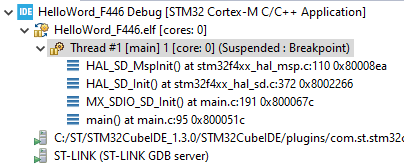
stm32f4xx_hal_conf.hstm32f4xx_hal_msp.c (MSP = MCU Support package)main.cmain.h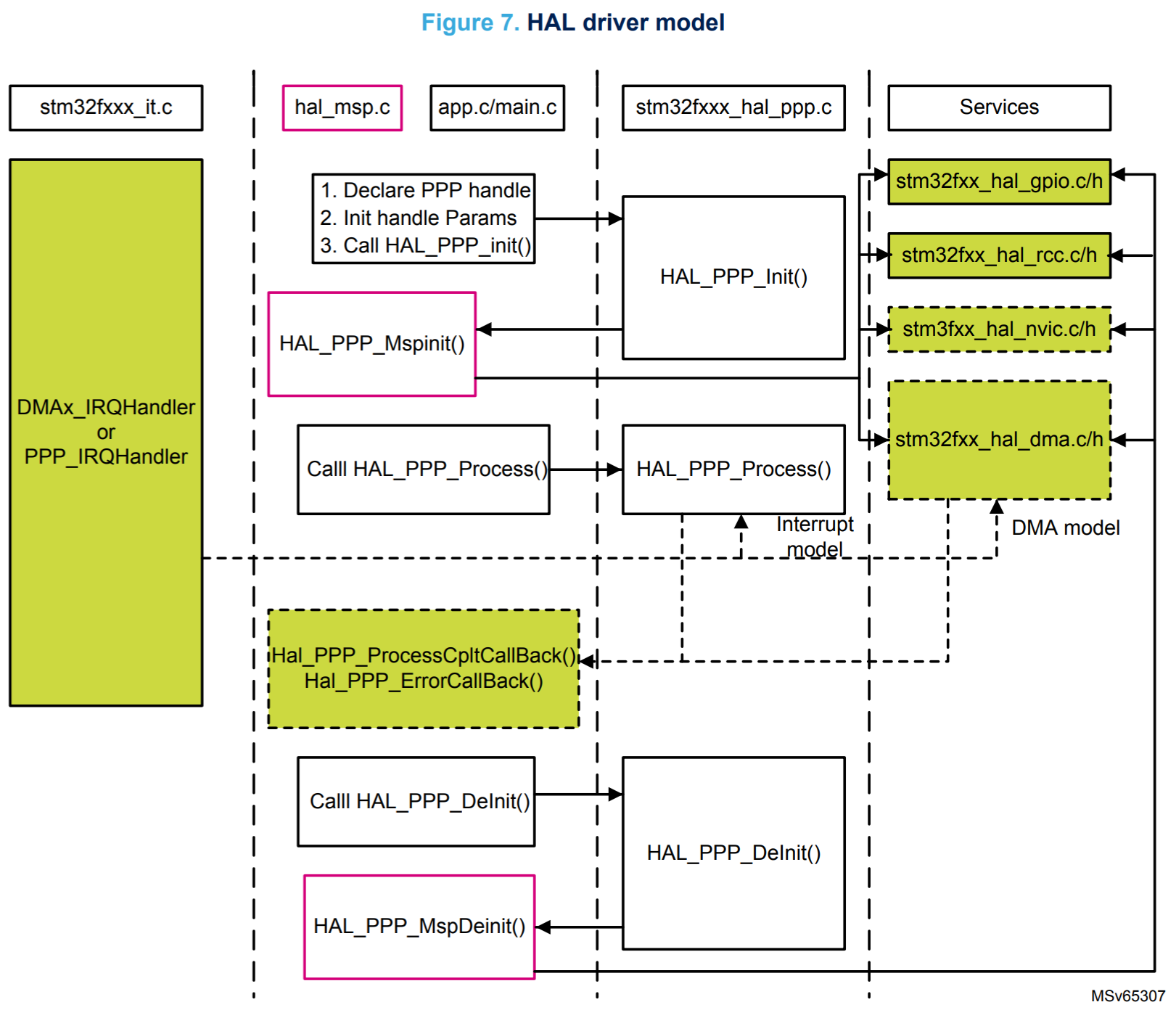 |
 |
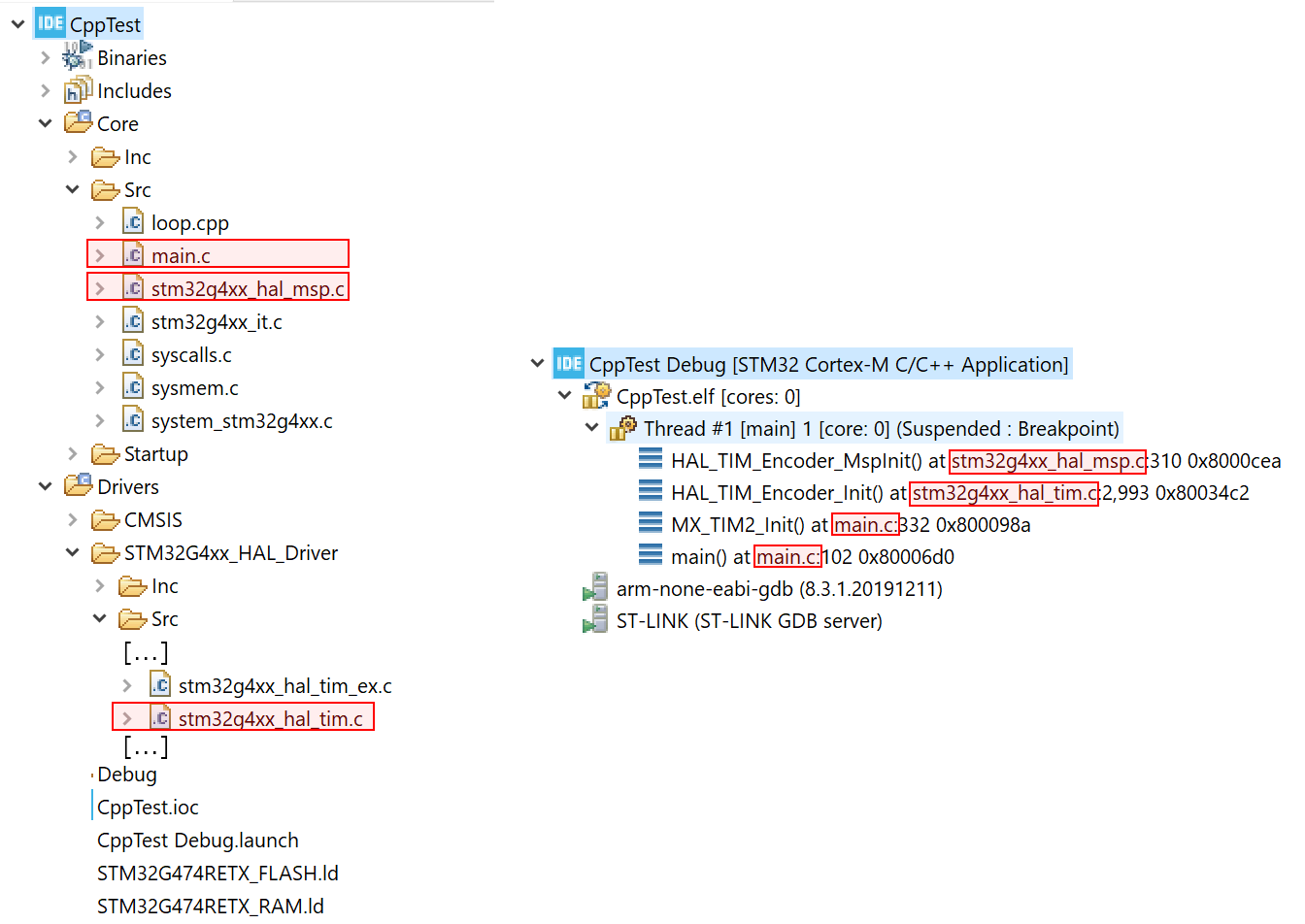 |
What means the Msp in HAL_MspInit ?
What does the MSP in STM32CubeMX HAL_xxx_MspInit() functions stand for?
The ST HAL is designed so that the SPI module of the HAL is generic and abstracts from the specific I/O settings, which may differ due to the MCU package and the user-defined hardware configuration. So, ST developers have leaved to the user the responsibility to “fill” this piece of the HAL with the code necessary to configure the peripheral, using a sort of callback routines. Source
The HAL and LL are complementary and cover a wide range of application requirements:
HAL vs LL
STM32 HAL vs LL
How to use LL (low level) drivers in CubeMX STM32?
STM32G0 Workshop – Pt. 8, Low Layer Drivers
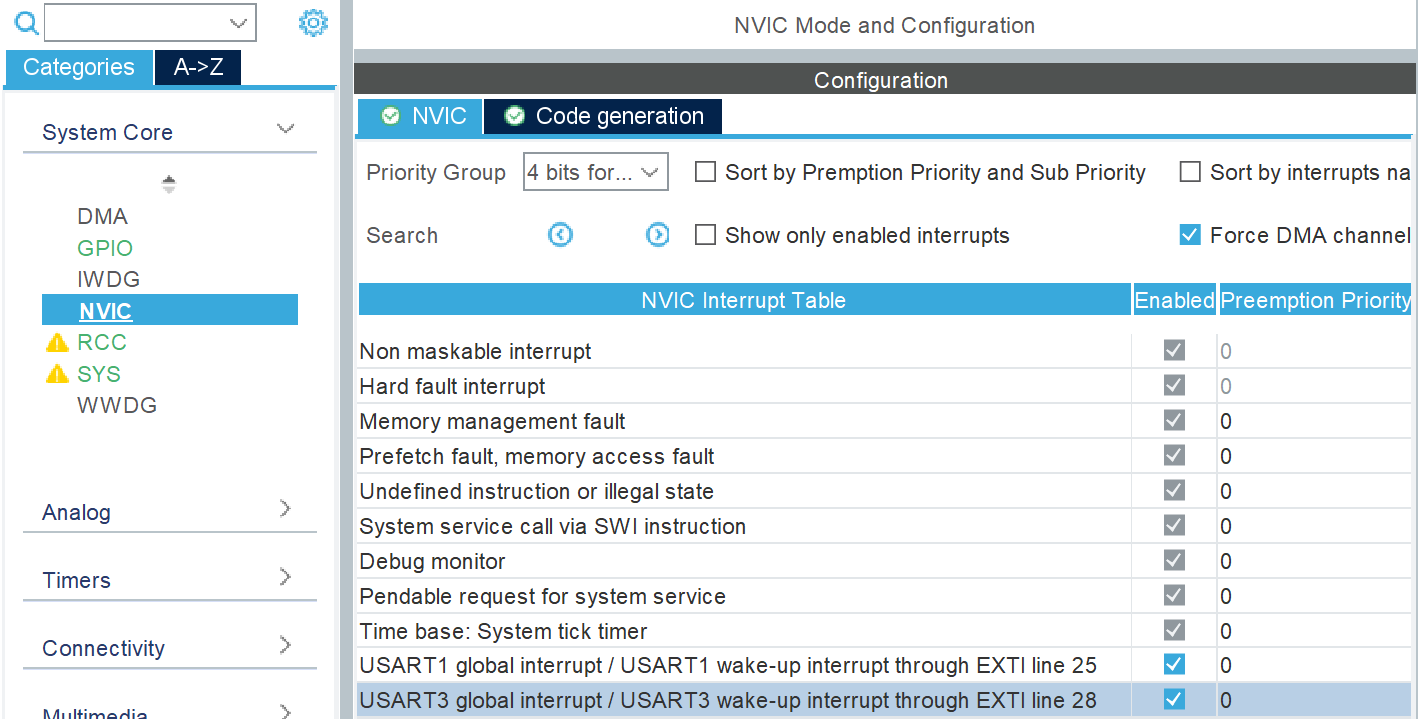
g_pfnVectors:
	.word	_estack
	.word	Reset_Handler
	.word	NMI_Handler
	.word	HardFault_Handler
	.word	MemManage_Handler
	.word	BusFault_Handler
	.word	UsageFault_Handler
        [...]
	.word	USART3_IRQHandler
        [...]
void USART3_IRQHandler(void)
{
  HAL_UART_IRQHandler(&huart3);
}
void HAL_UART_IRQHandler(UART_HandleTypeDef *huart)
{
  [...]
  /* UART in mode Transmitter (transmission end) -----------------------------*/
  if (((isrflags & USART_ISR_TC) != 0U) && ((cr1its & USART_CR1_TCIE) != 0U))
  {
    UART_EndTransmit_IT(huart);
    return;
  }
  [...]
}

static void UART_EndTransmit_IT(UART_HandleTypeDef *huart)
{
  [...]
#if (USE_HAL_UART_REGISTER_CALLBACKS == 1)
    /*Call registered Tx complete callback*/
    huart->TxCpltCallback(huart);
#else
    /*Call legacy weak Tx complete callback*/
    HAL_UART_TxCpltCallback(huart);
#endif /* USE_HAL_UART_REGISTER_CALLBACKS */
  [...]
}

__weak void HAL_UART_TxCpltCallback(UART_HandleTypeDef *huart)
{

}
/* Callbacks Register/UnRegister functions  ***********************************/
#if (USE_HAL_UART_REGISTER_CALLBACKS == 1)
HAL_StatusTypeDef HAL_UART_RegisterCallback(UART_HandleTypeDef *huart, HAL_UART_CallbackIDTypeDef CallbackID,
                                            pUART_CallbackTypeDef pCallback);
HAL_StatusTypeDef HAL_UART_UnRegisterCallback(UART_HandleTypeDef *huart, HAL_UART_CallbackIDTypeDef CallbackID);

HAL_StatusTypeDef HAL_UART_RegisterRxEventCallback(UART_HandleTypeDef *huart, pUART_RxEventCallbackTypeDef pCallback);
HAL_StatusTypeDef HAL_UART_UnRegisterRxEventCallback(UART_HandleTypeDef *huart);
#endif /* USE_HAL_UART_REGISTER_CALLBACKS */
Backlink: ARM Cortex-M4 Atomic / Mutex / Read-Modify-Write
Backlink: STM32 Spinlock vs. Interruptlock
How to properly enable/disable interrupts in ARM Cortex-M?
STM32L4 CRITICAL SECTION
STM32 HAL driver lock mechanism is not interrupt safe
FreeRTOS taskENTER_CRITICAL()
FreeRTOS taskENTER_CRITICAL_FROM_ISR()
__get_PRIMASK(), __disable_irq(), __enable_irq()HAL_NVIC_DisableIRQ(EXTI4_15_IRQn) __HAL_TIM_ENABLE_IT(__HANDLE__, __INTERRUPT__), __HAL_TIM_DISABLE_IT(__HANDLE__, __INTERRUPT__)__HAL_ENTER_CRITICAL_SECTION(), __HAL_EXIT_CRITICAL_SECTION()HAL_Lock(lock), HAL_UnLock(lock)void HAL_NVIC_EnableIRQ(IRQn_Type IRQn); void HAL_NVIC_DisableIRQ(IRQn_Type IRQn);
void HAL_NVIC_EnableIRQ(IRQn_Type IRQn);
void HAL_NVIC_DisableIRQ(IRQn_Type IRQn);
/* @brief  HAL Lock structures definition */
typedef enum
{
  HAL_UNLOCKED = 0x00U,
  HAL_LOCKED   = 0x01U
} HAL_LockTypeDef;

#if (USE_RTOS == 1U)
/* Reserved for future use */
#error " USE_RTOS should be 0 in the current HAL release "
#else
#define __HAL_LOCK(__HANDLE__)             \
  do{                                      \
    if((__HANDLE__)->Lock == HAL_LOCKED)   \
    {                                      \
      return HAL_BUSY;                     \
    }                                      \
    else                                   \
    {                                      \
      (__HANDLE__)->Lock = HAL_LOCKED;     \
    }                                      \
  }while (0U)

#define __HAL_UNLOCK(__HANDLE__)           \
  do{                                      \
    (__HANDLE__)->Lock = HAL_UNLOCKED;     \
  }while (0U)
#endif /* USE_RTOS */
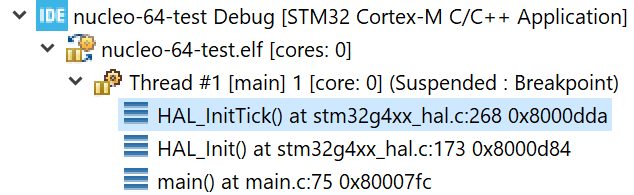
__weak HAL_StatusTypeDef HAL_InitTick(uint32_t TickPriority)
{
  HAL_StatusTypeDef  status = HAL_OK;

  if (uwTickFreq != 0U) {
    /* Configure the SysTick to have interrupt in 1ms time basis*/
    if (HAL_SYSTICK_Config(SystemCoreClock / (1000U / uwTickFreq)) == 0U) {
      /* Configure the SysTick IRQ priority */
      if (TickPriority < (1UL << __NVIC_PRIO_BITS)) {
        HAL_NVIC_SetPriority(SysTick_IRQn, TickPriority, 0U);
        uwTickPrio = TickPriority;
      }
  [...]

  /* Return function status */
  return status;
}
/* ########################## Module Selection ############################## */
/* @brief This is the list of modules to be used in the HAL driver */

#define HAL_I2S_MODULE_ENABLED
#define HAL_SPI_MODULE_ENABLED
#define HAL_TIM_MODULE_ENABLED
#define HAL_UART_MODULE_ENABLED

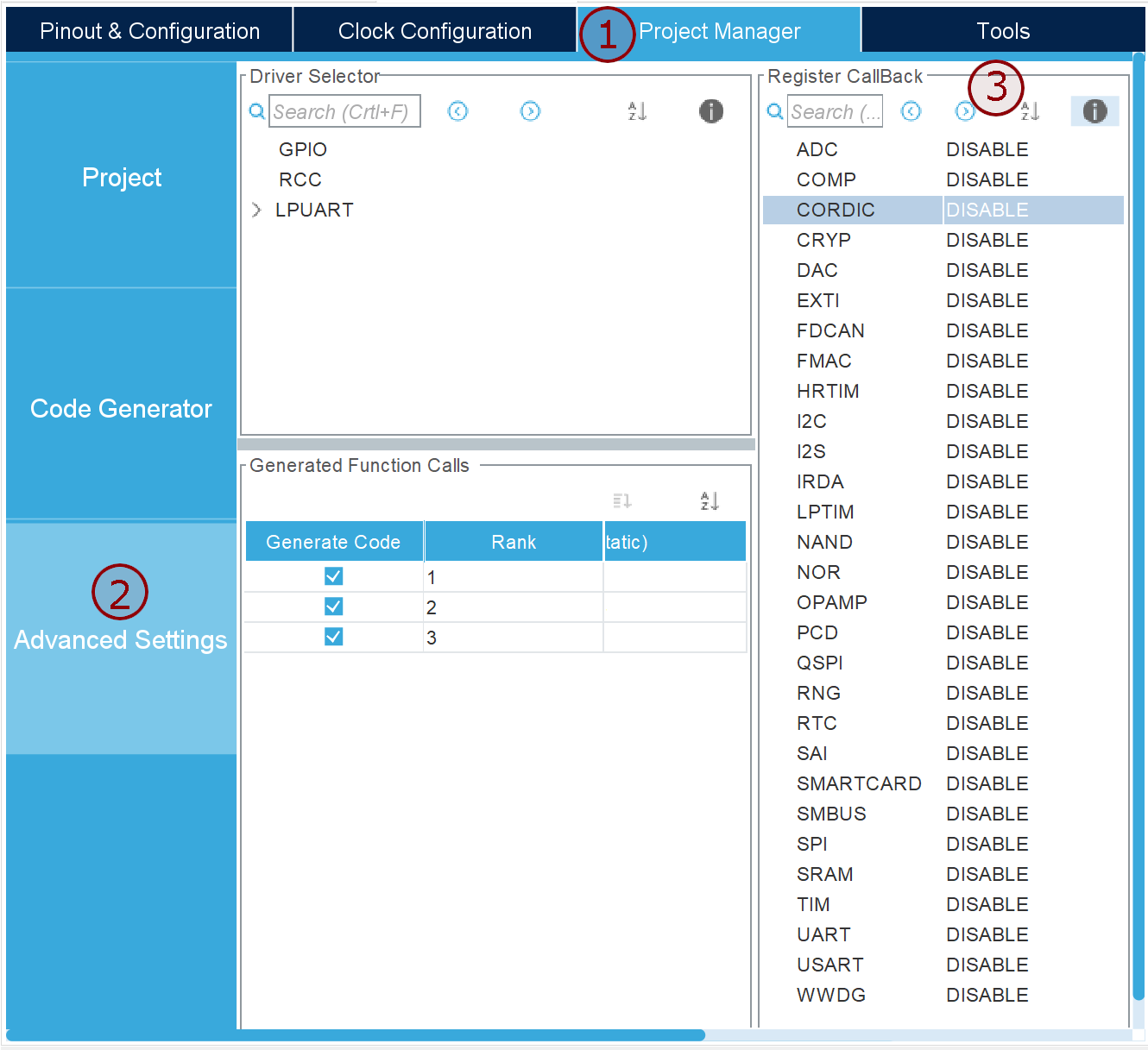
/* ########################## Register Callbacks selection ############################## */
/* @brief This is the list of modules where register callback can be used
          instead of the weak predefined callback */

#define USE_HAL_I2S_REGISTER_CALLBACKS        0U
#define USE_HAL_SPI_REGISTER_CALLBACKS        0U
#define USE_HAL_TIM_REGISTER_CALLBACKS        0U
#define USE_HAL_UART_REGISTER_CALLBACKS       0U

/* ########################## Oscillator Values adaptation ####################*/

#define HSE_VALUE    (24000000UL) /*!< Value of the External oscillator in Hz */
#define HSE_STARTUP_TIMEOUT    (100UL)   /*!< Time out for HSE start up, in ms */

/* ########################### System Configuration ######################### */
/* @brief This is the HAL system configuration section */

#define  VDD_VALUE                   (3300UL) /*!< Value of VDD in mv */
#define  TICK_INT_PRIORITY           (0UL)    /*!< tick interrupt priority (lowest by default)  */
#define  USE_RTOS                     0U
#define  PREFETCH_ENABLE              0U
#define  INSTRUCTION_CACHE_ENABLE     1U
#define  DATA_CACHE_ENABLE            1U
STM32CubeIDE: The First Free ST IDE with STM32CubeMX Built-in
github.com/cnoviello/mastering-stm32/, Repository of all examples presented in the “Mastering STM32” book
MOOC – STM32CubeMX and STM32Cube HAL basics (Playlist)
MOOC – STM32CubeIDE basics
MOOC – STM32G0 Workshop
How to build a “Blink LED” project from STM32CubeMX for ST/Atollic TrueSTUDIO for STM32
STM32 Tutorials by Controllers Tech (Playlist)
DAC in STM32 || Sine wave || HAL || CubeIDE
STM32 4 SWO Output
Tutorial CubeMX 4 External Interrupts EXTI
STM32, by Web learning (Playlist)
HAL: #1 How to – GPIO
HAL: #2 How to – GPIO Interrupt
HAL #10: HowTo Timer with Interrupt
HAL #11: HowTo use the DAC