SYSTEMWECHSEL IN RUSSLAND
FinanzNews KOMPAKT | Geld – Vermögen – Finanzen
Die größten Gefahren für Ihr Vermögen 2024 -Alexander Streeb – Vortragender
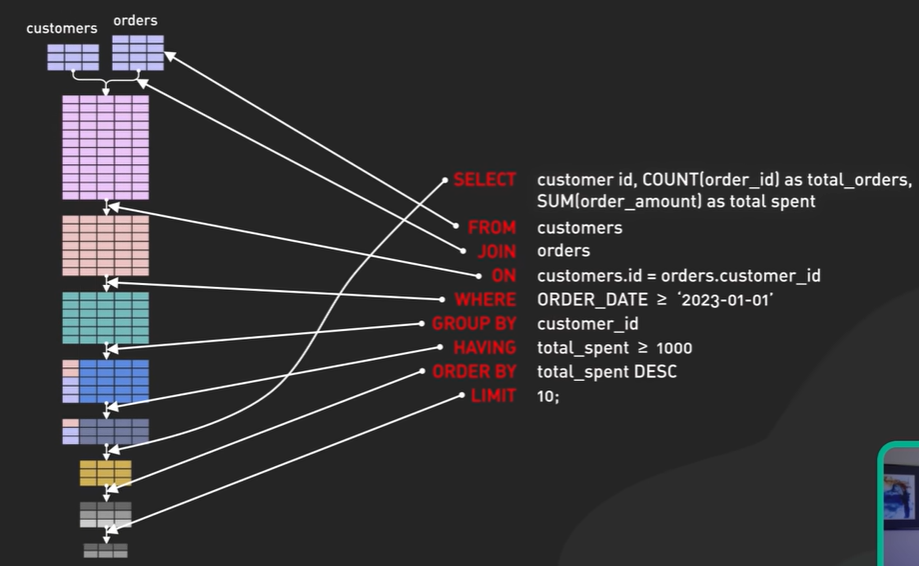
Secret To Optimizing SQL Queries – Understand The SQL Execution Order
 |
Filament-Trockenboxen für 10€
DIY 10€ Filament Dry box
Single Spool 4L Drybox
Filament Drybox for 8 to 10 spools
Cereal Container Spool Roller
Cereal Container Drybox
DryBox
Filament Drybox
Filament DryBox
Filament Drybox
FILAMENTBOX – DAS BESTE, WAS ES GIBT! – FILAMENTBOX-MASTER-2000
FILAMENT-TROCKENHALTEBOX
WALZE FÜR DIY-TROCKENBOX
XCR3D 3D Filament Trocknen Box Filamente Lagerung Halter Halten Filament Trockenen Sublimation 3D Drucker Filament Storage Box Halter
KINGROON 3D Drucker Filament Box Kit Filament Trockner Box Filament Lagerung Halter für Trockene TPU ABS PLA Filament 3D Drucker teile
4Liter luftdichter Müsli-Vorrats behälter feuchtigkeit beständiger insekten sicherer Reis-Eimer Lebensmittel-Aufbewahrung sbox Kunststoff transparenter versiegelter Tank
Amazon: GoMaihe 4L Vorratsdosen 6 Set
Doit-Garden: SmartStore Classic 31, 3er Set
Festo fitting QSM-M5
QSM-M5-4 – Push-In Fitting, 16.2mm, Compressed Air, QSM, Festo
chefstore.ch: Silica Gel Orange Lose, Trockenmittel
Dry & Safe GmbH: Silicagel orange Perlen
3dfilstore.ch: Silica Gel zur Feuchtigkeitsregulierung
Galaxus: Okko SILICA GEL CATLITTER 3.8L DA572
Wiederverwendbare Silicagel-Trockenmittelperlen Feuchtigkeit absorbieren Trockenbox für Kamera -bp
PLA Storage Concerns: Silica Gel Cat Litter? How paranoid should one be?
Cat litter dessicant – dehumidifier of filaments?
Filament storage science, Beware. Plastic containers are moisture permeable.
Filament Spool
PrestaShop
WebshopWorks
Creative Elements
How to replace your homepage with Creative Elements
ChefStore, Zürich
TinySpline
Weitz / HAW Hamburg
Splines in 5 minutes: Part 1 — cubic curves
Splines in 5 Minutes: Part 2 — Catmull-Rom and Natural Cubic Splines
Splines in 5 minutes: Part 3 — B-splines and 2D
Failure to compile firmware 1.0.8
github.com/flohoff/amifldrv
github.com/RomanHargrave/amifldrv
blog.bachi.net/download/amifldrv.tgz
# pwd
/home/andreas/Downloads/UDOOBOLT_C40_UEFI_Update_rel108/updater_andreas

# uname -a
Linux andreas-C40 5.15.0-89-generic #99-Ubuntu SMP Mon Oct 30 20:42:41 UTC 2023 x86_64 x86_64 x86_64 GNU/Linux

# dpkg -l | grep linux-headers
ii  linux-headers-5.15.0-76          5.15.0-76.83     all      Header files related to Linux kernel version 5.15.0
ii  linux-headers-5.15.0-76-generic  5.15.0-76.83     amd64   Linux kernel headers for version 5.15.0 on 64 bit x86 SMP
ii  linux-headers-5.15.0-89          5.15.0-89.99     all     Header files related to Linux kernel version 5.15.0
ii  linux-headers-5.15.0-89-generic  5.15.0-89.99     amd64   Linux kernel headers for version 5.15.0 on 64 bit x86 SMP
ii  linux-headers-6.1.0-4639-amd+    6.1.0-4639       amd64   Linux kernel headers for 6.1.0-4639-amd+ on amd64
ii  linux-headers-generic            5.15.0.89.86     amd64   Generic Linux kernel headers

# ls -la
total 8852
drwxrwxr-x 2 andreas andreas    4096 Dec  3 10:59 .
drwxrwxr-x 6 andreas andreas    4096 Dec  3 10:57 ..
-rwxrwxr-x 1 andreas andreas     450 Jul 17  2018 bios_updater_x64.sh
-rw-rw-r-- 1 andreas andreas 8388608 Apr 24  2020 C4000000.108
-rwxrwxr-x 1 andreas andreas  657344 Jun 29  2020 EtaAfuOemLnx64
-rw-rw-r-- 1 andreas andreas     999 Apr 24  2020 History.txt

# ./bios_updater_x64.sh C4000000.108

GHO BIOS updater - Linux 64 bit Version

DriverSource/amifldrv.c:128:9: error: ‘struct file_operations’ has no member named ‘ioctl’
  128 |         ioctl                   : amifldrv_ioctl,
      |         ^~~~~
DriverSource/amifldrv.c:128:35: error: positional initialization of field in ‘struct’ declared with ‘designated_init’ attribute [-Werror=designated-init]
  128 |         ioctl                   : amifldrv_ioctl,
      |                                   ^~~~~~~~~~~~~~
DriverSource/amifldrv.c:128:35: note: (near initialization for ‘amifldrv_fops’)
DriverSource/amifldrv.c:128:35: error: initialization of ‘int (*)(struct file *, loff_t,  loff_t,  int)’ {aka ‘int (*)(struct file *, long long int,  long long int,  int)’} from incompatible pointer type ‘int (*)(struct inode *, struct file *, unsigned int,  long unsigned int)’ [-Werror=incompatible-pointer-types]
DriverSource/amifldrv.c:128:35: note: (near initialization for ‘amifldrv_fops.fsync’)
cc1: some warnings being treated as errors
make[2]: *** [scripts/Makefile.build:297: DriverSource/amifldrv.o] Error 1
make[1]: *** [Makefile:1909: DriverSource] Error 2
mv: cannot stat 'amifldrv_mod.ko': No such file or directory
make: *** [Makefile:20: default] Error 1
+---------------------------------------------------------------------------+
|           AMI Firmware Update Utility Manufacture v5.12.05.2125           |
|                         for SECO S.p.A. 64 bits                           |
|      Copyright (c) 1985-2020, American Megatrends International LLC.      |
|         All rights reserved. Subject to AMI licensing agreement.          |
+---------------------------------------------------------------------------+
 Reading flash ...................... Done
 - System Secure Flash .............. Enabled
 - FFS Checksums .................... Pass
 - Check RomLayout .................. Pass
 Loading File To Verify Memory ...... Done
 Erasing Main Block ................. Done
 Updating Main Block ................ Done
 Verifying Main Block ............... Done
 Erasing Boot Block ................. Done
 Updating Boot Block ................ Done
 Verifying Boot Block ............... Done
 Erasing NVRAM Block ................ Done
 Updating NVRAM Block ............... Done
 Verifying NVRAM Block .............. Done
 Erasing NCB Block .................. Done
 Updating NCB Block ................. Done
 Verifying NCB Block ................ Done
 Erasing RomHole Block .............. Done
 Updating RomHole Block ............. Done
 Verifying RomHole Block ............ Done

 Process completed.

Please reboot the system

# sudo dmidecode -t bios
[sudo] password for andreas:
# dmidecode 3.3
Getting SMBIOS data from sysfs.
SMBIOS 3.1.1 present.

Handle 0x0000, DMI type 0, 26 bytes
BIOS Information
	Vendor: American Megatrends Inc.
	Version: 1.04 R.C. 2
	Release Date: 07/10/2019
	Address: 0xF0000
	Runtime Size: 64 kB
	ROM Size: 8 MB
	Characteristics:
		PCI is supported
		BIOS is upgradeable
		BIOS shadowing is allowed
		Boot from CD is supported
		Selectable boot is supported
		BIOS ROM is socketed
		EDD is supported
		5.25"/1.2 MB floppy services are supported (int 13h)
		3.5"/720 kB floppy services are supported (int 13h)
		3.5"/2.88 MB floppy services are supported (int 13h)
		Print screen service is supported (int 5h)
		Serial services are supported (int 14h)
		Printer services are supported (int 17h)
		ACPI is supported
		USB legacy is supported
		BIOS boot specification is supported
		Targeted content distribution is supported
		UEFI is supported
	BIOS Revision: 5.13
	Firmware Revision: 0.6

Handle 0x0019, DMI type 13, 22 bytes
BIOS Language Information
	Language Description Format: Long
	Installable Languages: 1
		en|US|iso8859-1
# strings EtaAfuOemLnx64 | grep DriverSource
DriverSource
rm -rf DriverSource


# strings EtaAfuOemLnx64 | grep amifldrv
./amifldrv_mod.o
./amifldrv_mod.o
amifldrv.tgz
tar --no-same-owner -zxvf amifldrv.tgz
rm -f amifldrv.tgz
./amifldrv_mod
grep amifldrv /proc/devices
amifldrv
[...]


# strings EtaAfuOemLnx64 | grep http
# strings EtaAfuOemLnx64 | grep -i http
# strings EtaAfuOemLnx64 | grep -i tgz
D$(.tgz
amifldrv.tgz
tar --no-same-owner -zxvf amifldrv.tgz > /dev/null
rm -f amifldrv.tgz


# strings EtaAfuOemLnx64 | grep -i ftp
EFI_TFTP_ERROR


# strings EtaAfuOemLnx64 | grep -i wget
# strings EtaAfuOemLnx64 | grep -i curl
# strings EtaAfuOemLnx64 | grep -i amifldrv_ioctl

 strings EtaAfuOemLnx64 | grep -i make
gnu_dev_makedev
/makedrvH
/MAKEDRV
|   /MAKEDRV - Make BGTLNX driver with user defined environment.            |
/makedrv
|%*s - Make AFULNX driver with user defined environment.            |
/makedrv
Error: Unable to make kernel driver.
/makedrv
 - Make AMI Linux driver ....
make > /dev/null
make
make gendrv
undefined8 amifldrv_0(void)

{
  bool bVar1;
  char cVar2;
  int iVar3;
  uint __major;
  undefined8 uVar4;
  ulonglong uVar5;
  long in_FS_OFFSET;
  undefined4 local_28;
  undefined4 local_24;
  undefined2 local_20;
  undefined local_1e;
  long local_10;

  local_10 = *(long *)(in_FS_OFFSET + 0x28);
  local_28 = 0x7665642f;
  local_24 = 0x696d612f;
  local_20 = 0x6c66;
  local_1e = 0;
  iVar3 = access("./amifldrv_mod.o",0);
  if (iVar3 == 0) {
    FUN_00459b7e("./amifldrv_mod","./amifldrv_mod.o");
  }
  else {
    cVar2 = amifldrv_1();
    if (cVar2 == '\0') {
LAB_004565a4:
      bVar1 = true;
    }
    else {
      cVar2 = amifldrv_build();
      if (cVar2 == '\0') goto LAB_004565a4;
      bVar1 = false;
    }
    if (bVar1) {
      uVar4 = 0xf;
      goto LAB_004566a2;
    }
  }
  system("insmod ./amifldrv_mod > /dev/null");
  __major = FUN_00456100();
  if (__major == 0) {
    uVar4 = 0x10;
  }
  else {
    uVar5 = gnu_dev_makedev(__major,0);
    iVar3 = FUN_0046d500(&local_28,0x21b6,uVar5);
    if (iVar3 == 0) {
      DAT_0069e330 = open((char *)&local_28,2);
      if (DAT_0069e330 == -1) {
        remove((char *)&local_28);
        system("rmmod amifldrv_mod");
        uVar4 = 0x10;
      }
      else {
        cVar2 = FUN_004561c0();
        if (cVar2 == '\0') {
          FUN_004564f2();
          DAT_0069e330 = -1;
          uVar4 = 0x10;
        }
        else {
          uVar4 = 0;
        }
      }
    }
    else {
      remove((char *)&local_28);
      system("rmmod amifldrv_mod");
      uVar4 = 0x10;
    }
  }
LAB_004566a2:
  if (local_10 != *(long *)(in_FS_OFFSET + 0x28)) {
                    /* WARNING: Subroutine does not return */
    __stack_chk_fail();
  }
  return uVar4;
}


undefined8 amifldrv_1(void)

{
  bool bVar1;
  FILE *pFVar2;
  undefined8 uVar3;
  long in_FS_OFFSET;
  undefined4 local_38;
  undefined local_34;
  undefined4 local_28;
  undefined4 local_24;
  undefined4 local_20;
  undefined local_1c;
  long local_10;

  local_10 = *(long *)(in_FS_OFFSET + 0x28);
  local_38 = 0x44464140;
  local_34 = 0;
  local_28 = 0x66696d61;
  local_24 = 0x7672646c;
  local_20 = 0x7a67742e;
  local_1c = 0;
  bVar1 = amifldrv_start(&local_38,&local_28,'\x01');
  if (!bVar1) {
    if (DAT_0069faf0 == 0) {
      uVar3 = 0;
      goto LAB_00456081;
    }
    pFVar2 = (FILE *)amifldrv_fopen();
    amifldrv_seek_write(pFVar2,0,DAT_0069faf0,&DAT_0069e760);
    amifldrv_fclose();
  }
  system("tar --no-same-owner -zxvf amifldrv.tgz > /dev/null");
  system("rm -f amifldrv.tgz");
  uVar3 = 1;
LAB_00456081:
  if (local_10 != *(long *)(in_FS_OFFSET + 0x28)) {
                    /* WARNING: Subroutine does not return */
    __stack_chk_fail();
  }
  return uVar3;
}


undefined8 amifldrv_build(void)

{
  int iVar1;
  undefined8 uVar2;

  iVar1 = chdir("DriverSource");
  if (iVar1 == 0) {
    system("make > /dev/null");
    chdir("../");
    system("rm -rf DriverSource");
    iVar1 = access("./amifldrv_mod",0);
    if (iVar1 == 0) {
      uVar2 = 1;
    }
    else {
      uVar2 = 0;
    }
  }
  else {
    uVar2 = 0;
  }
  return uVar2;
}
fp_read = open("EtaAfuOemLnx64", "rb")
fp_write = open("amifldrv.tgz", "wb")

fp_read.seek(0x9E760)
size = 0x9FAEF - 0x9E760
extracted_bytes = fp_read.read(size)

fp_write.write(extracted_bytes)

fp_write.close()
fp_read.close()
$ tar xzf amifldrv.tgz
$ ls -la DriverSource/
total 60
drwxrwxr-x 2 andreas andreas 4096 Mar  9  2020 .
drwxrwxr-x 3 andreas andreas 4096 Dec  3 14:19 ..
-rwxrwxr-x 1 andreas andreas 4953 Jul 18  2019 amifldrv.c
-rwxrwxr-x 1 andreas andreas 3380 Apr 12  2019 amifldrvdefs.h
-rwxrwxr-x 1 andreas andreas 3757 Apr 12  2019 amifldrv.h
-rwxrwxr-x 1 andreas andreas 5338 Jun 20  2018 amiiodrv.c
-rwxrwxr-x 1 andreas andreas 6471 Jun 20  2018 amimemdrv.c
-rwxrwxr-x 1 andreas andreas 2840 May 16  2019 amiother.c
-rwxrwxr-x 1 andreas andreas  313 Feb 27  2019 DriverSource.cif
-rwxrwxr-x 1 andreas andreas  189 Apr 24  2018 DriverSource.sdl
-rwxrwxr-x 1 andreas andreas 1568 Apr 23  2019 Makefile
-rwxrwxr-x 1 andreas andreas  564 Apr 23  2019 Makefile.Shipped
static struct file_operations amifldrv_fops =
{
	owner			: THIS_MODULE,
	open			: amifldrv_open,
	release			: amifldrv_release,
#if defined(HAVE_UNLOCKED_IOCTL)
	unlocked_ioctl	: amifldrv_unlocked_ioctl,
#else
	ioctl			: amifldrv_ioctl,
#endif
	mmap			: amifldrv_mmap
};
inux/v5.5.15/source/include/linux/fs.h
struct file_operations {
	struct module *owner;
	loff_t (*llseek) (struct file *, loff_t, int);
	ssize_t (*read) (struct file *, char __user *, size_t, loff_t *);
	ssize_t (*write) (struct file *, const char __user *, size_t, loff_t *);
	ssize_t (*read_iter) (struct kiocb *, struct iov_iter *);
	ssize_t (*write_iter) (struct kiocb *, struct iov_iter *);
	int (*iopoll)(struct kiocb *kiocb, bool spin);
	int (*iterate) (struct file *, struct dir_context *);
	int (*iterate_shared) (struct file *, struct dir_context *);
	__poll_t (*poll) (struct file *, struct poll_table_struct *);
	long (*unlocked_ioctl) (struct file *, unsigned int, unsigned long);
	long (*compat_ioctl) (struct file *, unsigned int, unsigned long);
	int (*mmap) (struct file *, struct vm_area_struct *);
	unsigned long mmap_supported_flags;
	int (*open) (struct inode *, struct file *);
	int (*flush) (struct file *, fl_owner_t id);
	int (*release) (struct inode *, struct file *);
	int (*fsync) (struct file *, loff_t, loff_t, int datasync);
	int (*fasync) (int, struct file *, int);
	int (*lock) (struct file *, int, struct file_lock *);
	ssize_t (*sendpage) (struct file *, struct page *, int, size_t, loff_t *, int);
	unsigned long (*get_unmapped_area)(struct file *, unsigned long, unsigned long, unsigned long, unsigned long);
	int (*check_flags)(int);
	int (*flock) (struct file *, int, struct file_lock *);
	ssize_t (*splice_write)(struct pipe_inode_info *, struct file *, loff_t *, size_t, unsigned int);
	ssize_t (*splice_read)(struct file *, loff_t *, struct pipe_inode_info *, size_t, unsigned int);
	int (*setlease)(struct file *, long, struct file_lock **, void **);
	long (*fallocate)(struct file *file, int mode, loff_t offset,
			  loff_t len);
	void (*show_fdinfo)(struct seq_file *m, struct file *f);
#ifndef CONFIG_MMU
	unsigned (*mmap_capabilities)(struct file *);
#endif
	ssize_t (*copy_file_range)(struct file *, loff_t, struct file *,
			loff_t, size_t, unsigned int);
	loff_t (*remap_file_range)(struct file *file_in, loff_t pos_in,
				   struct file *file_out, loff_t pos_out,
				   loff_t len, unsigned int remap_flags);
	int (*fadvise)(struct file *, loff_t, loff_t, int);
} __randomize_layout;
Militärökonom Marcus Keupp