Linux: Software RAID mit MDADM verwalten

Software-RAID
mdadm – Tipps & Tricks
Auto Mounting RAID Arrays on Linux Server Startup
Software Raid0 doesn’t mount successfully in fstab
Wikipedia: mdadm
Software RAID mit MDADM verwalten
mdadm mounting
How can I make mdadm auto-assemble RAID after each boot?
How to get an inactive RAID device working again?
How To Set Up Software RAID1 On A Running System – Part 1
How To Set Up Software RAID1 On A Running System – Part 2
RAID 5 mdadm superblock and mount on boot help!
Soft Raid 1 on Ubuntu 12.04 with GPT disks
Software RAID and LVM

fstab
Best practice /etc/fstab mount
Automatic mount ext4 hard disk on boot problem

Create RAID 1

# Install mdadm
apt-get update && apt-get install mdadm

# Partition the disk
fdisk /dev/sdb
fdisk /dev/sdc

# Create RAID
mdadm --create /dev/md0 --level=1 --raid-devices=2 /dev/sdb2 /dev/sdc2

# Create partition on RAID
mkfs.ext3 /dev/md0

# Mount /dev/md0
mkdir /raid
mount /dev/md0 /raid
df -H

# Add to /etc/fstab
/dev/md0 /raid1 ext3 noatime,rw 0 0

Maintain RAID

$ mdadm --version
mdadm - v3.3 - 3rd September 2013
$ sudo mdadm --assemble --scan -v
mdadm: looking for devices for /dev/md/0
mdadm: no RAID superblock on /dev/md/0
mdadm: no RAID superblock on /dev/sde5
mdadm: no RAID superblock on /dev/sde2
mdadm: no RAID superblock on /dev/sde1
mdadm: no RAID superblock on /dev/sde
mdadm: /dev/sdd1 is busy - skipping
mdadm: no RAID superblock on /dev/sdd
mdadm: /dev/sdc1 is busy - skipping
mdadm: no RAID superblock on /dev/sdc
mdadm: /dev/sdb1 is busy - skipping
mdadm: no RAID superblock on /dev/sdb
mdadm: /dev/sda1 is busy - skipping
mdadm: no RAID superblock on /dev/sda
$ sudo mdadm -v /dev/md0
/dev/md0: 3725.78GiB raid10 4 devices, 0 spares. Use mdadm --detail for more detail.

$ sudo mdadm --detail /dev/md0
[sudo] password for fabmin: 
/dev/md0:
        Version : 1.2
  Creation Time : Thu Nov 13 15:47:46 2014
     Raid Level : raid10
     Array Size : 3906763776 (3725.78 GiB 4000.53 GB)
  Used Dev Size : 1953381888 (1862.89 GiB 2000.26 GB)
   Raid Devices : 4
  Total Devices : 4
    Persistence : Superblock is persistent

    Update Time : Thu Dec 25 18:43:07 2014
          State : clean 
 Active Devices : 4
Working Devices : 4
 Failed Devices : 0
  Spare Devices : 0

         Layout : near=2
     Chunk Size : 512K

           Name : homeserver:0
           UUID : d11e189b:bf60aac9:536e72e5:3c8655ab
         Events : 375

    Number   Major   Minor   RaidDevice State
       0       8        1        0      active sync set-A   /dev/sda1
       1       8       17        1      active sync set-B   /dev/sdb1
       2       8       33        2      active sync set-A   /dev/sdc1
       3       8       49        3      active sync set-B   /dev/sdd1
$ cat /proc/mdstat 
Personalities : [linear] [multipath] [raid0] [raid1] [raid6] [raid5] [raid4] [raid10] 
md0 : active raid10 sda1[0] sdd1[3] sdc1[2] sdb1[1]
      3906763776 blocks super 1.2 512K chunks 2 near-copies [4/4] [UUUU]
      
unused devices: <none>
# auto-create devices with Debian standard permissions
CREATE owner=root group=disk mode=0755 auto=yes

# automatically tag new arrays as belonging to the local system
HOMEHOST <system>

# instruct the monitoring daemon where to send mail alerts
MAILADDR root

ARRAY /dev/md0 metadata=1.2 name=homeserver:0 UUID=d11e189b:bf60aac9:536e72e5:3c8655ab
$ ps aux | grep mdadm
root      1415  0.0  0.1  13492  2028 ?        Ss   17:27   0:00 /sbin/mdadm --monitor --pid-file /run/mdadm/monitor.pid --daemonise --scan --syslog

UUID of RAID

root@nas:~# blkid
/dev/sda1: LABEL="Wiederherstellung" UUID="EC9A5F809A5F466C" TYPE="ntfs" PARTLABEL="Basic data partition" PARTUUID="03445844-6d0c-4055-a155-6a1442f31f64"
/dev/sda2: UUID="EC60-8F16" TYPE="vfat" PARTLABEL="EFI system partition" PARTUUID="10226de3-9880-442e-a9e5-d59cdb0ce76d"
/dev/sda4: UUID="C07C7CA27C7C953E" TYPE="ntfs" PARTLABEL="Basic data partition" PARTUUID="63bc6c88-f15f-4001-98cd-5ebb71519308"
/dev/sda5: UUID="e1d7ee86-6489-4389-a936-7552cb2292e8" TYPE="ext4" PARTUUID="9c269108-0270-43e0-b264-b29da816e33a"
/dev/sda6: UUID="47c5ef7e-a68d-4ddd-8aef-feb0a678f05b" TYPE="swap" PARTUUID="e4674559-cd6f-4d08-8bfe-2767821fe661"
/dev/sdb1: LABEL="DATA1" UUID="4C787EC15DDC54A0" TYPE="ntfs" PARTLABEL="DATA1" PARTUUID="45b920c2-1203-48e9-993d-12e70cb6029d"
/dev/sdb2: UUID="0317b14e-ea32-fa89-f352-5cce2ce8839e" UUID_SUB="e2ccf7f5-235a-88dd-e9f8-5bcda5e7983d" LABEL="nas:0" TYPE="linux_raid_member" PARTLABEL="RAID1_1" PARTUUID="170cbcce-7100-43be-8ee9-f8308e41e2cf"
/dev/sdc1: LABEL="DATA2" UUID="01A1558230E30FE7" TYPE="ntfs" PARTLABEL="DATA2" PARTUUID="c637c62a-1b13-496b-96db-bba719110c3b"
/dev/sdc2: UUID="0317b14e-ea32-fa89-f352-5cce2ce8839e" UUID_SUB="2586842b-0c7b-7a8c-1876-5291b55f0b97" LABEL="nas:0" TYPE="linux_raid_member" PARTLABEL="RAID1_2" PARTUUID="3f74418d-5a64-4647-9907-ec24ccf70517"
/dev/md0p1: LABEL="RAID1" UUID="d3150381-ba4a-4a75-8163-dbf9e0a59e33" TYPE="ext4" PARTLABEL="RAID1" PARTUUID="9a8b494a-2f69-48c1-89f8-2cbf0986a991"
/dev/sda3: PARTLABEL="Microsoft reserved partition" PARTUUID="09fa6865-ee2b-4591-ad2f-9d6d3d00b48d"
/dev/md0: PTUUID="d56f81c4-e1ca-4b60-b7df-fc31e89c34d0" PTTYPE="gpt"
$ sudo mdadm --detail /dev/md0
/dev/md0:
        Version : 1.2
  Creation Time : Fri Jun 24 18:36:32 2016
     Raid Level : raid1
     Array Size : 3370014720 (3213.90 GiB 3450.90 GB)
  Used Dev Size : 3370014720 (3213.90 GiB 3450.90 GB)
   Raid Devices : 2
  Total Devices : 1
    Persistence : Superblock is persistent

  Intent Bitmap : Internal

    Update Time : Fri Dec 16 22:33:59 2016
          State : clean, degraded 
 Active Devices : 1
Working Devices : 1
 Failed Devices : 0
  Spare Devices : 0

           Name : nas:0  (local to host nas)
           UUID : 0317b14e:ea32fa89:f3525cce:2ce8839e
         Events : 9836

    Number   Major   Minor   RaidDevice State
       0       0        0        0      removed
       1       8       34        1      active sync   /dev/sdc2

Hinzufügen von Disks (wenn sie removed worden sind)

$ sudo mdadm --manage /dev/md/0 -a /dev/sdb2
mdadm: re-added /dev/sdb2

$ sudo mdadm --detail /dev/md0
/dev/md0:
[...]
 Rebuild Status : 42% complete
[...]
    Number   Major   Minor   RaidDevice State
       0       8       18        0      spare rebuilding   /dev/sdb2
       1       8       34        1      active sync   /dev/sdc2
Mar  2 21:47:30 nas kernel: [    0.752405] ata3: SATA max UDMA/133 abar m2048@0xe1540000 port 0xe1540200 irq 25
Mar  2 21:47:30 nas kernel: [    6.115679] ata3: link is slow to respond, please be patient (ready=0)
Mar  2 21:47:30 nas kernel: [   10.763743] ata3: COMRESET failed (errno=-16)
Mar  2 21:47:30 nas kernel: [   16.123820] ata3: link is slow to respond, please be patient (ready=0)
Mar  2 21:47:30 nas kernel: [   20.771889] ata3: COMRESET failed (errno=-16)
Mar  2 21:47:30 nas kernel: [   26.131960] ata3: link is slow to respond, please be patient (ready=0)
Mar  2 21:47:30 nas kernel: [   45.004224] ata3: SATA link up 3.0 Gbps (SStatus 123 SControl 300)
Mar  2 21:47:30 nas kernel: [   45.093844] ata3.00: ATA-9: WDC WD40EFRX-68WT0N0, 82.00A82, max UDMA/133
Mar  2 21:47:30 nas kernel: [   45.093849] ata3.00: 7814037168 sectors, multi 0: LBA48 NCQ (depth 31/32), AA
Mar  2 21:47:30 nas kernel: [   45.097003] ata3.00: configured for UDMA/133
# dmesg | egrep 'error|fail|bug'
[    0.113512] PCI: Using host bridge windows from ACPI; if necessary, use "pci=nocrs" and report a bug
[    0.117340] acpi PNP0A08:00: _OSC failed (AE_ERROR); disabling ASPM
[    0.633202] ehci-pci 0000:00:1a.0: debug port 2
[    0.647962] ehci-pci 0000:00:1d.0: debug port 2
[   10.763743] ata3: COMRESET failed (errno=-16)
[   20.771889] ata3: COMRESET failed (errno=-16)
[   53.028988] systemd[1]: Mounting Debug File System...
[   53.034543] systemd[1]: Mounted Debug File System.
[   53.125708] EXT4-fs (sda5): re-mounted. Opts: errors=remount-ro
[   53.976282] vboxdrv: module verification failed: signature and/or required key missing - tainting kernel
# sudo lshw -class disk -short
H/W path         Device     Class          Description
======================================================
/0/1/0.0.0       /dev/sda   disk           256GB Samsung SSD 850
/0/2/0.0.0       /dev/sdb   disk           4TB WDC WD40EFRX-68W
/0/3/0.0.0       /dev/sdc   disk           4TB WDC WD40EFRX-68W


HOWTO: Repair a broken Ext4 Superblock in Ubuntu
MDADM Superblock Recovery

Remove failed disk

$ sudo mdadm --detail /dev/md0
/dev/md0:
           Version : 1.2
        Raid Level : raid0
     Total Devices : 1
       Persistence : Superblock is persistent

             State : inactive
   Working Devices : 1

              Name : nas:0  (local to host nas)
              UUID : 0317b14e:ea32fa89:f3525cce:2ce8839e
            Events : 96209

    Number   Major   Minor   RaidDevice

       -       8       18        -        /dev/sdb2


$ sudo mdadm -E /dev/sdb2 
/dev/sdb2:
          Magic : a92b4efc
        Version : 1.2
    Feature Map : 0x1
     Array UUID : 0317b14e:ea32fa89:f3525cce:2ce8839e
           Name : nas:0  (local to host nas)
  Creation Time : Fri Jun 24 18:36:32 2016
     Raid Level : raid1
   Raid Devices : 2

 Avail Dev Size : 6740029440 (3213.90 GiB 3450.90 GB)
     Array Size : 3370014720 (3213.90 GiB 3450.90 GB)
    Data Offset : 262144 sectors
   Super Offset : 8 sectors
   Unused Space : before=262056 sectors, after=0 sectors
          State : clean
    Device UUID : 2586842b:0c7b7a8c:18765291:b55f0b97

Internal Bitmap : 8 sectors from superblock
    Update Time : Sun Jan  2 11:28:52 2022
  Bad Block Log : 512 entries available at offset 72 sectors
       Checksum : e64dc54f - correct
         Events : 96209


   Device Role : Active device 1
   Array State : AA ('A' == active, '.' == missing, 'R' == replacing)

$ sudo mdadm -A /dev/md0 /dev/sdb2 
mdadm: /dev/sdb2 is busy - skipping


$ sudo mdadm --manage /dev/md0 --run
mdadm: started array /dev/md/0


$ sudo mdadm --detail /dev/md0
/dev/md0:
           Version : 1.2
     Creation Time : Fri Jun 24 18:36:32 2016
        Raid Level : raid1
        Array Size : 3370014720 (3213.90 GiB 3450.90 GB)
     Used Dev Size : 3370014720 (3213.90 GiB 3450.90 GB)
      Raid Devices : 2
     Total Devices : 1
       Persistence : Superblock is persistent

     Intent Bitmap : Internal

       Update Time : Sun Jan  2 11:28:52 2022
             State : clean, degraded 
    Active Devices : 1
   Working Devices : 1
    Failed Devices : 0
     Spare Devices : 0

Consistency Policy : bitmap

              Name : nas:0  (local to host nas)
              UUID : 0317b14e:ea32fa89:f3525cce:2ce8839e
            Events : 96209

    Number   Major   Minor   RaidDevice State
       -       0        0        0      removed
       1       8       18        1      active sync   /dev/sdb2


$ sudo mount /raid1

$ ls -la
total 8
drwxr-xr-x  2 root root 4096 Aug 15  2018 .
drwxr-xr-x 25 root root 4096 Feb 23 20:18 ..

$ sudo mdadm --manage /dev/md0 --stop
mdadm: stopped /dev/md0

$ sudo mdadm --assemble --scan -v

$ sudo mdadm --grow /dev/md0 --raid-devices=1 --force
raid_disks for /dev/md0 set to 1

$ sudo mdadm --detail /dev/md0
/dev/md0:
           Version : 1.2
     Creation Time : Fri Jun 24 18:36:32 2016
        Raid Level : raid1
        Array Size : 3370014720 (3213.90 GiB 3450.90 GB)
     Used Dev Size : 3370014720 (3213.90 GiB 3450.90 GB)
      Raid Devices : 1
     Total Devices : 1
       Persistence : Superblock is persistent

     Intent Bitmap : Internal

       Update Time : Wed Feb 23 21:42:48 2022
             State : clean 
    Active Devices : 1
   Working Devices : 1
    Failed Devices : 0
     Spare Devices : 0

Consistency Policy : bitmap

              Name : nas:0  (local to host nas)
              UUID : 0317b14e:ea32fa89:f3525cce:2ce8839e
            Events : 96224

    Number   Major   Minor   RaidDevice State
       1       8       18        0      active sync   /dev/sdb2

$ sudo mount /raid1

$ ls -la
drwxrwxrwx  13 andreas andreas     4096 Feb 24  2019 public
drwxrwxrwx  56 root    root        4096 Jun 15  2021 share
Ubuntu Package nicht Upgraden

How to prevent updating of a specific package?

Using dpkg

Put a package on hold

echo "package hold" | sudo dpkg --set-selections

Remove the hold

echo "package install" | sudo dpkg --set-selections

Displaying the status of your packages

dpkg --get-selections

Displaying the status of a single package

dpkg --get-selections | grep "package"

Using apt

you can hold a package using

sudo apt-mark hold package_name

and remove the hold with

sudo apt-mark unhold package_name

Using aptitude

you can hold a package using

sudo aptitude hold package_name

and remove the hold with

sudo aptitude unhold package_name

NIOS II: Internals

Internals

.section .exceptions.irqhandler, "xa"
/*
 * Now that all necessary registers have been preserved, call 
 * alt_irq_handler() to process the interrupts.
 */

call alt_irq_handler
/*
 * Prepare to service unimplemtned instructions or traps,
 * each of which is optionally inked into section .exceptions.soft,
 * which will preceed .exceptions.unknown below.
 *
 * Unlike interrupts, we want to skip the exception-causing instructon
 * upon completion, so we write ea (address of instruction *after*
 * the one where the exception occured) into 72(sp). The actual
 * instruction that caused the exception is written in r2, which these
 * handlers will utilize.
 */
stw   ea,  72(sp)  /* Don't re-issue */
ldw   r2, -4(ea)   /* Instruction that caused exception */
/*
 * The C-based HAL routine alt_instruction_exception_entry() will
 * attempt to service the exception by calling a user-registered
 * exception handler using alt_instruction_exception_register().
 * If no handler was registered it will either break (if the
 * debugger is present) or go into an infinite loop since the
 * handling behavior is undefined; in that case we will not return here.
 */

/* Load exception-causing address as first argument (r4) */
addi   r4, ea, -4

/* Call the instruction-exception entry */
call   alt_instruction_exception_entry
/*
 * This is the entry point for instruction-generated exceptions handling.
 * This routine will be called by alt_exceptions_entry.S, after it determines
 * that an exception could not be handled by handlers that preceed that
 * of instruction-generated exceptions (such as interrupts).
 *
 * For this to function properly, you must register an exception handler
 * using alt_instruction_exception_register(). This routine will call
 * that handler if it has been registered. Absent a handler, it will
 * break break or hang as discussed below.
 */
int alt_instruction_exception_entry (alt_u32 exception_pc)
{
  alt_u32 cause, badaddr;
/*
 * Catch any unhandled exception from the HAL layer.
 */

#include <stdint.h>

#include <system.h>
#include <sys/alt_exceptions.h>

#ifdef ALT_INCLUDE_INSTRUCTION_RELATED_EXCEPTION_API

unsigned int spurious_ints;

static alt_exception_result
unhandled_exception (alt_exception_cause cause,
                     uint32_t exception_pc,
                     uint32_t bad_addr)
{
  ++spurious_ints;
  return NIOS2_EXCEPTION_RETURN_REISSUE_INST;
}

#endif

void
init_uhe (void)
{
#ifdef ALT_INCLUDE_INSTRUCTION_RELATED_EXCEPTION_API
  alt_instruction_exception_register (unhandled_exception);
#endif
}

Python 3

Official Python Documentation

Python3 Tutorial

Python Concepts/Numbers

type

>>> type(6)
<class 'int'>

>>> type(6.4)
<class 'float'>
 
>>> type('6.4')
<class 'str'>

>>> type(b'6.4')
<class 'bytes'>

>>> type(['6.4'])
<class 'list'>

print

print
Formatted Output
PEP 378 — Format Specifier for Thousands Separator

### comma separated list of values
# sep=" " -> separated by blanks (default behaviour)
>>> print(q, p, p * q)
459 0.098 44.982

>>> print(q, p, p * q, sep=",")
459,0.098,44.982

>>> print(q, p, p * q, sep=" ! ")
459 ! 0.098 ! 44.982

# string concatenation
>>> print(str(q) + " " + str(p) + " " + str(p * q))
459 0.098 44.982

### The Old Way or the non-existing printf and sprintf
>>> print('Art: %5d, Price per Unit: %8.2f' % (453, 59.058))
Art:   453, Price per Unit:    59.06

>>> print("%#5x" % 12336)
0x3030

### The Pythonic Way: The string method "format"
>>> print('Art: {0:5d}, Price per Unit: {1:8.2f}'.format(453, 59.058))
Art:   453, Price per Unit:    59.06

>>> print('Art: {a:5d}, Price per Unit: {b:8.2f}'.format(a=453, b=59.058))
Art:   453, Price per Unit:    59.06

locale

Fastest way to thousands-commafy large numbers in Python/PyPy, 13 October 2012

Python locale error: unsupported locale setting
What is the correct way to set Python’s locale on Windows?
Language Strings
VS2017: setlocale
.NET Standard Numeric Format Strings

‘n’ Number. This is the same as ‘d’, except that it uses the current locale setting to insert the appropriate number separator characters.
# On Windows 10
>>> print(locale.getlocale())
('German_Switzerland', '1252')

>>> locale.setlocale(locale.LC_ALL, 'german-swiss')
'German_Switzerland.1252'

>>> x = 1234567890
>>> print("The value is {0:6,n}".format(x))
Traceback (most recent call last):
  File "<stdin>", line 1, in <module>
ValueError: Cannot specify ',' with 'n'.

>>> print("The value is {0:6n}".format(x))
The value is 1234567890

Different Tutorials

An Introduction to Python Lists
Python – Command Line Arguments

IP-Address Validation

Regular Expressions in Python for dissecting IP

first, second, third, fourth = str(ipaddy).split('.')

How to validate IP address in Python?

>>> import ipaddress

>>> ipaddress.ip_address('127.0.0.1')
IPv4Address('127.0.0.1')

>>> ipaddress.ip_address('277.0.0.1')
Traceback (most recent call last):
  File "<stdin>", line 1, in <module>
  File "/usr/lib/python3.3/ipaddress.py", line 54, in ip_address
    address)
ValueError: '277.0.0.1' does not appear to be an IPv4 or IPv6 address

>>> ipaddress.ip_address('foobar')
Traceback (most recent call last):
  File "<stdin>", line 1, in <module>
  File "/usr/lib/python3.3/ipaddress.py", line 54, in ip_address
    address)
ValueError: 'foobar' does not appear to be an IPv4 or IPv6 address

21.28. ipaddress — IPv4/IPv6 manipulation library
`netaddr` is a Python library for representing and manipulating network addresses
netaddr 0.7.11 documentation
IP Address Tutorial (21.08.2009)
python 3: ipaddr/netaddr modules

String to Number

Convert strings to int or float in python 3?

try:
    integer = int(input('something: '))
    print('2 + {} = {}'.format(integer, integer + 2))
except ValueError as e:
    print("ooops - you didn't enter something I could make an int of...")

Visio 2013 Visual Basic for Applications

VisioMVP
VisioGuy

Visio 2013 Automation reference
Application.ActiveWindow
Window
Shape
Selection

Public Sub AddConnectionPoint()
    Dim selectedShapes  As Selection
    Dim theShape        As Shape
    Dim index           As Integer
    Dim rowNumber       As Integer
    
    Set selectedShapes = ActiveWindow.Selection
    
    For index = 1 To selectedShapes.Count
        Set theShape = selectedShapes.Item(index)
        
        ' If there is no 'Connection Points' section, create one for the shape
        If theShape.SectionExists(Visio.visSectionConnectionPts, 1) = False Then
            theShape.AddSection (Visio.visSectionConnectionPts)
        End If
        
        ' Add a new row to the 'Connection Points' section
        rowNumber = theShape.AddRow(Visio.visSectionConnectionPts, Visio.visRowConnectionPts, Visio.VisRowTags.visTagCnnctPt)
        theShape.CellsSRC(Visio.visSectionConnectionPts, Visio.visRowConnectionPts, Visio.visX).Formula = "=0"
        theShape.CellsSRC(Visio.visSectionConnectionPts, Visio.visRowConnectionPts, Visio.visY).Formula = "=Height/2"
        
        rowNumber = theShape.AddRow(Visio.visSectionConnectionPts, Visio.visRowConnectionPts, Visio.VisRowTags.visTagCnnctPt)
        theShape.CellsSRC(Visio.visSectionConnectionPts, Visio.visRowConnectionPts, Visio.visX).Formula = "=Width/2"
        theShape.CellsSRC(Visio.visSectionConnectionPts, Visio.visRowConnectionPts, Visio.visY).Formula = "=0"
        
        rowNumber = theShape.AddRow(Visio.visSectionConnectionPts, Visio.visRowConnectionPts, Visio.VisRowTags.visTagCnnctPt)
        theShape.CellsSRC(Visio.visSectionConnectionPts, Visio.visRowConnectionPts, Visio.visX).Formula = "=Width"
        theShape.CellsSRC(Visio.visSectionConnectionPts, Visio.visRowConnectionPts, Visio.visY).Formula = "=Height/2"
        
        rowNumber = theShape.AddRow(Visio.visSectionConnectionPts, Visio.visRowConnectionPts, Visio.VisRowTags.visTagCnnctPt)
        theShape.CellsSRC(Visio.visSectionConnectionPts, Visio.visRowConnectionPts, Visio.visX).Formula = "=Width/2"
        theShape.CellsSRC(Visio.visSectionConnectionPts, Visio.visRowConnectionPts, Visio.visY).Formula = "=Height"
        
        rowNumber = theShape.AddRow(Visio.visSectionConnectionPts, Visio.visRowConnectionPts, Visio.VisRowTags.visTagCnnctPt)
        theShape.CellsSRC(Visio.visSectionConnectionPts, Visio.visRowConnectionPts, Visio.visX).Formula = "=(Width/2)  * (1 + cos(45 deg))"
        theShape.CellsSRC(Visio.visSectionConnectionPts, Visio.visRowConnectionPts, Visio.visY).Formula = "=(Height/2) * (1 + cos(45 deg))"
        
        rowNumber = theShape.AddRow(Visio.visSectionConnectionPts, Visio.visRowConnectionPts, Visio.VisRowTags.visTagCnnctPt)
        theShape.CellsSRC(Visio.visSectionConnectionPts, Visio.visRowConnectionPts, Visio.visX).Formula = "=(Width/2)  * (1 - cos(45 deg))"
        theShape.CellsSRC(Visio.visSectionConnectionPts, Visio.visRowConnectionPts, Visio.visY).Formula = "=(Height/2) * (1 + cos(45 deg))"
        
        rowNumber = theShape.AddRow(Visio.visSectionConnectionPts, Visio.visRowConnectionPts, Visio.VisRowTags.visTagCnnctPt)
        theShape.CellsSRC(Visio.visSectionConnectionPts, Visio.visRowConnectionPts, Visio.visX).Formula = "=(Width/2)  * (1 + cos(45 deg))"
        theShape.CellsSRC(Visio.visSectionConnectionPts, Visio.visRowConnectionPts, Visio.visY).Formula = "=(Height/2) * (1 - cos(45 deg))"
        
        rowNumber = theShape.AddRow(Visio.visSectionConnectionPts, Visio.visRowConnectionPts, Visio.VisRowTags.visTagCnnctPt)
        theShape.CellsSRC(Visio.visSectionConnectionPts, Visio.visRowConnectionPts, Visio.visX).Formula = "=(Width/2)  * (1 - cos(45 deg))"
        theShape.CellsSRC(Visio.visSectionConnectionPts, Visio.visRowConnectionPts, Visio.visY).Formula = "=(Height/2) * (1 - cos(45 deg))"
        
    Next
End Sub

Subversion Server

FreeBSD

Installing Subversion server on FreeBSD using svnserve
Subversion verwenden

$ pkg search subversion
subversion-1.8.10_3
subversion16-1.6.23_8
subversion17-1.7.18
[...]

$ pkg install subversion-1.8.10_3

$ pw groupadd svn;
$ pw adduser svn -g svn -s /usr/sbin/nologin
$ mkdir -p /usr/home/svn/repos
$ chown -R svn:svn /usr/home/svn

$ vi /etc/rc.conf
svnserve_enable="YES"
svnserve_data="/usr/home/svn/repos"

$ service svnserve start
Starting svnserve.

$ ps aux | grep svn
svn     1988   0.0  0.1  54360  4216  -  Ss   11:00AM  0:00.00 /usr/local/bin/svnserve -d --listen-port=3690 --listen-host 0.0.0.0 -r /usr/home/svn/repos

$ sockstat | grep svnserve
svn      svnserve   1988  3  tcp4   *:3690                *:*

$ svnadmin create /usr/home/svn/repos/myfirstrepo
$ cd /home/svn/repos/myfirstrepo/conf

$ vi passwd
andreas = andreas-secret

$ vi authz
[/]
andreas = rw

$ vi svnserve.conf
[general]
anon-access = none
auth-access = write
password-db = passwd
authz-db = authz
realm = My First Repository
[...]

FAQ

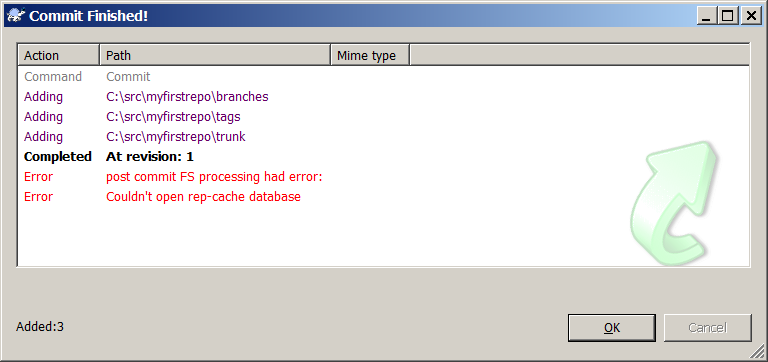
Couldn’t open rep-cache database

Compiling Subversion 1.8

tortoise_svn_commit_rep-cache
$ svn checkout file:///usr/home/svn/repos/myfirstrepo
svn: E200029: Couldn't perform atomic initialization
svn: E200030: SQLite compiled for 3.8.7.2, but running with 3.8.5

$ pkg info subversion | grep Version
Version        : 1.8.10_3

$ pkg info sqlite3 | grep Version
Version        : 3.8.5_1

$ pkg upgrade
Updating FreeBSD repository catalogue...
FreeBSD repository is up-to-date.
All repositories are up-to-date.
Checking for upgrades (31 candidates): 100%
The following 30 packages will be affected (of 0 checked):

New packages to be INSTALLED:
        [...]

Installed packages to be UPGRADED:
        sqlite3: 3.8.5_1 -> 3.8.7.2
        [...]

Installed packages to be REINSTALLED:
        [...]

Proceed with this action? [y/N]: y
[...]
Fetching sqlite3-3.8.7.2.txz: 100%  685 KB 701.0k/s    00:01
[...]
[27/30] Upgrading sqlite3 from 3.8.5_1 to 3.8.7.2: 100%
[...]

$ svn checkout file:///usr/home/svn/repos/myfirstrepo
A    myfirstrepo/tags
A    myfirstrepo/trunk
A    myfirstrepo/branches
Checked out revision 1.

txn-current-lock: Permission denied

$ svn checkout file:///home/svn/repos/project_2015_08_31_a
$ mkdir test
$ cd project_2015_08_31_a
$ echo "hallo" > test/welt
$ svn add test
A         test
A         test/welt

$ svn commit -m "add test"
svn: E000013: Commit failed (details follow):
svn: E000013: Can't open file '/home/svn/repos/project_2015_08_31_a/db/txn-current-lock': Permission denied

$ cd /home/svn/repos
$ ls -la
drwxr-xr-x  6 root  svn  512 Aug 31 10:46 project_2015_08_31_a

$ chown -R svn:svn project_2015_08_31_a
$ /usr/local/etc/rc.d/svnserve restart
=> use sockets (--listen-port=3690 --listen-host 0.0.0.0)
$ svn checkout svn://localhost/project_2015_08_31_a/
$ mkdir test
$ cd project_2015_08_31_a
$ echo "hallo" > test/welt
$ svn add test
A         test
A         test/welt

$ svn commit -m "add test"
svn: E170001: Commit failed (details follow):
svn: E170001: Authorization failed

Use username/password.
Edit repository configuration.

$ svn checkout svn://localhost/project_2015_08_31_a/
Authentication realm: <svn://localhost:3690> My First Repository
Username: andreas
Password for 'andreas': ********
Checked out revision 0.

$  cd project_2015_08_31_a
$  mkdir test
$  echo "hallo" > test/welt
$  svn add test
A         test
A         test/welt
$ svn commit -m "add test"
Adding         test
Adding         test/welt
Transmitting file data .
Committed revision 1.

$  echo "welt" > test/hallo
$ svn add test/welt
$ svn add test/hallo
A         test/hallo
$ svn commit -m "add test"
Adding         test/hallo
Transmitting file data .
Committed revision 2.

FabLab Arduino Starter Kit

Photoresistor 5528
Temperature Sensors TMP36

    1 x Arduino Projects Buch (170 Seiten)
    1 x Arduino UNO board rev.3
    1 x USB Kabel
    1 x Breadboard
    1 x Leicht zu assemblierender Holz-Rahmen
    1 x 9V Batterie-Adapter
    70 x Jumper-Kabel, Draht
    2 x Jumper-Kabel, Litze
    6 xPhotowiderstand[VT90N2 LDR]
    3 xPotentiometer 10kilohm
    10 xPushbuttons
    1 x Temperatur-Sensor [TMP36]
    1 x Neige-Sensor
    1 x Alphanumerisches LCD (16x2 Zeichen)
    1 x LED (Weiss, hell)
    1 x LED (RGB)
    8 x LEDs (Rot)
    8 x LEDs (Grün)
    8 x LEDs (Gelb)
    3 x LEDs (Blau)
    1 x DC motor 6/9V
    1 x Servo motor
    1 x Piezo Capsule [PKM17EPP-4001-B0]
    1 x H-bridge Motor Treiber [L293D]
    2 x Optokoppler [4N35]
    5 x Transistor [BC547]
    2 x Mosfet Transistor [IRF520]
    5 x Kondensator 100nF
    3 x Kondensator 100uF
    5 x Kondensator 100pF
    5 x Diode [1N4007]
    3 x Transparent gels (Rot, Grün, Blau)
    1 x Pinheader (40x1)
    20 x Widerstand 220 ohm
    5 x Widerstand 560 ohm
    5 x Widerstand 1 kilohm
    5 x Widerstand 4.7 kilohm
    10 x Widerstand 10 kilohm
    5 x Widerstand 1 megohm
    5 x Widerstand 10 megohm

FreeBSD Kernel Debugging

FreeBSD kernel module debugging
FreeBSD kernel debugging
KGDB with VirtualBox: Debug a Live Kernel (Linux)
FreeBSD 10; new X.org, KMS, PKGNG, poudriere…
Building a FreeBSD kernel for debugging
How to build and install a custom kernel on FreeBSD?

Online-Kernel-Fehlersuche mit DDB
Online-Kernel-Fehlersuche mit GDB auf einem entfernten System

On-Line Kernel Debugging Using DDB
On-Line Kernel Debugging Using Remote GDB

Link Aggregation (802.1AX-2008)

Link Aggregation und LACP Grundlagen
Multi-Chassis Link Aggregation Group (MC-LAG)

Chapters

  • 5. Link Aggregation
  • 5.1 Overview
  • 5.1.3 Positioning of Link Aggregation within the IEEE 802.3 architecture
  • Figure 5–2—Architectural positioning of Link Aggregation sublayer
  • Figure 5–3—Link Aggregation sublayer block diagram
  • 5.2 Link Aggregation operation
  • 5.3 Link Aggregation Control
  • 5.4 Link Aggregation Control Protocol (LACP)
  • 5.4.14 Selection Logic
  • 5.4.14.2 Selection Logic—Recommended default operation
  • 5.4.15 Mux machine
  • Figure 5–14—Mux machine state diagram (independent control)
  • Link Aggregation Control Protocol (LACP)
  • inverse multiplexing over multiple Ethernet links
  • increasing bandwidth
  • providing redundancy
  • node-level redundancy.
  • “MAC client can treat the Link Aggregation Group as if it were a single link.”
  • Protection Group
  • Protection Scheme
  • Protection Mode 1+1
  • single MAC address for all the device’s ports in the LAG group
  • LAG N: load sharing mode
  • LAG N+N: worker standby flavour

802.3ad Modes / Aggregation type:

  • balance-rr
  • balance-xor
  • broadcast
  • 802.3ad
  • active-backup
  • balance-tlb
  • balance-alb
  • failover

802.1AX Modes

  • Active
  • Standby

802.1AX State Machine
Aggregator/aggregation – Selected:

  • A value of SELECTED indicates that the Selection Logic has selected an appropriate
    Aggregator. A value of UNSELECTED indicates that no Aggregator is currently selected. A
    value of STANDBY indicates that although the Selection Logic has selected an appropriate
    Aggregator, aggregation restrictions currently prevent the port from being enabled as part of
    the aggregation, and so the port is being held in a standby condition. This variable can only be
    set to SELECTED or STANDBY by the operation of the port’s Selection Logic. It can be set to
    UNSELECTED by the operation of the port’s Receive machine, or by the operation of the
    Selection Logic associated with another port.

802.1AX Slow Protocol

  • The optional Marker Generator is used by the Marker protocol, as specified in 5.5. When implemented and
    so requested by the Distribution algorithm, the Marker Generator shall issue an
    AggMuxN:MA_DATA.request primitive, with a mac_service_data_unit containing a Marker PDU as
    defined in 5.5.3, to the port associated with the conversation being marked, subject to the timing restrictions
    for Slow Protocols specified in IEEE Std 802.3 Annex 57A.

FreeBSD Link Aggregation and Failover
Linux Link Aggregation and High Availability with Bonding
Oracle Solaris 11.1: Overview of Link Aggregations
FreeBSD: NIC Bonding / Link Aggregation / Trunking / Link Failover Tutorial
Understanding LACP on Chassis Clusters
Working with Link Aggregation (High Availability, Load Sharing)

FreeBSD Source

base/head/sys/net/if_lagg.c
base/head/sys/net/if_lagg.h