- STM32 F1. Cortex-M3 core, mainstream MCUs covers the needs of a large variety of applications in the industrial, medical and consumer markets
- STM32 F3: Cortex-M4 core (with FPU and DSP instructions) running at 72 MHz with a high number of integrated analog peripherals leading to cost reduction at application level and simplifying application design
Types
OliviliK/STM32F103 Wiki
- STM32F072C8T6, US $12.21
- STM32F030F4P6, US $1.93
- STM32F051C8T6, US $3.24 (ST STM32F051C8)
- STM32F103C8T6, US $1.78
- STM32F103C8T6, US $3.69
- STM32F103C8T6, US $4.18
- STM32F103RET6, US $7.10
- STM32F103RBT6, US $6.99
- STM32F103RBT6, US $7.94
- STM32F103RBT6, US $8.15
- STM32F103VET6, US $11.73
- STM32F103ZET6, US $12.16
- STM32F103ZET6, US $11.33
- STM32F103ZET6, US $12.42
- STM32F407VET6, US $11.73
- STM32F407ZET6, US $14.00
STM32F103
STM32F103C8
STM32F103C8, medium-densit (MD), Mainstream Performance line, ARM Cortex-M3 MCU with 64 Kbytes Flash, 72 MHz CPU, motor control, USB and CAN
Boards
Maple Mini
Maple Mini
Black Pill
STM32 Smart V2.0
Blue Pill
STM32Cube code initialization for “blue pill”
STM32F1 Anleitung
JTAG/SWD debugging via Black Magic Probe on an STM32 blue pill and blinking a LED using STM32CubeMX, libopencm3, and bare metal C
Code
STM32 – Prior to Start
STM32: Hello World
- Shenzhen LC Technology STM32F103C8 Entwicklungsboard
- Maple Mini STM32F103CB Entwicklungsboard
Debug
STM32 Programming Tips and Tricks
JTAG pins on Maple-mini?
J-Link
Using J-Link with the STM32 boards
Get yourself a J-Link
Programming STM32F103 Blue Pill using USB Bootloader and PlatformIO
Burn
Let’s start with a Blue Pill
Programming an STM32F103 board using its USB port (Blue Pill)
mbed
Using mbed with generic STM32F103C8T6 cheap eBay boards
Support for Blue Pill
STM32F103C8T6_Hello
STM32F103C8T6_USBSerial
Arduino => STM32duino
STM32duino
Bootloader
Burning the bootloader
STM32F103 Microcontroller
SGMK-SSAM-WIKI: STM32 dev
DFU Problem
dfu/upload not perfectly working
LeafLabs Maple – Perpetual Bootloader Mode
Arduino IDE with an STM32F103 board
I2C
I2C — Maple v0.0.12 Documentation
Wire library has SCL and SDA definitions but then doesn’t use them.
Wire (I2C)
C:\Users\bachman0\AppData\Local\Arduino15\packages\stm32duino\hardware\STM32F1\2017.3.26\libraries\Wire
C:\Users\bachman0\AppData\Local\Arduino15\packages\stm32duino
C:\Users\bachman0\AppData\Local\Arduino15\packages\stm32duino\tools\stm32tools\2017.3.26\win

C:\Users\bachman0\AppData\Local\Arduino15\packages\stm32duino\tools\stm32tools\2017.3.26\win>dfu-util.exe -l
dfu-util - (C) 2007-2008 by OpenMoko Inc.
This program is Free Software and has ABSOLUTELY NO WARRANTY

Found DFU: [0x1eaf:0x0003] devnum=1, cfg=0, intf=0, alt=0, name=""
Found DFU: [0x1eaf:0x0003] devnum=1, cfg=0, intf=0, alt=1, name="STM32duino bootloader v1.0  Upload to Flash 0x8005000"
Found DFU: [0x1eaf:0x0003] devnum=1, cfg=0, intf=0, alt=2, name="STM32duino bootloader v1.0  Upload to Flash 0x8002000"
Bus 001 Device 023: ID 1eaf:0004
Device Descriptor:
  bLength                18
  bDescriptorType         1
  bcdUSB               2.00
  bDeviceClass            2 Communications
  bDeviceSubClass         0
  bDeviceProtocol         0
  bMaxPacketSize0        64
  idVendor           0x1eaf
  idProduct          0x0004
  bcdDevice            2.00
  iManufacturer           1 LeafLabs
  iProduct                2 Maple
  iSerial                 0
  bNumConfigurations      1
  Configuration Descriptor:
    bLength                 9
    bDescriptorType         2
    wTotalLength           67
    bNumInterfaces          2
    bConfigurationValue     1
    iConfiguration          0
    bmAttributes         0xc0
      Self Powered
    MaxPower              100mA
    Interface Descriptor:
      bLength                 9
      bDescriptorType         4
      bInterfaceNumber        0
      bAlternateSetting       0
      bNumEndpoints           1
      bInterfaceClass         2 Communications
      bInterfaceSubClass      2 Abstract (modem)
      bInterfaceProtocol      1 AT-commands (v.25ter)
      iInterface              0
      CDC Header:
        bcdCDC               10.01
      CDC Call Management:
        bmCapabilities       0x03
          call management
          use DataInterface
        bDataInterface          1
      CDC ACM:
        bmCapabilities       0x06
          sends break
          line coding and serial state
      CDC Union:
        bMasterInterface        0
        bSlaveInterface         1
      Endpoint Descriptor:
        bLength                 7
        bDescriptorType         5
        bEndpointAddress     0x82  EP 2 IN
        bmAttributes            3
          Transfer Type            Interrupt
          Synch Type               None
          Usage Type               Data
        wMaxPacketSize     0x0040  1x 64 bytes
        bInterval             255
    Interface Descriptor:
      bLength                 9
      bDescriptorType         4
      bInterfaceNumber        1
      bAlternateSetting       0
      bNumEndpoints           2
      bInterfaceClass        10 CDC Data
      bInterfaceSubClass      0 Unused
      bInterfaceProtocol      0
      iInterface              0
      Endpoint Descriptor:
        bLength                 7
        bDescriptorType         5
        bEndpointAddress     0x03  EP 3 OUT
        bmAttributes            2
          Transfer Type            Bulk
          Synch Type               None
          Usage Type               Data
        wMaxPacketSize     0x0040  1x 64 bytes
        bInterval               0
      Endpoint Descriptor:
        bLength                 7
        bDescriptorType         5
        bEndpointAddress     0x81  EP 1 IN
        bmAttributes            2
          Transfer Type            Bulk
          Synch Type               None
          Usage Type               Data
        wMaxPacketSize     0x0040  1x 64 bytes
        bInterval               0
Sketch uses 12892 bytes (19%) of program storage space. Maximum is 65536 bytes.
Global variables use 2816 bytes of dynamic memory.
/home/andreas/.arduino15/packages/stm32duino/tools/stm32tools/2017.3.26/linux/maple_upload: line 29: /home/andreas/.arduino15/packages/stm32duino/tools/stm32tools/2017.3.26/linux/upload-reset: No such file or directory
dfu-util 0.7

Copyright 2005-2008 Weston Schmidt, Harald Welte and OpenMoko Inc.
Copyright 2010-2012 Tormod Volden and Stefan Schmidt
This program is Free Software and has ABSOLUTELY NO WARRANTY
Please report bugs to dfu-util@lists.gnumonks.org

Filter on vendor = 0x1eaf product = 0x0003
Opening DFU capable USB device... ID 1eaf:0003
Run-time device DFU version 0110
Found DFU: [1eaf:0003] devnum=0, cfg=1, intf=0, alt=2, name="STM32duino bootloader v1.0  Upload to Flash 0x8002000"
Claiming USB DFU Interface...
Setting Alternate Setting #2 ...
Determining device status: state = dfuIDLE, status = 0
dfuIDLE, continuing
DFU mode device DFU version 0110
Device returned transfer size 1024
bytes_per_hash=257
Copying data from PC to DFU device
No valid DFU suffix signature
Warning: File has no DFU suffix
Starting download: [##################################################] finished!
state(8) = dfuMANIFEST-WAIT-RESET, status(0) = No error condition is present
Done!
Resetting USB to switch back to runtime mode
home/andreas/.arduino15/packages/stm32duino/tools/stm32tools/2017.3.26/linux/maple_upload ttyS0 2 1EAF:0003 /tmp/arduino_build_747776/MyBlink.ino.bin
/home/andreas/.arduino15/packages/stm32duino/tools/stm32tools/2017.3.26/linux/maple_upload: line 29: /home/andreas/.arduino15/packages/stm32duino/tools/stm32tools/2017.3.26/linux/upload-reset: No such file or directory
No valid DFU suffix signature
dfu-util 0.7

Copyright 2005-2008 Weston Schmidt, Harald Welte and OpenMoko Inc.
Warning: File has no DFU suffix
Copyright 2010-2012 Tormod Volden and Stefan Schmidt
This program is Free Software and has ABSOLUTELY NO WARRANTY
Please report bugs to dfu-util@lists.gnumonks.org

Filter on vendor = 0x1eaf product = 0x0003
Opening DFU capable USB device... ID 1eaf:0003
Run-time device DFU version 0110
Found DFU: [1eaf:0003] devnum=0, cfg=1, intf=0, alt=2, name="STM32duino bootloader v1.0  Upload to Flash 0x8002000"
Claiming USB DFU Interface...
Setting Alternate Setting #2 ...
Determining device status: state = dfuIDLE, status = 0
dfuIDLE, continuing
DFU mode device DFU version 0110
Device returned transfer size 1024
bytes_per_hash=257
Copying data from PC to DFU device
Starting download: [##################################################] finished!
state(8) = dfuMANIFEST-WAIT-RESET, status(0) = No error condition is present
Done!
Resetting USB to switch back to runtime mode
stm32f103c8t6
STM32F103xx medium-density performance line microcontroller family
72 MHz
64 or 128 Kbytes of Flash memory
20 Kbytes of SRAM
STM32 Tutorial
STM32F10x Standard Peripherals Library
stm32plus – A C++ library for STM32 development
github.com/andysworkshop/stm32plus
STM32 Tutorial für C/C++ und UML
STM32 Blue Pill ARM development board first look: from Arduino to bare metal programming, 12.12.2017
github.com/solosky/stlink-uart, Clone
Getting Started with the STM32L432 Nucleo-32 using Eclipse and the GNU ARM Toolchain, 17.08.2017
UART over USB for STM32 Micro-controller
USB interface with STM32
Stm32 USB virtual com port example
STM32 USB-FS-Device Lib
STM32 Embedded Software, Low level drivers, hardware abstraction layers, and middleware
STSW-STM32121, STM32F10x, STM32L1xx and STM32F3xx USB full speed device library (UM0424)
UM0424 User manual
STM32 L152 Discovery kit toolchain setup, include/BlinkLed.h, src/BlinkLed.c
Examples
github.com/avislab/STM32F103, STM32F103C8 Examples
variant
- STM32F100 Value line – 24 MHz CPU with motor control and CEC functions
- STM32F101 – 36 MHz CPU, up to 1 Mbyte of Flash
- STM32F102 – 48 MHz CPU with USB FS
- STM32F103 – 72 MHz, up to 1 Mbyte of Flash with motor control, USB and CAN
- STM32F105/107 – 72 MHz CPU with Ethernet MAC, CAN and USB 2.0 OTG
density
- Low-density devices are STM32F101xx, STM32F102xx and STM32F103xx microcontrollers where the Flash memory density ranges between 16 and 32 Kbytes.
- Medium-density devices are STM32F101xx, STM32F102xx and STM32F103xx microcontrollers where the Flash memory density ranges between 64 and 128 Kbytes.
- High-density devices are STM32F101xx and STM32F103xx microcontrollers where the Flash memory density ranges between 256 and 512 Kbytes.
- XL-density devices are STM32F101xx and STM32F103xx microcontrollers where the Flash memory density ranges between 768 Kbytes and 1 Mbyte.
- Connectivity line devices are STM32F105xx and STM32F107xx microcontrollers.
a
For this document, we are only interested in that the Cortex-M3 core is connected to the AHB system bus, which is then split into two bridges APB1 (low speed) and APB2 (high speed) with each bridge connecting to a set of peripherals.
Let’s start with describing MCU’s startup procedure. After reset (power on) MCU works with HSI (internal high-speed oscilator) as system clock source. In my case (STM32F401RE), HSI = 16MHz. Assuming that we boot from Main Flash memory, MCU starts code execution from the boot memory starting from 0×00000004. This is the place where we need to put an address of initialization function. This function is usually named Reset_Handler and must do the following job:
- set stack pointer (usually at the end of SRAM)
- copy
.data section from flash to SRAM
- zero fill the
.bss section (in SRAM)
- call CMSIS
SystemInit() function
- call libc
__libc_init_array() function
- call
main()
typedef enum {
  GPIO_Mode_AIN         = 0x0,
  GPIO_Mode_IN_FLOATING = 0x04,
  GPIO_Mode_IPD         = 0x28,
  GPIO_Mode_IPU         = 0x48,
  GPIO_Mode_Out_OD      = 0x14,
  GPIO_Mode_Out_PP      = 0x10,
  GPIO_Mode_AF_OD       = 0x1C,
  GPIO_Mode_AF_PP       = 0x18
} GPIOMode_TypeDef;
Alternate Function (+ Remapping)
The I/Os alternate function configuration can be locked if needed following a specific sequence in order to avoid spurious writing to the I/Os registers.
STM32F103xx: If several peripherals share the same I/O pin, to avoid conflict between these alternate functions only one peripheral should be enabled at a time through the peripheral clock enable bit (in the corresponding RCC peripheral clock enable register)
STM32F072xx: Alternate functions selected through GPIOA_AFR registers
AN4228 Migrating from STM32F1 to STM32F3 microcontrollers
3.7 GPIO interface
The STM32F3 GPIO peripheral embeds new features compared to STM32F1 series, below the main features:
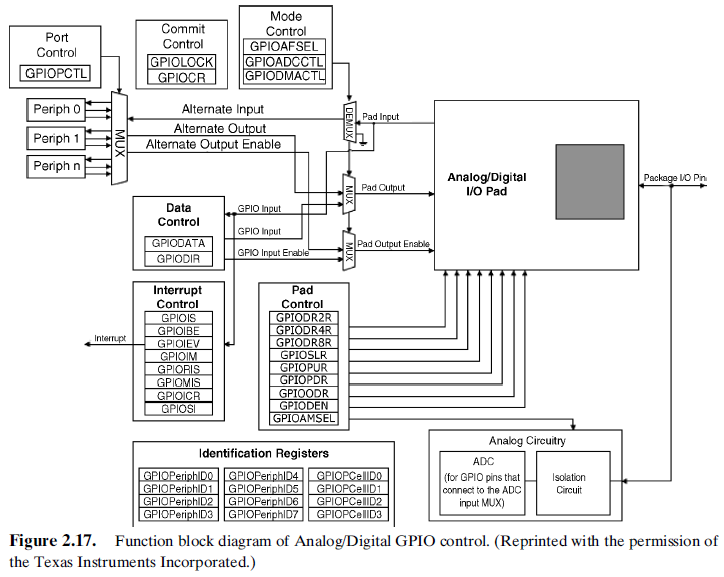
- GPIO mapped on AHB bus for better performance
- I/O pin multiplexer and mapping: pins are connected to on-chip peripherals/modules through a multiplexer that allows only one peripheral alternate function (AF) connected to an I/O pin at a time. In this way, there can be no conflict between peripherals sharing the same I/O pin.
- More possibilities and features for I/O configuration
The STM32F3 series GPIO peripheral is a new design and thus the architecture, features and registers are different from the GPIO peripheral in the STM32F1 series. Any code written for the STM32F1 series using the GPIO needs to be rewritten to run on STM32F3 series.
3.7.1 Alternate function mode
STM32F1 series
The configuration to use an I/O as an alternate function depends on the peripheral mode used. For example, the USART Tx pin should be configured as an alternate function push-pull, while the USART Rx pin should be configured as input floating or input pull-up. To optimize the number of peripheral I/O functions for different device packages (especially those with a low pin count), it is possible to remap some alternate functions to other pins by software. For example, the USART2_RX pin can be mapped on PA3 (default remap) or PD6 (by software remap).
STM32F3 series
Whatever the peripheral mode used, the I/O must be configured as an alternate function,
then the system can use the I/O in the proper way (input or output).
The I/O pins are connected to on-chip peripherals/modules through a multiplexer that allows only one peripheral alternate function to be connected to an I/O pin at a time. In this way, there can be no conflict between peripherals sharing the same I/O pin. Each I/O pin has a multiplexer with 16 alternate function inputs (AF0 to AF15) that can be configured through the GPIOx_AFRL and GPIOx_AFRH registers: the peripheral alternate functions are mapped by configuring AF0 to AF15.
In addition to this flexible I/O multiplexing architecture, each peripheral has alternate functions mapped on different I/O pins to optimize the number of peripheral I/O functions for different device packages. For example, the USART2_RX pin can be mapped on PA3 or PA15 pin.
RM0008 Reference manual for STM32F103xx
- 9.1.4 Alternate functions (AF),
- 9.1.5 Software remapping of I/O alternate functions,
- 9.1.9 Alternate function configuration,
- 9.3 Alternate function I/O and debug configuration (AFIO), p. 174
To optimize the number of peripherals available for the 64-pin or the 100-pin or the 144-pin package, it is possible to remap some alternate functions to some other pins. This is achieved by software, by programming the AF remap and debug I/O configuration register (AFIO_MAPR). In this case, the alternate functions are no longer mapped to their original assignations.
STM32Cube
STM32Cube & STM32CubeMX
Programming ARM Cortex (STM32) under GNU/Linux
Cortex-M4 rather than Cortex-M3
Building a Minimal C Project for the STM32F4 Processor using CMSIS
GPIO B Alternative Function Setup
Tutorial for Cortex-M4
typedef struct
{
  __IO uint32_t MODER;    /*!< GPIO port mode register,               Address offset: 0x00      */
  __IO uint32_t OTYPER;   /*!< GPIO port output type register,        Address offset: 0x04      */
  __IO uint32_t OSPEEDR;  /*!< GPIO port output speed register,       Address offset: 0x08      */
  __IO uint32_t PUPDR;    /*!< GPIO port pull-up/pull-down register,  Address offset: 0x0C      */
  __IO uint32_t IDR;      /*!< GPIO port input data register,         Address offset: 0x10      */
  __IO uint32_t ODR;      /*!< GPIO port output data register,        Address offset: 0x14      */
  __IO uint16_t BSRRL;    /*!< GPIO port bit set/reset low register,  Address offset: 0x18      */
  __IO uint16_t BSRRH;    /*!< GPIO port bit set/reset high register, Address offset: 0x1A      */
  __IO uint32_t LCKR;     /*!< GPIO port configuration lock register, Address offset: 0x1C      */
  __IO uint32_t AFR[2];   /*!< GPIO alternate function registers,     Address offset: 0x20-0x24 */
} GPIO_TypeDef;
Cortex-M3 from GNU ARM Eclipse Plug-In (CMSIS)
/**
  * @brief General Purpose I/O
  */
typedef struct {
  __IO uint32_t CRL;
  __IO uint32_t CRH;
  __IO uint32_t IDR;
  __IO uint32_t ODR;
  __IO uint32_t BSRR;
  __IO uint32_t BRR;
  __IO uint32_t LCKR;
} GPIO_TypeDef;

/**
  * @brief  GPIO Init structure definition
  */
typedef struct {
  uint16_t GPIO_Pin;             /*!< Specifies the GPIO pins to be configured. This parameter can be any value of @ref GPIO_pins_define */
  GPIOSpeed_TypeDef GPIO_Speed;  /*!< Specifies the speed for the selected pins. This parameter can be a value of @ref GPIOSpeed_TypeDef */
  GPIOMode_TypeDef GPIO_Mode;    /*!< Specifies the operating mode for the selected pins. This parameter can be a value of @ref GPIOMode_TypeDef */
} GPIO_InitTypeDef;

void GPIO_Init(GPIO_TypeDef* GPIOx, GPIO_InitTypeDef* GPIO_InitStruct);
Cortex-M0
typedef struct
{
  __IO uint32_t MODER;        /*!< GPIO port mode register,                     Address offset: 0x00      */
  __IO uint32_t OTYPER;       /*!< GPIO port output type register,              Address offset: 0x04      */
  __IO uint32_t OSPEEDR;      /*!< GPIO port output speed register,             Address offset: 0x08      */
  __IO uint32_t PUPDR;        /*!< GPIO port pull-up/pull-down register,        Address offset: 0x0C      */
  __IO uint32_t IDR;          /*!< GPIO port input data register,               Address offset: 0x10      */
  __IO uint32_t ODR;          /*!< GPIO port output data register,              Address offset: 0x14      */
  __IO uint32_t BSRR;         /*!< GPIO port bit set/reset register,            Address offset: 0x1A      */
  __IO uint32_t LCKR;         /*!< GPIO port configuration lock register,       Address offset: 0x1C      */
  __IO uint32_t AFR[2];       /*!< GPIO alternate function low register,        Address offset: 0x20-0x24 */
  __IO uint32_t BRR;          /*!< GPIO bit reset register,                     Address offset: 0x28      */
} GPIO_TypeDef;
typedef struct
{
  uint32_t Pin;       /*!< Specifies the GPIO pins to be configured.
                           This parameter can be any value of @ref GPIO_pins */
  uint32_t Mode;      /*!< Specifies the operating mode for the selected pins.
                           This parameter can be a value of @ref GPIO_mode */
  uint32_t Pull;      /*!< Specifies the Pull-up or Pull-Down activation for the selected pins.
                           This parameter can be a value of @ref GPIO_pull */
  uint32_t Speed;     /*!< Specifies the speed for the selected pins.
                           This parameter can be a value of @ref GPIO_speed */
  uint32_t Alternate; /*!< Peripheral to be connected to the selected pins
                           This parameter can be a value of @ref GPIOEx_Alternate_function_selection */
} GPIO_InitTypeDef;
STM32 HAL
UM1850 Description of STM32F1xx HAL drivers
- p. 256, GPIOEx Firmware driver defines
- No AFR
UM1786 Description of STM32F3 HAL drivers
- p. 261, GPIOEx Firmware driver defines, GPIOEx Alternate function selection
- p. 1809, Table 33: Correspondence between GPIO registers and GPIO low-layer driver functions
Libraries / System Calls
NewLib
Getting NewLib and printf to work with the STM32 and Code Sourcery Lite eabi
Semihosting
What is semihosting?
printf(…) ganz einfach per Semihosting auf dem STM32F4
Input/Output Modes
Programming the STM32 MCU Peripherals
Input:
- Analog
- Floating / High Impedance, Tri-Stated
- Pull-down
- Pull-up
When an input pin is in high impedance input mode, its state is indeterminate unless it is driven high or low by an external source. Pins configured as high impedance inputs and not currently driven are called “floating”. Many times “float” or “floating” is used interchaneably with “high impedance” or “tri-stated”. To prevent pins from floating when they are not externally driven, internally pulling resistors are used.
STM32 Understanding GPIO Settings
Understanding Microcontroller Pin Input/Output Modes
Was ist ein Pullup- und ein Pulldown-Widerstand?
Output:
- Push-Pull => 2 x MOSFET (N-MOS, P-MOS)
- Tristate / High-Z / High Drive
- Open-Drain / Open-Collector
Ausgangsstufen Logik-ICs
Open-Collector-Ausgang
Gegentaktendstufe
Things to remember when developing a program for STM32 using STM32-Library
ARM Cortex-M3 (STM32F103) Tutorial – GPIO – Control LED On/Off
General Purpose Input/Output (GPIO) (Chinese!!)
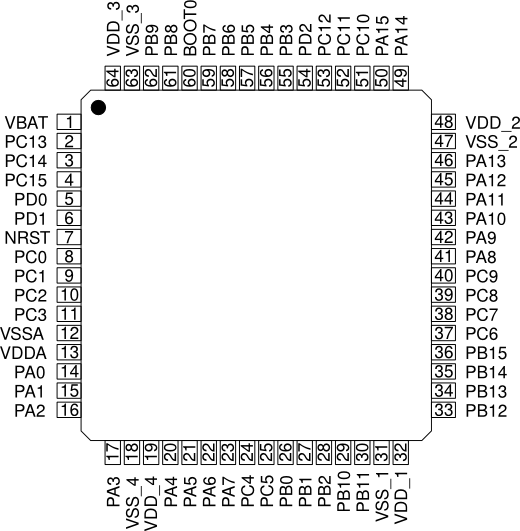
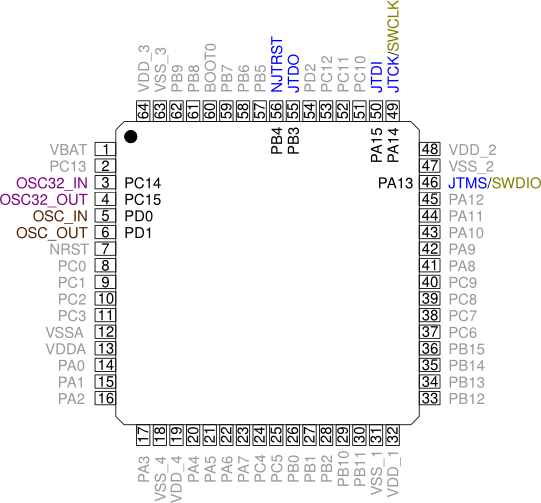
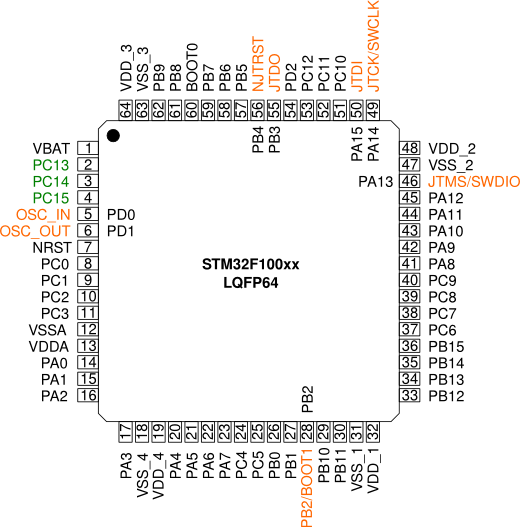
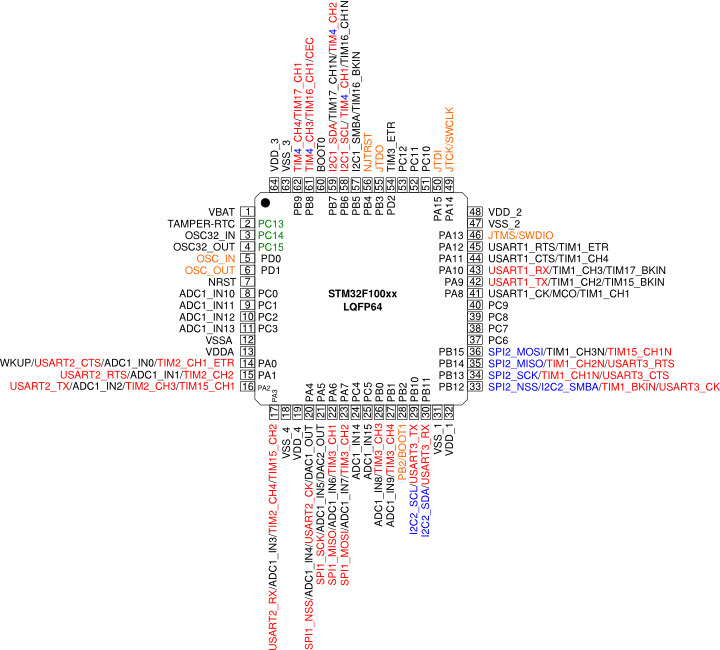
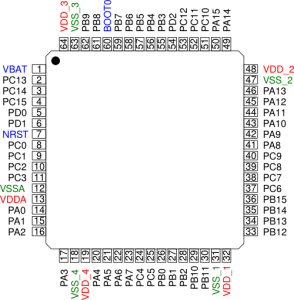
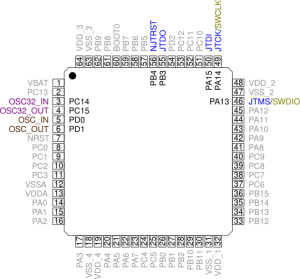
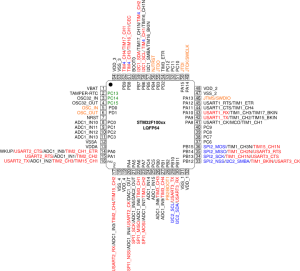
STM32F100xx LQFP64 Pin Functions
STM32F100xx LQFP64 Pin Functions
| Pins |
 |
| Power Dedicated Pins |
 |
| Oscillator and Debug Pins |
 |
| Pins at Reset |
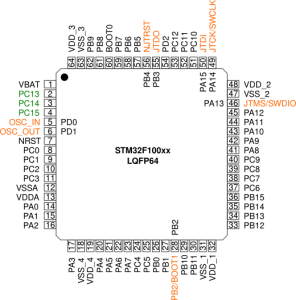 |
| Alternate Function Pins |
The alternate functions are the internal peripheral device connections to the external pins.
Alternate functions shown in red can be remapped to other port pins. |
 |
18:17:11 **** Build of configuration Debug for project blinky ****
make all
Building file: ../system/src/stm32f1-stdperiph/misc.c
Invoking: Cross ARM C Compiler
arm-none-eabi-gcc -mcpu=cortex-m3 -mthumb -Og -fmessage-length=0 -fsigned-char -ffunction-sections -fdata-sections -ffreestanding -fno-move-loop-invariants -Wall -Wextra  -g3 -DDEBUG -DUSE_FULL_ASSERT -DTRACE -DOS_USE_TRACE_SEMIHOSTING_DEBUG -DSTM32F10X_MD -DUSE_STDPERIPH_DRIVER -DHSE_VALUE=8000000 -I"../include" -I"../system/include" -I"../system/include/cmsis" -I"../system/include/stm32f1-stdperiph" -std=gnu11 -MMD -MP -MF"system/src/stm32f1-stdperiph/misc.d" -MT"system/src/stm32f1-stdperiph/misc.o" -c -o "system/src/stm32f1-stdperiph/misc.o" "../system/src/stm32f1-stdperiph/misc.c"
Finished building: ../system/src/stm32f1-stdperiph/misc.c

Building file: ../system/src/stm32f1-stdperiph/stm32f10x_adc.c
Invoking: Cross ARM C Compiler
arm-none-eabi-gcc -mcpu=cortex-m3 -mthumb -Og -fmessage-length=0 -fsigned-char -ffunction-sections -fdata-sections -ffreestanding -fno-move-loop-invariants -Wall -Wextra  -g3 -DDEBUG -DUSE_FULL_ASSERT -DTRACE -DOS_USE_TRACE_SEMIHOSTING_DEBUG -DSTM32F10X_MD -DUSE_STDPERIPH_DRIVER -DHSE_VALUE=8000000 -I"../include" -I"../system/include" -I"../system/include/cmsis" -I"../system/include/stm32f1-stdperiph" -std=gnu11 -MMD -MP -MF"system/src/stm32f1-stdperiph/stm32f10x_adc.d" -MT"system/src/stm32f1-stdperiph/stm32f10x_adc.o" -c -o "system/src/stm32f1-stdperiph/stm32f10x_adc.o" "../system/src/stm32f1-stdperiph/stm32f10x_adc.c"
Finished building: ../system/src/stm32f1-stdperiph/stm32f10x_adc.c

Building file: ../system/src/stm32f1-stdperiph/stm32f10x_bkp.c
Invoking: Cross ARM C Compiler
arm-none-eabi-gcc -mcpu=cortex-m3 -mthumb -Og -fmessage-length=0 -fsigned-char -ffunction-sections -fdata-sections -ffreestanding -fno-move-loop-invariants -Wall -Wextra  -g3 -DDEBUG -DUSE_FULL_ASSERT -DTRACE -DOS_USE_TRACE_SEMIHOSTING_DEBUG -DSTM32F10X_MD -DUSE_STDPERIPH_DRIVER -DHSE_VALUE=8000000 -I"../include" -I"../system/include" -I"../system/include/cmsis" -I"../system/include/stm32f1-stdperiph" -std=gnu11 -MMD -MP -MF"system/src/stm32f1-stdperiph/stm32f10x_bkp.d" -MT"system/src/stm32f1-stdperiph/stm32f10x_bkp.o" -c -o "system/src/stm32f1-stdperiph/stm32f10x_bkp.o" "../system/src/stm32f1-stdperiph/stm32f10x_bkp.c"
Finished building: ../system/src/stm32f1-stdperiph/stm32f10x_bkp.c

Building file: ../system/src/stm32f1-stdperiph/stm32f10x_can.c
Invoking: Cross ARM C Compiler
arm-none-eabi-gcc -mcpu=cortex-m3 -mthumb -Og -fmessage-length=0 -fsigned-char -ffunction-sections -fdata-sections -ffreestanding -fno-move-loop-invariants -Wall -Wextra  -g3 -DDEBUG -DUSE_FULL_ASSERT -DTRACE -DOS_USE_TRACE_SEMIHOSTING_DEBUG -DSTM32F10X_MD -DUSE_STDPERIPH_DRIVER -DHSE_VALUE=8000000 -I"../include" -I"../system/include" -I"../system/include/cmsis" -I"../system/include/stm32f1-stdperiph" -std=gnu11 -MMD -MP -MF"system/src/stm32f1-stdperiph/stm32f10x_can.d" -MT"system/src/stm32f1-stdperiph/stm32f10x_can.o" -c -o "system/src/stm32f1-stdperiph/stm32f10x_can.o" "../system/src/stm32f1-stdperiph/stm32f10x_can.c"
Finished building: ../system/src/stm32f1-stdperiph/stm32f10x_can.c

Building file: ../system/src/stm32f1-stdperiph/stm32f10x_cec.c
Invoking: Cross ARM C Compiler
arm-none-eabi-gcc -mcpu=cortex-m3 -mthumb -Og -fmessage-length=0 -fsigned-char -ffunction-sections -fdata-sections -ffreestanding -fno-move-loop-invariants -Wall -Wextra  -g3 -DDEBUG -DUSE_FULL_ASSERT -DTRACE -DOS_USE_TRACE_SEMIHOSTING_DEBUG -DSTM32F10X_MD -DUSE_STDPERIPH_DRIVER -DHSE_VALUE=8000000 -I"../include" -I"../system/include" -I"../system/include/cmsis" -I"../system/include/stm32f1-stdperiph" -std=gnu11 -MMD -MP -MF"system/src/stm32f1-stdperiph/stm32f10x_cec.d" -MT"system/src/stm32f1-stdperiph/stm32f10x_cec.o" -c -o "system/src/stm32f1-stdperiph/stm32f10x_cec.o" "../system/src/stm32f1-stdperiph/stm32f10x_cec.c"
Finished building: ../system/src/stm32f1-stdperiph/stm32f10x_cec.c

Building file: ../system/src/stm32f1-stdperiph/stm32f10x_crc.c
Invoking: Cross ARM C Compiler
arm-none-eabi-gcc -mcpu=cortex-m3 -mthumb -Og -fmessage-length=0 -fsigned-char -ffunction-sections -fdata-sections -ffreestanding -fno-move-loop-invariants -Wall -Wextra  -g3 -DDEBUG -DUSE_FULL_ASSERT -DTRACE -DOS_USE_TRACE_SEMIHOSTING_DEBUG -DSTM32F10X_MD -DUSE_STDPERIPH_DRIVER -DHSE_VALUE=8000000 -I"../include" -I"../system/include" -I"../system/include/cmsis" -I"../system/include/stm32f1-stdperiph" -std=gnu11 -MMD -MP -MF"system/src/stm32f1-stdperiph/stm32f10x_crc.d" -MT"system/src/stm32f1-stdperiph/stm32f10x_crc.o" -c -o "system/src/stm32f1-stdperiph/stm32f10x_crc.o" "../system/src/stm32f1-stdperiph/stm32f10x_crc.c"
Finished building: ../system/src/stm32f1-stdperiph/stm32f10x_crc.c

Building file: ../system/src/stm32f1-stdperiph/stm32f10x_dac.c
Invoking: Cross ARM C Compiler
arm-none-eabi-gcc -mcpu=cortex-m3 -mthumb -Og -fmessage-length=0 -fsigned-char -ffunction-sections -fdata-sections -ffreestanding -fno-move-loop-invariants -Wall -Wextra  -g3 -DDEBUG -DUSE_FULL_ASSERT -DTRACE -DOS_USE_TRACE_SEMIHOSTING_DEBUG -DSTM32F10X_MD -DUSE_STDPERIPH_DRIVER -DHSE_VALUE=8000000 -I"../include" -I"../system/include" -I"../system/include/cmsis" -I"../system/include/stm32f1-stdperiph" -std=gnu11 -MMD -MP -MF"system/src/stm32f1-stdperiph/stm32f10x_dac.d" -MT"system/src/stm32f1-stdperiph/stm32f10x_dac.o" -c -o "system/src/stm32f1-stdperiph/stm32f10x_dac.o" "../system/src/stm32f1-stdperiph/stm32f10x_dac.c"
Finished building: ../system/src/stm32f1-stdperiph/stm32f10x_dac.c

Building file: ../system/src/stm32f1-stdperiph/stm32f10x_dbgmcu.c
Invoking: Cross ARM C Compiler
arm-none-eabi-gcc -mcpu=cortex-m3 -mthumb -Og -fmessage-length=0 -fsigned-char -ffunction-sections -fdata-sections -ffreestanding -fno-move-loop-invariants -Wall -Wextra  -g3 -DDEBUG -DUSE_FULL_ASSERT -DTRACE -DOS_USE_TRACE_SEMIHOSTING_DEBUG -DSTM32F10X_MD -DUSE_STDPERIPH_DRIVER -DHSE_VALUE=8000000 -I"../include" -I"../system/include" -I"../system/include/cmsis" -I"../system/include/stm32f1-stdperiph" -std=gnu11 -MMD -MP -MF"system/src/stm32f1-stdperiph/stm32f10x_dbgmcu.d" -MT"system/src/stm32f1-stdperiph/stm32f10x_dbgmcu.o" -c -o "system/src/stm32f1-stdperiph/stm32f10x_dbgmcu.o" "../system/src/stm32f1-stdperiph/stm32f10x_dbgmcu.c"
Finished building: ../system/src/stm32f1-stdperiph/stm32f10x_dbgmcu.c

Building file: ../system/src/stm32f1-stdperiph/stm32f10x_dma.c
Invoking: Cross ARM C Compiler
arm-none-eabi-gcc -mcpu=cortex-m3 -mthumb -Og -fmessage-length=0 -fsigned-char -ffunction-sections -fdata-sections -ffreestanding -fno-move-loop-invariants -Wall -Wextra  -g3 -DDEBUG -DUSE_FULL_ASSERT -DTRACE -DOS_USE_TRACE_SEMIHOSTING_DEBUG -DSTM32F10X_MD -DUSE_STDPERIPH_DRIVER -DHSE_VALUE=8000000 -I"../include" -I"../system/include" -I"../system/include/cmsis" -I"../system/include/stm32f1-stdperiph" -std=gnu11 -MMD -MP -MF"system/src/stm32f1-stdperiph/stm32f10x_dma.d" -MT"system/src/stm32f1-stdperiph/stm32f10x_dma.o" -c -o "system/src/stm32f1-stdperiph/stm32f10x_dma.o" "../system/src/stm32f1-stdperiph/stm32f10x_dma.c"
Finished building: ../system/src/stm32f1-stdperiph/stm32f10x_dma.c

Building file: ../system/src/stm32f1-stdperiph/stm32f10x_exti.c
Invoking: Cross ARM C Compiler
arm-none-eabi-gcc -mcpu=cortex-m3 -mthumb -Og -fmessage-length=0 -fsigned-char -ffunction-sections -fdata-sections -ffreestanding -fno-move-loop-invariants -Wall -Wextra  -g3 -DDEBUG -DUSE_FULL_ASSERT -DTRACE -DOS_USE_TRACE_SEMIHOSTING_DEBUG -DSTM32F10X_MD -DUSE_STDPERIPH_DRIVER -DHSE_VALUE=8000000 -I"../include" -I"../system/include" -I"../system/include/cmsis" -I"../system/include/stm32f1-stdperiph" -std=gnu11 -MMD -MP -MF"system/src/stm32f1-stdperiph/stm32f10x_exti.d" -MT"system/src/stm32f1-stdperiph/stm32f10x_exti.o" -c -o "system/src/stm32f1-stdperiph/stm32f10x_exti.o" "../system/src/stm32f1-stdperiph/stm32f10x_exti.c"
Finished building: ../system/src/stm32f1-stdperiph/stm32f10x_exti.c

Building file: ../system/src/stm32f1-stdperiph/stm32f10x_flash.c
Invoking: Cross ARM C Compiler
arm-none-eabi-gcc -mcpu=cortex-m3 -mthumb -Og -fmessage-length=0 -fsigned-char -ffunction-sections -fdata-sections -ffreestanding -fno-move-loop-invariants -Wall -Wextra  -g3 -DDEBUG -DUSE_FULL_ASSERT -DTRACE -DOS_USE_TRACE_SEMIHOSTING_DEBUG -DSTM32F10X_MD -DUSE_STDPERIPH_DRIVER -DHSE_VALUE=8000000 -I"../include" -I"../system/include" -I"../system/include/cmsis" -I"../system/include/stm32f1-stdperiph" -std=gnu11 -MMD -MP -MF"system/src/stm32f1-stdperiph/stm32f10x_flash.d" -MT"system/src/stm32f1-stdperiph/stm32f10x_flash.o" -c -o "system/src/stm32f1-stdperiph/stm32f10x_flash.o" "../system/src/stm32f1-stdperiph/stm32f10x_flash.c"
Finished building: ../system/src/stm32f1-stdperiph/stm32f10x_flash.c

Building file: ../system/src/stm32f1-stdperiph/stm32f10x_fsmc.c
Invoking: Cross ARM C Compiler
arm-none-eabi-gcc -mcpu=cortex-m3 -mthumb -Og -fmessage-length=0 -fsigned-char -ffunction-sections -fdata-sections -ffreestanding -fno-move-loop-invariants -Wall -Wextra  -g3 -DDEBUG -DUSE_FULL_ASSERT -DTRACE -DOS_USE_TRACE_SEMIHOSTING_DEBUG -DSTM32F10X_MD -DUSE_STDPERIPH_DRIVER -DHSE_VALUE=8000000 -I"../include" -I"../system/include" -I"../system/include/cmsis" -I"../system/include/stm32f1-stdperiph" -std=gnu11 -MMD -MP -MF"system/src/stm32f1-stdperiph/stm32f10x_fsmc.d" -MT"system/src/stm32f1-stdperiph/stm32f10x_fsmc.o" -c -o "system/src/stm32f1-stdperiph/stm32f10x_fsmc.o" "../system/src/stm32f1-stdperiph/stm32f10x_fsmc.c"
Finished building: ../system/src/stm32f1-stdperiph/stm32f10x_fsmc.c

Building file: ../system/src/stm32f1-stdperiph/stm32f10x_gpio.c
Invoking: Cross ARM C Compiler
arm-none-eabi-gcc -mcpu=cortex-m3 -mthumb -Og -fmessage-length=0 -fsigned-char -ffunction-sections -fdata-sections -ffreestanding -fno-move-loop-invariants -Wall -Wextra  -g3 -DDEBUG -DUSE_FULL_ASSERT -DTRACE -DOS_USE_TRACE_SEMIHOSTING_DEBUG -DSTM32F10X_MD -DUSE_STDPERIPH_DRIVER -DHSE_VALUE=8000000 -I"../include" -I"../system/include" -I"../system/include/cmsis" -I"../system/include/stm32f1-stdperiph" -std=gnu11 -MMD -MP -MF"system/src/stm32f1-stdperiph/stm32f10x_gpio.d" -MT"system/src/stm32f1-stdperiph/stm32f10x_gpio.o" -c -o "system/src/stm32f1-stdperiph/stm32f10x_gpio.o" "../system/src/stm32f1-stdperiph/stm32f10x_gpio.c"
Finished building: ../system/src/stm32f1-stdperiph/stm32f10x_gpio.c

Building file: ../system/src/stm32f1-stdperiph/stm32f10x_i2c.c
Invoking: Cross ARM C Compiler
arm-none-eabi-gcc -mcpu=cortex-m3 -mthumb -Og -fmessage-length=0 -fsigned-char -ffunction-sections -fdata-sections -ffreestanding -fno-move-loop-invariants -Wall -Wextra  -g3 -DDEBUG -DUSE_FULL_ASSERT -DTRACE -DOS_USE_TRACE_SEMIHOSTING_DEBUG -DSTM32F10X_MD -DUSE_STDPERIPH_DRIVER -DHSE_VALUE=8000000 -I"../include" -I"../system/include" -I"../system/include/cmsis" -I"../system/include/stm32f1-stdperiph" -std=gnu11 -MMD -MP -MF"system/src/stm32f1-stdperiph/stm32f10x_i2c.d" -MT"system/src/stm32f1-stdperiph/stm32f10x_i2c.o" -c -o "system/src/stm32f1-stdperiph/stm32f10x_i2c.o" "../system/src/stm32f1-stdperiph/stm32f10x_i2c.c"
Finished building: ../system/src/stm32f1-stdperiph/stm32f10x_i2c.c

Building file: ../system/src/stm32f1-stdperiph/stm32f10x_iwdg.c
Invoking: Cross ARM C Compiler
arm-none-eabi-gcc -mcpu=cortex-m3 -mthumb -Og -fmessage-length=0 -fsigned-char -ffunction-sections -fdata-sections -ffreestanding -fno-move-loop-invariants -Wall -Wextra  -g3 -DDEBUG -DUSE_FULL_ASSERT -DTRACE -DOS_USE_TRACE_SEMIHOSTING_DEBUG -DSTM32F10X_MD -DUSE_STDPERIPH_DRIVER -DHSE_VALUE=8000000 -I"../include" -I"../system/include" -I"../system/include/cmsis" -I"../system/include/stm32f1-stdperiph" -std=gnu11 -MMD -MP -MF"system/src/stm32f1-stdperiph/stm32f10x_iwdg.d" -MT"system/src/stm32f1-stdperiph/stm32f10x_iwdg.o" -c -o "system/src/stm32f1-stdperiph/stm32f10x_iwdg.o" "../system/src/stm32f1-stdperiph/stm32f10x_iwdg.c"
Finished building: ../system/src/stm32f1-stdperiph/stm32f10x_iwdg.c

Building file: ../system/src/stm32f1-stdperiph/stm32f10x_pwr.c
Invoking: Cross ARM C Compiler
arm-none-eabi-gcc -mcpu=cortex-m3 -mthumb -Og -fmessage-length=0 -fsigned-char -ffunction-sections -fdata-sections -ffreestanding -fno-move-loop-invariants -Wall -Wextra  -g3 -DDEBUG -DUSE_FULL_ASSERT -DTRACE -DOS_USE_TRACE_SEMIHOSTING_DEBUG -DSTM32F10X_MD -DUSE_STDPERIPH_DRIVER -DHSE_VALUE=8000000 -I"../include" -I"../system/include" -I"../system/include/cmsis" -I"../system/include/stm32f1-stdperiph" -std=gnu11 -MMD -MP -MF"system/src/stm32f1-stdperiph/stm32f10x_pwr.d" -MT"system/src/stm32f1-stdperiph/stm32f10x_pwr.o" -c -o "system/src/stm32f1-stdperiph/stm32f10x_pwr.o" "../system/src/stm32f1-stdperiph/stm32f10x_pwr.c"
Finished building: ../system/src/stm32f1-stdperiph/stm32f10x_pwr.c

Building file: ../system/src/stm32f1-stdperiph/stm32f10x_rcc.c
Invoking: Cross ARM C Compiler
arm-none-eabi-gcc -mcpu=cortex-m3 -mthumb -Og -fmessage-length=0 -fsigned-char -ffunction-sections -fdata-sections -ffreestanding -fno-move-loop-invariants -Wall -Wextra  -g3 -DDEBUG -DUSE_FULL_ASSERT -DTRACE -DOS_USE_TRACE_SEMIHOSTING_DEBUG -DSTM32F10X_MD -DUSE_STDPERIPH_DRIVER -DHSE_VALUE=8000000 -I"../include" -I"../system/include" -I"../system/include/cmsis" -I"../system/include/stm32f1-stdperiph" -std=gnu11 -MMD -MP -MF"system/src/stm32f1-stdperiph/stm32f10x_rcc.d" -MT"system/src/stm32f1-stdperiph/stm32f10x_rcc.o" -c -o "system/src/stm32f1-stdperiph/stm32f10x_rcc.o" "../system/src/stm32f1-stdperiph/stm32f10x_rcc.c"
Finished building: ../system/src/stm32f1-stdperiph/stm32f10x_rcc.c

Building file: ../system/src/stm32f1-stdperiph/stm32f10x_rtc.c
Invoking: Cross ARM C Compiler
arm-none-eabi-gcc -mcpu=cortex-m3 -mthumb -Og -fmessage-length=0 -fsigned-char -ffunction-sections -fdata-sections -ffreestanding -fno-move-loop-invariants -Wall -Wextra  -g3 -DDEBUG -DUSE_FULL_ASSERT -DTRACE -DOS_USE_TRACE_SEMIHOSTING_DEBUG -DSTM32F10X_MD -DUSE_STDPERIPH_DRIVER -DHSE_VALUE=8000000 -I"../include" -I"../system/include" -I"../system/include/cmsis" -I"../system/include/stm32f1-stdperiph" -std=gnu11 -MMD -MP -MF"system/src/stm32f1-stdperiph/stm32f10x_rtc.d" -MT"system/src/stm32f1-stdperiph/stm32f10x_rtc.o" -c -o "system/src/stm32f1-stdperiph/stm32f10x_rtc.o" "../system/src/stm32f1-stdperiph/stm32f10x_rtc.c"
Finished building: ../system/src/stm32f1-stdperiph/stm32f10x_rtc.c

Building file: ../system/src/stm32f1-stdperiph/stm32f10x_sdio.c
Invoking: Cross ARM C Compiler
arm-none-eabi-gcc -mcpu=cortex-m3 -mthumb -Og -fmessage-length=0 -fsigned-char -ffunction-sections -fdata-sections -ffreestanding -fno-move-loop-invariants -Wall -Wextra  -g3 -DDEBUG -DUSE_FULL_ASSERT -DTRACE -DOS_USE_TRACE_SEMIHOSTING_DEBUG -DSTM32F10X_MD -DUSE_STDPERIPH_DRIVER -DHSE_VALUE=8000000 -I"../include" -I"../system/include" -I"../system/include/cmsis" -I"../system/include/stm32f1-stdperiph" -std=gnu11 -MMD -MP -MF"system/src/stm32f1-stdperiph/stm32f10x_sdio.d" -MT"system/src/stm32f1-stdperiph/stm32f10x_sdio.o" -c -o "system/src/stm32f1-stdperiph/stm32f10x_sdio.o" "../system/src/stm32f1-stdperiph/stm32f10x_sdio.c"
Finished building: ../system/src/stm32f1-stdperiph/stm32f10x_sdio.c

Building file: ../system/src/stm32f1-stdperiph/stm32f10x_spi.c
Invoking: Cross ARM C Compiler
arm-none-eabi-gcc -mcpu=cortex-m3 -mthumb -Og -fmessage-length=0 -fsigned-char -ffunction-sections -fdata-sections -ffreestanding -fno-move-loop-invariants -Wall -Wextra  -g3 -DDEBUG -DUSE_FULL_ASSERT -DTRACE -DOS_USE_TRACE_SEMIHOSTING_DEBUG -DSTM32F10X_MD -DUSE_STDPERIPH_DRIVER -DHSE_VALUE=8000000 -I"../include" -I"../system/include" -I"../system/include/cmsis" -I"../system/include/stm32f1-stdperiph" -std=gnu11 -MMD -MP -MF"system/src/stm32f1-stdperiph/stm32f10x_spi.d" -MT"system/src/stm32f1-stdperiph/stm32f10x_spi.o" -c -o "system/src/stm32f1-stdperiph/stm32f10x_spi.o" "../system/src/stm32f1-stdperiph/stm32f10x_spi.c"
Finished building: ../system/src/stm32f1-stdperiph/stm32f10x_spi.c

Building file: ../system/src/stm32f1-stdperiph/stm32f10x_tim.c
Invoking: Cross ARM C Compiler
arm-none-eabi-gcc -mcpu=cortex-m3 -mthumb -Og -fmessage-length=0 -fsigned-char -ffunction-sections -fdata-sections -ffreestanding -fno-move-loop-invariants -Wall -Wextra  -g3 -DDEBUG -DUSE_FULL_ASSERT -DTRACE -DOS_USE_TRACE_SEMIHOSTING_DEBUG -DSTM32F10X_MD -DUSE_STDPERIPH_DRIVER -DHSE_VALUE=8000000 -I"../include" -I"../system/include" -I"../system/include/cmsis" -I"../system/include/stm32f1-stdperiph" -std=gnu11 -MMD -MP -MF"system/src/stm32f1-stdperiph/stm32f10x_tim.d" -MT"system/src/stm32f1-stdperiph/stm32f10x_tim.o" -c -o "system/src/stm32f1-stdperiph/stm32f10x_tim.o" "../system/src/stm32f1-stdperiph/stm32f10x_tim.c"
Finished building: ../system/src/stm32f1-stdperiph/stm32f10x_tim.c

Building file: ../system/src/stm32f1-stdperiph/stm32f10x_usart.c
Invoking: Cross ARM C Compiler
arm-none-eabi-gcc -mcpu=cortex-m3 -mthumb -Og -fmessage-length=0 -fsigned-char -ffunction-sections -fdata-sections -ffreestanding -fno-move-loop-invariants -Wall -Wextra  -g3 -DDEBUG -DUSE_FULL_ASSERT -DTRACE -DOS_USE_TRACE_SEMIHOSTING_DEBUG -DSTM32F10X_MD -DUSE_STDPERIPH_DRIVER -DHSE_VALUE=8000000 -I"../include" -I"../system/include" -I"../system/include/cmsis" -I"../system/include/stm32f1-stdperiph" -std=gnu11 -MMD -MP -MF"system/src/stm32f1-stdperiph/stm32f10x_usart.d" -MT"system/src/stm32f1-stdperiph/stm32f10x_usart.o" -c -o "system/src/stm32f1-stdperiph/stm32f10x_usart.o" "../system/src/stm32f1-stdperiph/stm32f10x_usart.c"
Finished building: ../system/src/stm32f1-stdperiph/stm32f10x_usart.c

Building file: ../system/src/stm32f1-stdperiph/stm32f10x_wwdg.c
Invoking: Cross ARM C Compiler
arm-none-eabi-gcc -mcpu=cortex-m3 -mthumb -Og -fmessage-length=0 -fsigned-char -ffunction-sections -fdata-sections -ffreestanding -fno-move-loop-invariants -Wall -Wextra  -g3 -DDEBUG -DUSE_FULL_ASSERT -DTRACE -DOS_USE_TRACE_SEMIHOSTING_DEBUG -DSTM32F10X_MD -DUSE_STDPERIPH_DRIVER -DHSE_VALUE=8000000 -I"../include" -I"../system/include" -I"../system/include/cmsis" -I"../system/include/stm32f1-stdperiph" -std=gnu11 -MMD -MP -MF"system/src/stm32f1-stdperiph/stm32f10x_wwdg.d" -MT"system/src/stm32f1-stdperiph/stm32f10x_wwdg.o" -c -o "system/src/stm32f1-stdperiph/stm32f10x_wwdg.o" "../system/src/stm32f1-stdperiph/stm32f10x_wwdg.c"
Finished building: ../system/src/stm32f1-stdperiph/stm32f10x_wwdg.c

Building file: ../system/src/newlib/_cxx.cpp
Invoking: Cross ARM C++ Compiler
arm-none-eabi-g++ -mcpu=cortex-m3 -mthumb -Og -fmessage-length=0 -fsigned-char -ffunction-sections -fdata-sections -ffreestanding -fno-move-loop-invariants -Wall -Wextra  -g3 -DDEBUG -DUSE_FULL_ASSERT -DTRACE -DOS_USE_TRACE_SEMIHOSTING_DEBUG -DSTM32F10X_MD -DUSE_STDPERIPH_DRIVER -DHSE_VALUE=8000000 -I"../include" -I"../system/include" -I"../system/include/cmsis" -I"../system/include/stm32f1-stdperiph" -std=gnu++11 -fabi-version=0 -fno-exceptions -fno-rtti -fno-use-cxa-atexit -fno-threadsafe-statics -MMD -MP -MF"system/src/newlib/_cxx.d" -MT"system/src/newlib/_cxx.o" -c -o "system/src/newlib/_cxx.o" "../system/src/newlib/_cxx.cpp"
Finished building: ../system/src/newlib/_cxx.cpp

Building file: ../system/src/newlib/_exit.c
Invoking: Cross ARM C Compiler
arm-none-eabi-gcc -mcpu=cortex-m3 -mthumb -Og -fmessage-length=0 -fsigned-char -ffunction-sections -fdata-sections -ffreestanding -fno-move-loop-invariants -Wall -Wextra  -g3 -DDEBUG -DUSE_FULL_ASSERT -DTRACE -DOS_USE_TRACE_SEMIHOSTING_DEBUG -DSTM32F10X_MD -DUSE_STDPERIPH_DRIVER -DHSE_VALUE=8000000 -I"../include" -I"../system/include" -I"../system/include/cmsis" -I"../system/include/stm32f1-stdperiph" -std=gnu11 -MMD -MP -MF"system/src/newlib/_exit.d" -MT"system/src/newlib/_exit.o" -c -o "system/src/newlib/_exit.o" "../system/src/newlib/_exit.c"
Finished building: ../system/src/newlib/_exit.c

Building file: ../system/src/newlib/_sbrk.c
Invoking: Cross ARM C Compiler
arm-none-eabi-gcc -mcpu=cortex-m3 -mthumb -Og -fmessage-length=0 -fsigned-char -ffunction-sections -fdata-sections -ffreestanding -fno-move-loop-invariants -Wall -Wextra  -g3 -DDEBUG -DUSE_FULL_ASSERT -DTRACE -DOS_USE_TRACE_SEMIHOSTING_DEBUG -DSTM32F10X_MD -DUSE_STDPERIPH_DRIVER -DHSE_VALUE=8000000 -I"../include" -I"../system/include" -I"../system/include/cmsis" -I"../system/include/stm32f1-stdperiph" -std=gnu11 -MMD -MP -MF"system/src/newlib/_sbrk.d" -MT"system/src/newlib/_sbrk.o" -c -o "system/src/newlib/_sbrk.o" "../system/src/newlib/_sbrk.c"
Finished building: ../system/src/newlib/_sbrk.c

Building file: ../system/src/newlib/_startup.c
Invoking: Cross ARM C Compiler
arm-none-eabi-gcc -mcpu=cortex-m3 -mthumb -Og -fmessage-length=0 -fsigned-char -ffunction-sections -fdata-sections -ffreestanding -fno-move-loop-invariants -Wall -Wextra  -g3 -DDEBUG -DUSE_FULL_ASSERT -DTRACE -DOS_USE_TRACE_SEMIHOSTING_DEBUG -DSTM32F10X_MD -DUSE_STDPERIPH_DRIVER -DHSE_VALUE=8000000 -I"../include" -I"../system/include" -I"../system/include/cmsis" -I"../system/include/stm32f1-stdperiph" -std=gnu11 -MMD -MP -MF"system/src/newlib/_startup.d" -MT"system/src/newlib/_startup.o" -c -o "system/src/newlib/_startup.o" "../system/src/newlib/_startup.c"
Finished building: ../system/src/newlib/_startup.c

Building file: ../system/src/newlib/_syscalls.c
Invoking: Cross ARM C Compiler
arm-none-eabi-gcc -mcpu=cortex-m3 -mthumb -Og -fmessage-length=0 -fsigned-char -ffunction-sections -fdata-sections -ffreestanding -fno-move-loop-invariants -Wall -Wextra  -g3 -DDEBUG -DUSE_FULL_ASSERT -DTRACE -DOS_USE_TRACE_SEMIHOSTING_DEBUG -DSTM32F10X_MD -DUSE_STDPERIPH_DRIVER -DHSE_VALUE=8000000 -I"../include" -I"../system/include" -I"../system/include/cmsis" -I"../system/include/stm32f1-stdperiph" -std=gnu11 -MMD -MP -MF"system/src/newlib/_syscalls.d" -MT"system/src/newlib/_syscalls.o" -c -o "system/src/newlib/_syscalls.o" "../system/src/newlib/_syscalls.c"
Finished building: ../system/src/newlib/_syscalls.c

Building file: ../system/src/newlib/assert.c
Invoking: Cross ARM C Compiler
arm-none-eabi-gcc -mcpu=cortex-m3 -mthumb -Og -fmessage-length=0 -fsigned-char -ffunction-sections -fdata-sections -ffreestanding -fno-move-loop-invariants -Wall -Wextra  -g3 -DDEBUG -DUSE_FULL_ASSERT -DTRACE -DOS_USE_TRACE_SEMIHOSTING_DEBUG -DSTM32F10X_MD -DUSE_STDPERIPH_DRIVER -DHSE_VALUE=8000000 -I"../include" -I"../system/include" -I"../system/include/cmsis" -I"../system/include/stm32f1-stdperiph" -std=gnu11 -MMD -MP -MF"system/src/newlib/assert.d" -MT"system/src/newlib/assert.o" -c -o "system/src/newlib/assert.o" "../system/src/newlib/assert.c"
Finished building: ../system/src/newlib/assert.c

Building file: ../system/src/diag/Trace.c
Invoking: Cross ARM C Compiler
arm-none-eabi-gcc -mcpu=cortex-m3 -mthumb -Og -fmessage-length=0 -fsigned-char -ffunction-sections -fdata-sections -ffreestanding -fno-move-loop-invariants -Wall -Wextra  -g3 -DDEBUG -DUSE_FULL_ASSERT -DTRACE -DOS_USE_TRACE_SEMIHOSTING_DEBUG -DSTM32F10X_MD -DUSE_STDPERIPH_DRIVER -DHSE_VALUE=8000000 -I"../include" -I"../system/include" -I"../system/include/cmsis" -I"../system/include/stm32f1-stdperiph" -std=gnu11 -MMD -MP -MF"system/src/diag/Trace.d" -MT"system/src/diag/Trace.o" -c -o "system/src/diag/Trace.o" "../system/src/diag/Trace.c"
Finished building: ../system/src/diag/Trace.c

Building file: ../system/src/diag/trace_impl.c
Invoking: Cross ARM C Compiler
arm-none-eabi-gcc -mcpu=cortex-m3 -mthumb -Og -fmessage-length=0 -fsigned-char -ffunction-sections -fdata-sections -ffreestanding -fno-move-loop-invariants -Wall -Wextra  -g3 -DDEBUG -DUSE_FULL_ASSERT -DTRACE -DOS_USE_TRACE_SEMIHOSTING_DEBUG -DSTM32F10X_MD -DUSE_STDPERIPH_DRIVER -DHSE_VALUE=8000000 -I"../include" -I"../system/include" -I"../system/include/cmsis" -I"../system/include/stm32f1-stdperiph" -std=gnu11 -MMD -MP -MF"system/src/diag/trace_impl.d" -MT"system/src/diag/trace_impl.o" -c -o "system/src/diag/trace_impl.o" "../system/src/diag/trace_impl.c"
Finished building: ../system/src/diag/trace_impl.c

Building file: ../system/src/cortexm/_initialize_hardware.c
Invoking: Cross ARM C Compiler
arm-none-eabi-gcc -mcpu=cortex-m3 -mthumb -Og -fmessage-length=0 -fsigned-char -ffunction-sections -fdata-sections -ffreestanding -fno-move-loop-invariants -Wall -Wextra  -g3 -DDEBUG -DUSE_FULL_ASSERT -DTRACE -DOS_USE_TRACE_SEMIHOSTING_DEBUG -DSTM32F10X_MD -DUSE_STDPERIPH_DRIVER -DHSE_VALUE=8000000 -I"../include" -I"../system/include" -I"../system/include/cmsis" -I"../system/include/stm32f1-stdperiph" -std=gnu11 -MMD -MP -MF"system/src/cortexm/_initialize_hardware.d" -MT"system/src/cortexm/_initialize_hardware.o" -c -o "system/src/cortexm/_initialize_hardware.o" "../system/src/cortexm/_initialize_hardware.c"
Finished building: ../system/src/cortexm/_initialize_hardware.c

Building file: ../system/src/cortexm/_reset_hardware.c
Invoking: Cross ARM C Compiler
arm-none-eabi-gcc -mcpu=cortex-m3 -mthumb -Og -fmessage-length=0 -fsigned-char -ffunction-sections -fdata-sections -ffreestanding -fno-move-loop-invariants -Wall -Wextra  -g3 -DDEBUG -DUSE_FULL_ASSERT -DTRACE -DOS_USE_TRACE_SEMIHOSTING_DEBUG -DSTM32F10X_MD -DUSE_STDPERIPH_DRIVER -DHSE_VALUE=8000000 -I"../include" -I"../system/include" -I"../system/include/cmsis" -I"../system/include/stm32f1-stdperiph" -std=gnu11 -MMD -MP -MF"system/src/cortexm/_reset_hardware.d" -MT"system/src/cortexm/_reset_hardware.o" -c -o "system/src/cortexm/_reset_hardware.o" "../system/src/cortexm/_reset_hardware.c"
Finished building: ../system/src/cortexm/_reset_hardware.c

Building file: ../system/src/cortexm/exception_handlers.c
Invoking: Cross ARM C Compiler
arm-none-eabi-gcc -mcpu=cortex-m3 -mthumb -Og -fmessage-length=0 -fsigned-char -ffunction-sections -fdata-sections -ffreestanding -fno-move-loop-invariants -Wall -Wextra  -g3 -DDEBUG -DUSE_FULL_ASSERT -DTRACE -DOS_USE_TRACE_SEMIHOSTING_DEBUG -DSTM32F10X_MD -DUSE_STDPERIPH_DRIVER -DHSE_VALUE=8000000 -I"../include" -I"../system/include" -I"../system/include/cmsis" -I"../system/include/stm32f1-stdperiph" -std=gnu11 -MMD -MP -MF"system/src/cortexm/exception_handlers.d" -MT"system/src/cortexm/exception_handlers.o" -c -o "system/src/cortexm/exception_handlers.o" "../system/src/cortexm/exception_handlers.c"
Finished building: ../system/src/cortexm/exception_handlers.c

Building file: ../system/src/cmsis/system_stm32f10x.c
Invoking: Cross ARM C Compiler
arm-none-eabi-gcc -mcpu=cortex-m3 -mthumb -Og -fmessage-length=0 -fsigned-char -ffunction-sections -fdata-sections -ffreestanding -fno-move-loop-invariants -Wall -Wextra  -g3 -DDEBUG -DUSE_FULL_ASSERT -DTRACE -DOS_USE_TRACE_SEMIHOSTING_DEBUG -DSTM32F10X_MD -DUSE_STDPERIPH_DRIVER -DHSE_VALUE=8000000 -I"../include" -I"../system/include" -I"../system/include/cmsis" -I"../system/include/stm32f1-stdperiph" -std=gnu11 -MMD -MP -MF"system/src/cmsis/system_stm32f10x.d" -MT"system/src/cmsis/system_stm32f10x.o" -c -o "system/src/cmsis/system_stm32f10x.o" "../system/src/cmsis/system_stm32f10x.c"
Finished building: ../system/src/cmsis/system_stm32f10x.c

Building file: ../system/src/cmsis/vectors_stm32f10x.c
Invoking: Cross ARM C Compiler
arm-none-eabi-gcc -mcpu=cortex-m3 -mthumb -Og -fmessage-length=0 -fsigned-char -ffunction-sections -fdata-sections -ffreestanding -fno-move-loop-invariants -Wall -Wextra  -g3 -DDEBUG -DUSE_FULL_ASSERT -DTRACE -DOS_USE_TRACE_SEMIHOSTING_DEBUG -DSTM32F10X_MD -DUSE_STDPERIPH_DRIVER -DHSE_VALUE=8000000 -I"../include" -I"../system/include" -I"../system/include/cmsis" -I"../system/include/stm32f1-stdperiph" -std=gnu11 -MMD -MP -MF"system/src/cmsis/vectors_stm32f10x.d" -MT"system/src/cmsis/vectors_stm32f10x.o" -c -o "system/src/cmsis/vectors_stm32f10x.o" "../system/src/cmsis/vectors_stm32f10x.c"
Finished building: ../system/src/cmsis/vectors_stm32f10x.c

Building file: ../src/BlinkLed.cpp
Invoking: Cross ARM C++ Compiler
arm-none-eabi-g++ -mcpu=cortex-m3 -mthumb -Og -fmessage-length=0 -fsigned-char -ffunction-sections -fdata-sections -ffreestanding -fno-move-loop-invariants -Wall -Wextra  -g3 -DDEBUG -DUSE_FULL_ASSERT -DTRACE -DOS_USE_TRACE_SEMIHOSTING_DEBUG -DSTM32F10X_MD -DUSE_STDPERIPH_DRIVER -DHSE_VALUE=8000000 -I"../include" -I"../system/include" -I"../system/include/cmsis" -I"../system/include/stm32f1-stdperiph" -std=gnu++11 -fabi-version=0 -fno-exceptions -fno-rtti -fno-use-cxa-atexit -fno-threadsafe-statics -MMD -MP -MF"src/BlinkLed.d" -MT"src/BlinkLed.o" -c -o "src/BlinkLed.o" "../src/BlinkLed.cpp"
Finished building: ../src/BlinkLed.cpp

Building file: ../src/Timer.cpp
Invoking: Cross ARM C++ Compiler
arm-none-eabi-g++ -mcpu=cortex-m3 -mthumb -Og -fmessage-length=0 -fsigned-char -ffunction-sections -fdata-sections -ffreestanding -fno-move-loop-invariants -Wall -Wextra  -g3 -DDEBUG -DUSE_FULL_ASSERT -DTRACE -DOS_USE_TRACE_SEMIHOSTING_DEBUG -DSTM32F10X_MD -DUSE_STDPERIPH_DRIVER -DHSE_VALUE=8000000 -I"../include" -I"../system/include" -I"../system/include/cmsis" -I"../system/include/stm32f1-stdperiph" -std=gnu++11 -fabi-version=0 -fno-exceptions -fno-rtti -fno-use-cxa-atexit -fno-threadsafe-statics -MMD -MP -MF"src/Timer.d" -MT"src/Timer.o" -c -o "src/Timer.o" "../src/Timer.cpp"
Finished building: ../src/Timer.cpp

Building file: ../src/_write.c
Invoking: Cross ARM C Compiler
arm-none-eabi-gcc -mcpu=cortex-m3 -mthumb -Og -fmessage-length=0 -fsigned-char -ffunction-sections -fdata-sections -ffreestanding -fno-move-loop-invariants -Wall -Wextra  -g3 -DDEBUG -DUSE_FULL_ASSERT -DTRACE -DOS_USE_TRACE_SEMIHOSTING_DEBUG -DSTM32F10X_MD -DUSE_STDPERIPH_DRIVER -DHSE_VALUE=8000000 -I"../include" -I"../system/include" -I"../system/include/cmsis" -I"../system/include/stm32f1-stdperiph" -std=gnu11 -MMD -MP -MF"src/_write.d" -MT"src/_write.o" -c -o "src/_write.o" "../src/_write.c"
Finished building: ../src/_write.c

Building file: ../src/main.cpp
Invoking: Cross ARM C++ Compiler
arm-none-eabi-g++ -mcpu=cortex-m3 -mthumb -Og -fmessage-length=0 -fsigned-char -ffunction-sections -fdata-sections -ffreestanding -fno-move-loop-invariants -Wall -Wextra  -g3 -DDEBUG -DUSE_FULL_ASSERT -DTRACE -DOS_USE_TRACE_SEMIHOSTING_DEBUG -DSTM32F10X_MD -DUSE_STDPERIPH_DRIVER -DHSE_VALUE=8000000 -I"../include" -I"../system/include" -I"../system/include/cmsis" -I"../system/include/stm32f1-stdperiph" -std=gnu++11 -fabi-version=0 -fno-exceptions -fno-rtti -fno-use-cxa-atexit -fno-threadsafe-statics -MMD -MP -MF"src/main.d" -MT"src/main.o" -c -o "src/main.o" "../src/main.cpp"
Finished building: ../src/main.cpp

Building target: blinky.elf
Invoking: Cross ARM C++ Linker
arm-none-eabi-g++ -mcpu=cortex-m3 -mthumb -Og -fmessage-length=0 -fsigned-char -ffunction-sections -fdata-sections -ffreestanding -fno-move-loop-invariants -Wall -Wextra  -g3 -T mem.ld -T libs.ld -T sections.ld -nostartfiles -Xlinker --gc-sections -L"../ldscripts" -Wl,-Map,"blinky.map" --specs=nano.specs -o "blinky.elf"  ./system/src/stm32f1-stdperiph/misc.o ./system/src/stm32f1-stdperiph/stm32f10x_adc.o ./system/src/stm32f1-stdperiph/stm32f10x_bkp.o ./system/src/stm32f1-stdperiph/stm32f10x_can.o ./system/src/stm32f1-stdperiph/stm32f10x_cec.o ./system/src/stm32f1-stdperiph/stm32f10x_crc.o ./system/src/stm32f1-stdperiph/stm32f10x_dac.o ./system/src/stm32f1-stdperiph/stm32f10x_dbgmcu.o ./system/src/stm32f1-stdperiph/stm32f10x_dma.o ./system/src/stm32f1-stdperiph/stm32f10x_exti.o ./system/src/stm32f1-stdperiph/stm32f10x_flash.o ./system/src/stm32f1-stdperiph/stm32f10x_fsmc.o ./system/src/stm32f1-stdperiph/stm32f10x_gpio.o ./system/src/stm32f1-stdperiph/stm32f10x_i2c.o ./system/src/stm32f1-stdperiph/stm32f10x_iwdg.o ./system/src/stm32f1-stdperiph/stm32f10x_pwr.o ./system/src/stm32f1-stdperiph/stm32f10x_rcc.o ./system/src/stm32f1-stdperiph/stm32f10x_rtc.o ./system/src/stm32f1-stdperiph/stm32f10x_sdio.o ./system/src/stm32f1-stdperiph/stm32f10x_spi.o ./system/src/stm32f1-stdperiph/stm32f10x_tim.o ./system/src/stm32f1-stdperiph/stm32f10x_usart.o ./system/src/stm32f1-stdperiph/stm32f10x_wwdg.o  ./system/src/newlib/_cxx.o ./system/src/newlib/_exit.o ./system/src/newlib/_sbrk.o ./system/src/newlib/_startup.o ./system/src/newlib/_syscalls.o ./system/src/newlib/assert.o  ./system/src/diag/Trace.o ./system/src/diag/trace_impl.o  ./system/src/cortexm/_initialize_hardware.o ./system/src/cortexm/_reset_hardware.o ./system/src/cortexm/exception_handlers.o  ./system/src/cmsis/system_stm32f10x.o ./system/src/cmsis/vectors_stm32f10x.o  ./src/BlinkLed.o ./src/Timer.o ./src/_write.o ./src/main.o
Finished building target: blinky.elf

Invoking: Cross ARM GNU Create Flash Image
arm-none-eabi-objcopy -O ihex "blinky.elf"  "blinky.hex"
Finished building: blinky.hex

Invoking: Cross ARM GNU Print Size
arm-none-eabi-size --format=berkeley "blinky.elf"
   text	   data	    bss	    dec	    hex	filename
   5639	    176	    416	   6231	   1857	blinky.elf
Finished building: blinky.siz


18:17:16 Build Finished (took 4s.836ms)