ElectronJS GUI Toolkit
Leave a reply
Python for Data Analysis, 2nd Edition
IPython Interactive Computing and Visualization Cookbook, Second Edition
Jupyter for Data Science
Centralized hosting of business applications dates back to the 1960s. Starting in that decade, IBM and other mainframe providers conducted a service bureau business, often referred to as time-sharing or utility computing. Such services included offering computing power and database storage to banks and other large organizations from their worldwide data centers.
Snowflake, The Only Data Warehouse Built for the Cloud
Welcome to the Snowflake Documentation
Key Concepts & Architecture
Snowflake is an analytic data warehouse provided as Software-as-a-Service (SaaS). Snowflake provides a data warehouse that is faster, easier to use, and far more flexible than traditional data warehouse offerings.
Snowflake’s data warehouse is not built on an existing database or “big data” software platform such as Hadoop. The Snowflake data warehouse uses a new SQL database engine with a unique architecture designed for the cloud. To the user, Snowflake has many similarities to other enterprise data warehouses, but also has additional functionality and unique capabilities.
The Jupyter Notebook, Formerly known as the IPython Notebook
The Jupyter Notebook
github.com/jupyter/jupyter/wiki/Jupyter-kernels, Jupyter kernels
How do I install different languages in Jupyter Notebook?
web application that allows you to create and share documents that contain live code, equations, visualizations and narrative text
Apache Parquet is a columnar storage format available to any project in the Hadoop ecosystem, regardless of the choice of data processing framework, data model or programming language.
A cross-language development platform for in-memory data.
Reading and Writing the Apache Parquet Format
SymPy is a Python library for symbolic mathematics. It aims to become a full-featured computer algebra system (CAS) while keeping the code as simple as possible in order to be comprehensible and easily extensible. SymPy is written entirely in Python.
Which Is the Hottest UI Framework in the Java World: JSF or JavaFX?
java.nio: Non-blocking I/O (Java)
Java NIO Tutorial
Java SE 8: Creating a Basic REST Web Service using Grizzly, Jersey, and Maven
Project Grizzly (software)
Project Grizzly, NIO Event Development Simplified
Wikipedia: JavaFX
What Is JavaFX?
JDK 11 update: JavaFX will be decoupled from the JDK
What are the alternatives to JavaFX?
Gluon Scene Builder
One guys perspective on JavaFX, March 27, 2018
ControlsFX
Scenic View
Christopher Janietz
sudo apt-get install mint-meta-codecs
sudo apt-get install nvme-cli
sudo apt-get install smartmontools
sudo apt-get install openssh-server
sudo apt-get install p7zip-full
sudo apt-get install build-essential
sudo apt-get install coreutils
sudo apt-get install autoconf automake groff libtool
$ sudo apt-get install python-gi python-gi-cairo python3-gi python3-gi-cairo gir1.2-gtk-3.0
$ sudo apt-get install libcairo2-dev
$ sudo apt-get install libgirepository1.0-dev
Ubuntu Users Wiki: Qt
Qt for Linux/X11
Install Qt 5 on Ubuntu (Ubuntu 12.10!!)
Getting Started on the Commandline
sudo apt-get install libfontconfig1
sudo apt-get install mesa-common-dev
sudo apt-get install libglu1-mesa-dev -y
sudo apt-get install libglvnd-dev
sudo apt-get install qtchooser

sudo apt-get install qt5-default
sudo apt-get install qttools5-dev-tools

$ apt-cache search
libglvnd-dev - Vendor neutral GL dispatch library -- development files

$ qmake -project
$ qmake
Info: creating stash file /home/andreas/src/qt_libgl/.qmake.stash

$ make
g++ -c -pipe -O2 -Wall -W -D_REENTRANT -fPIC -DQT_DEPRECATED_WARNINGS -DQT_NO_DEBUG -DQT_GUI_LIB -DQT_CORE_LIB -I. -I. -isystem /usr/include/x86_64-linux-gnu/qt5 -isystem /usr/include/x86_64-linux-gnu/qt5/QtGui -isystem /usr/include/x86_64-linux-gnu/qt5/QtCore -I. -isystem /usr/include/libdrm -I/usr/lib/x86_64-linux-gnu/qt5/mkspecs/linux-g++ -o qt_libgl.o qt_libgl.cc
g++ -Wl,-O1 -o qt_libgl qt_libgl.o   -lQt5Gui -lQt5Core -lGL -lpthread
$ sudo apt-get install python-pip

$ sudo apt-get install python3-pip python3-dev python-virtualenv
$ sudo apt-get install python3-distutils

$ sudo apt-get install python3-setuptools python3-wheel
python3-setuptools python3-wheel

$ sudo apt-get install jupyter jupyter-notebook
  fonts-font-awesome javascript-common jupyter jupyter-client jupyter-console jupyter-core jupyter-nbformat jupyter-notebook \
  libjs-backbone libjs-bootstrap libjs-bootstrap-tour libjs-codemirror libjs-es6-promise libjs-jed libjs-jquery \
  libjs-jquery-typeahead libjs-jquery-ui libjs-marked libjs-moment libjs-requirejs libjs-requirejs-text libjs-text-encoding \
  libjs-underscore libjs-xterm python3-bleach python3-dateutil python3-decorator python3-entrypoints \
  python3-html5lib python3-ipykernel python3-ipython python3-ipython-genutils python3-jinja2 python3-jsonschema \
  python3-jupyter-client python3-jupyter-console python3-jupyter-core python3-mistune python3-nbconvert python3-nbformat \
  python3-notebook python3-pandocfilters python3-pickleshare python3-prompt-toolkit python3-pygments python3-simplegeneric \
  python3-terminado python3-testpath python3-tornado python3-traitlets python3-wcwidth python3-webencodings \
  python3-zmq
$ sudo apt-get install openjdk-11-jdk

$ java --version
openjdk 10.0.2 2018-07-17
OpenJDK Runtime Environment (build 10.0.2+13-Ubuntu-1ubuntu0.18.04.1)
OpenJDK 64-Bit Server VM (build 10.0.2+13-Ubuntu-1ubuntu0.18.04.1, mixed mode)
# inxi -Fxz
System:    Host: andreas-HP-EliteBook-850-G4 Kernel: 4.15.0-32-generic x86_64 bits: 64 gcc: 7.3.0
           Desktop: Cinnamon 3.8.8 (Gtk 3.22.30-1ubuntu1) Distro: Linux Mint 19 Tara
Machine:   Device: laptop System: HP product: HP EliteBook 850 G4 serial: <filter>
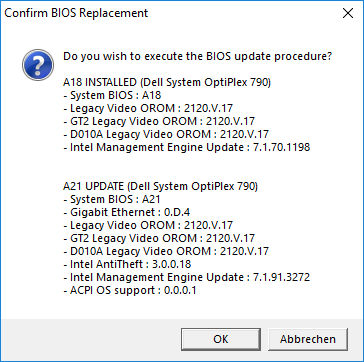
           Mobo: HP model: 828C v: KBC Version 45.41 serial: <filter> UEFI: HP v: P78 Ver. 01.18 date: 05/16/2018
Battery    BAT0: charge: 35.7 Wh 98.3% condition: 36.4/36.4 Wh (100%) model: Hewlett-Packard Primary status: N/A
           hidpp__0: charge: 60% condition: NA/NA Wh model: Logitech M705 status: Discharging
CPU:       Dual core Intel Core i7-7500U (-MT-MCP-) arch: Kaby Lake rev.9 cache: 4096 KB
           flags: (lm nx sse sse2 sse3 sse4_1 sse4_2 ssse3 vmx) bmips: 11616
           clock speeds: max: 3500 MHz 1: 798 MHz 2: 782 MHz 3: 799 MHz 4: 797 MHz
Graphics:  Card-1: Intel HD Graphics 620 bus-ID: 00:02.0
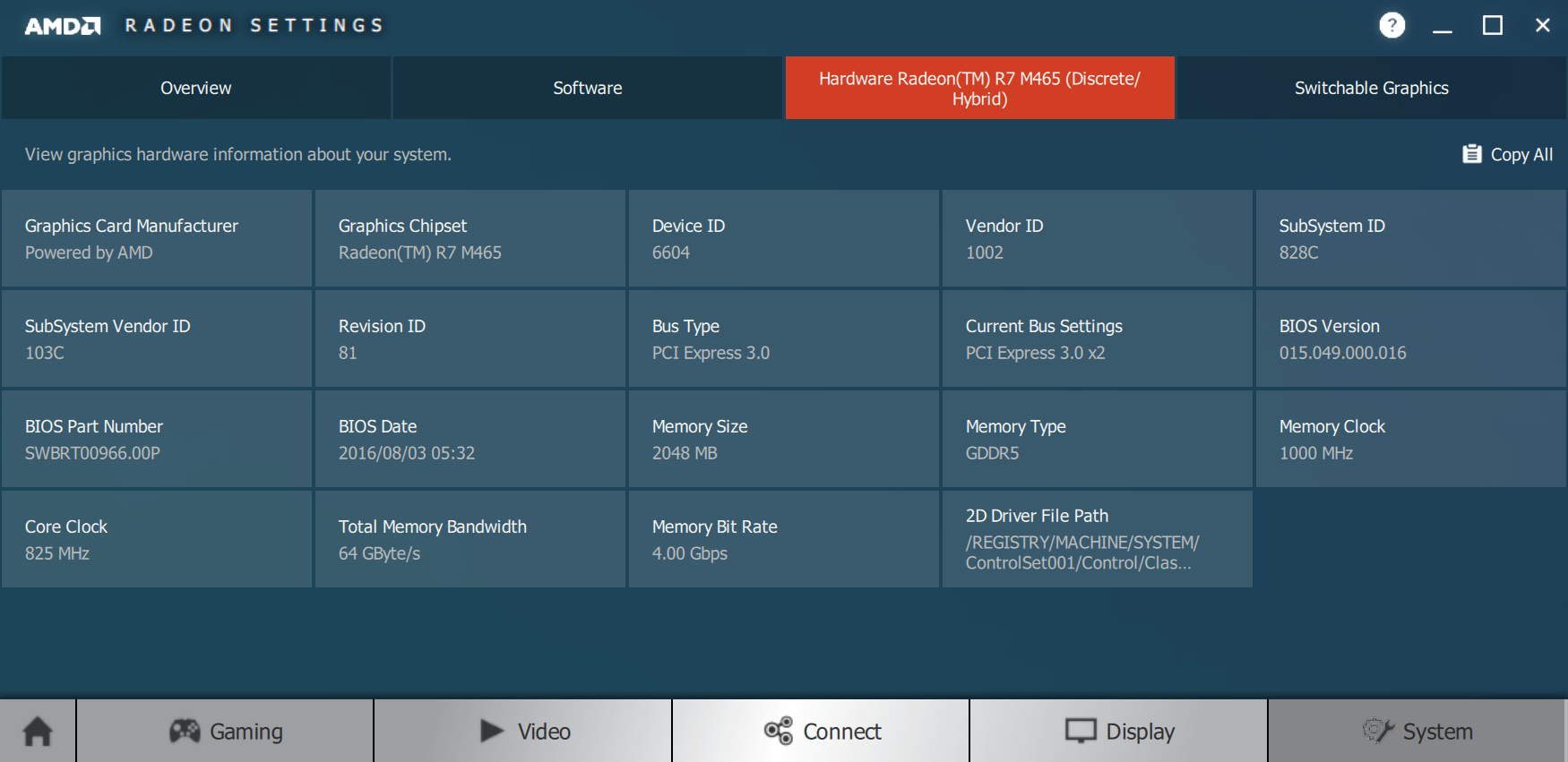
           Card-2: Advanced Micro Devices [AMD/ATI] Opal XT [Radeon R7 M265] bus-ID: 03:00.0
           Display Server: X.Org 1.19.6 drivers: modesetting,ati,radeon (unloaded: fbdev,vesa)
           Resolution: 3840x2160@60.00hz
           OpenGL: renderer: Mesa DRI Intel HD Graphics 620 (Kaby Lake GT2)
           version: 4.5 Mesa 18.0.5 Direct Render: Yes
Audio:     Card Intel Sunrise Point-LP HD Audio driver: snd_hda_intel bus-ID: 00:1f.3
           Sound: Advanced Linux Sound Architecture v: k4.15.0-32-generic
Network:   Card-1: Intel Ethernet Connection (4) I219-V driver: e1000e v: 3.2.6-k bus-ID: 00:1f.6
           IF: enp0s31f6 state: up speed: 100 Mbps duplex: full mac: <filter>
           Card-2: Intel Wireless 8265 / 8275 driver: iwlwifi bus-ID: 02:00.0
           IF: wlp2s0 state: down mac: <filter>
Drives:    HDD Total Size: 512.1GB (4.3% used)
           ID-1: /dev/nvme0n1 model: THNSN5512GPUK_TOSHIBA size: 512.1GB temp: 40C
Partition: ID-1: / size: 137G used: 6.4G (5%) fs: ext4 dev: /dev/nvme0n1p5
           ID-2: swap-1 size: 16.00GB used: 0.00GB (0%) fs: swap dev: /dev/nvme0n1p6
RAID:      No RAID devices: /proc/mdstat, md_mod kernel module present
Sensors:   System Temperatures: cpu: 42.0C mobo: 39.0C gpu: 43.0
           Fan Speeds (in rpm): cpu: N/A
Info:      Processes: 196 Uptime: 56 min Memory: 1661.7/15890.4MB Init: systemd runlevel: 5 Gcc sys: 7.3.0
           Client: Shell (bash 4.4.191) inxi: 2.3.56
$ cat /usr/share/applications/jetbrains-idea.desktop
[Desktop Entry]
Version=1.0
Type=Application
Name=IntelliJ IDEA
Icon=/opt/idea-IU/bin/idea.png
Exec="/opt/idea-IU/bin/idea.sh" %f
Comment=The Drive to Develop
Categories=Development;IDE;
Terminal=false
StartupWMClass=jetbrains-idea

$ cat /usr/share/applications/jetbrains-pycharm.desktop
[Desktop Entry]
Version=1.0
Type=Application
Name=PyCharm
Icon=/opt/pycharm/bin/pycharm.png
Exec="/opt/pycharm/bin/pycharm.sh" %f
Comment=The Drive to Develop
Categories=Development;IDE;
Terminal=false
Setting python 2.6 as default on Linux
sudo apt-get install python2.6 idle-python2.6
sudo update-alternatives --install /usr/bin/python python /usr/bin/python3.1 1
sudo update-alternatives --install /usr/bin/python python /usr/bin/python2.6 10
sudo update-alternatives --config python
 |
 |
$ lspci | grep -i amd
03:00.0 VGA compatible controller: Advanced Micro Devices, Inc. [AMD/ATI] Opal XT [Radeon R7 M265/M365X/M465] (rev 81)

$ dmesg | grep -i radeon
[    5.559181] [drm] radeon kernel modesetting enabled.
[    5.559629] radeon 0000:03:00.0: enabling device (0006 -> 0007)
[    5.570964] radeon 0000:03:00.0: VRAM: 2048M 0x0000000000000000 - 0x000000007FFFFFFF (2048M used)
[    5.570965] radeon 0000:03:00.0: GTT: 2048M 0x0000000080000000 - 0x00000000FFFFFFFF
[    5.571137] [drm] radeon: 2048M of VRAM memory ready
[    5.571138] [drm] radeon: 2048M of GTT memory ready.
[    5.578766] [drm] radeon: dpm initialized
[    5.590312] radeon 0000:03:00.0: WB enabled
[    5.590314] radeon 0000:03:00.0: fence driver on ring 0 use gpu addr 0x0000000080000c00 and cpu addr 0x        (ptrval)
[    5.590315] radeon 0000:03:00.0: fence driver on ring 1 use gpu addr 0x0000000080000c04 and cpu addr 0x        (ptrval)
[    5.590316] radeon 0000:03:00.0: fence driver on ring 2 use gpu addr 0x0000000080000c08 and cpu addr 0x        (ptrval)
[    5.590318] radeon 0000:03:00.0: fence driver on ring 3 use gpu addr 0x0000000080000c0c and cpu addr 0x        (ptrval)
[    5.590319] radeon 0000:03:00.0: fence driver on ring 4 use gpu addr 0x0000000080000c10 and cpu addr 0x        (ptrval)
[    5.591135] radeon 0000:03:00.0: fence driver on ring 5 use gpu addr 0x0000000000075a18 and cpu addr 0x        (ptrval)
[    5.691895] radeon 0000:03:00.0: failed VCE resume (-110).
[    5.691930] radeon 0000:03:00.0: radeon: MSI limited to 32-bit
[    5.691964] radeon 0000:03:00.0: radeon: using MSI.
[    5.691998] [drm] radeon: irq initialized.
[    5.778217] radeon 0000:03:00.0: vgaarb: changed VGA decodes: olddecodes=io+mem,decodes=none:owns=none
[    6.717290] [drm] Radeon Display Connectors
[    6.730467] [drm] Initialized radeon 2.50.0 20080528 for 0000:03:00.0 on minor 0

$ lsmod | egrep -i "amdgpu|i915"
amdgpu               2703360  0
chash                  16384  1 amdgpu
i915                 1617920  18
ttm                   106496  2 amdgpu,radeon
i2c_algo_bit           16384  3 amdgpu,radeon,i915
drm_kms_helper        167936  3 amdgpu,radeon,i915
drm                   401408  10 drm_kms_helper,amdgpu,radeon,i915,ttm
video                  45056  1 i915
| EFL | Effective Focal Length | Effektive Brennweite |
| FL | Focal Length | Brennweite |
| f/#, FA | Focal Aperture | Blendenöffnung |
| HFOV | Horizontal Field of View | Horizontales Sichtfeld |
| DOF | Depth of Field | Schärfentiefe |
| FFC | Flat-Field Correction | Flat-Field Korrektur |
2.3 mm, f/1.0, 92deg
Brennweite, Blendenöffnung, Horizontales Sichtfeld (HFOV)
Geometrische Optik / Strahlenoptik
Gauß-Strahl
Linsengleichung
Gegenstandsweite
Bildweite
Brennweite
Sichtfeld (FOV)
Schärfentiefe (DOF)
Sichtweite
Bildwinkel
Lichtstärke (= Blende)
Okular
Normalobjektiv
Teleobjektiv
Formelsammlung Physik: Optik: Geometrische Optik
Focal length (Brennweite)
Field of view (FOV), (Sichtfeld)
Depth of field (DOF) (Schärfentiefe)
Blende, Fokus, Schärfentiefe einfach erklärt – Fotografie Grundlagen 1 – HD
Brennweite, Belichtungszeit, Bewegungsunschärfe einfach erklärt – Fotografie Grundlagen 2 – HD
Crop-Faktor, ISO Wert, Bildrauschen einfach erklärt – Fotografie Grundlagen 3 – HD
Durchlichtmikroskop
Auflichtmikroskopie
Konfokalmikroskop
Laser-Scanning-Mikroskop
Monthly News – July 2018
Grub EFI amd 64 signed signed package fails on clean install mint 19
Installer Crashed with Error: the grub-efi-amd64-signed package failed to install into /target/ linux mint
sudo mount /dev/sdXXX /mnt
sudo mount /dev/sdXX /mnt/boot/efi
sudo mount -t efivarfs efivarfs /sys/firmware/efi/efivars
for i in /dev /dev/pts /proc /sys /run; do sudo mount -B $i /mnt$i; done
sudo chroot /mnt
grub-install /dev/sdX   or   grub-install -v --target=x86_64-efi --recheck /dev/sdX
update-grub
$ grub-install -v --target=x86_64-efi --recheck /dev/sdX
[...]
grub-install: info: Registering with EFI: distributor = `ubuntu', path = `\EFI\ubuntu\shimx64.efi', ESP at hostdisk//dev/sda,gpt1.
grub-install: info: executing efibootmgr --version </dev/null >/dev/null.
grub-install: info: executing modprobe -q efivars.
grub-install: info: executing efibootmgr -b 0001 -B.
BootCurrent: 0002
Timeout: 1 seconds
BootOrder: 0002,0000
Boot0000* Diagnostic Program
Boot0002* ubuntu
grub-install: info: executing efibootmgr -b 0002 -B.
BootCurrent: 0002
Timeout: 1 seconds
BootOrder: 0000
Boot0000* Diagnostic Program
grub-install: info: executing efibootmgr -c -d /dev/sda -p 1 -w -L ubuntu -l \EFI\ubuntu\shimx64.efi.
BootCurrent: 0002
Timeout: 1 seconds
BootOrder: 0001,0000
Boot0000* Diagnostic Program
Boot0001* ubuntu
Installation finished. No error reported.
Secure Boot Error: Invalid signature detected. Check secure boot policy in setup
Linux Mint Installation Guide – EFI SecureBoot
$ sudo efibootmgr -v
BootCurrent: 0001
Timeout: 1 seconds
BootOrder: 0002,0001,0000
Boot0000* Diagnostic Program	MemoryMapped(11,0xca89e004,0xcb1cb003)/FvFile(6f1cf8df-2398-4b3b-aaa6-35d97d4a76e9)
Boot0001* ubuntu	HD(1,GPT,2c027cf1-db3e-45e0-becb-a3224a6a7662,0x800,0x80000)/File(\EFI\ubuntu\shimx64.efi)
Boot0002* Ubuntu Boot Manager	HD(1,GPT,2c027cf1-db3e-45e0-becb-a3224a6a7662,0x800,0x80000)/File(\EFI\ubuntu\grubx64.efi)..

$ sudo efibootmgr -o 0001,0002
BootCurrent: 0001
Timeout: 1 seconds
BootOrder: 0001,0002
Boot0000* Diagnostic Program
Boot0001* ubuntu
Boot0002* Ubuntu Boot Manager
$ sudo grub-install --target=x86_64-efi
Installing for x86_64-efi platform.
grub-install: error: cannot open `/boot/efi/EFI/ubuntu/grubx64.efi': Read-only file system.

$ sudo mount -o remount,rw /boot/efi

$ sudo apt-get install grub-common grub-efi-amd64 grub-efi-amd64-bin grub-efi-amd64-signed grub2-common grub2-theme-mint mint-meta-cinnamon mint-meta-core os-prober

???
$ sudo apt-get install shim-signed
$ lsblk -f
NAME   FSTYPE LABEL    UUID                                 MOUNTPOINT
sda
├─sda1 vfat   GPT-BOOT E9CE-9FC2                            /boot/efi
├─sda2
├─sda3 ntfs            48A0C580A0C574CA
├─sda4 ntfs            3E38754C387503E5
├─sda5 ext4            27c3c697-3dca-4a68-9709-5b59f20955b0 /
├─sda6 vfat   EFISYS   BD41-11EE
├─sda7 ufs             5d349a66b8ac1be8
├─sda8
└─sda9 swap            6a1747ad-120c-4c65-9062-2bb4eb071168 [SWAP]
sr0
nvidia-compute-utils-390
nvidia-dkms-390
nvidia-driver-390
nvidia-kernel-common-390
nvidia-kernel-source-390
nvidia-prime
nvidia-prime-applet
nvidia-settings
nvidia-utils-390
$ sudo apt-get install shim-signed
[...]
After this operation, 0 B of additional disk space will be used.
Setting up shim-signed (1.37~18.04.8+15+1552672080.a4a1fbe-0ubuntu2) ...
Installing for x86_64-efi platform.
Installation finished. No error reported.
Generating a new Secure Boot signing key:
Can't load /var/lib/shim-signed/mok/.rnd into RNG
140070714560960:error:2406F079:random number generator:RAND_load_file:Cannot open file:../crypto/rand/randfile.c:88:Filename=/var/lib/shim-signed/mok/.rnd
Generating a RSA private key
.........................................................................................................................+++++
.................................................+++++
writing new private key to '/var/lib/shim-signed/mok/MOK.priv'
-----

-------- Uninstall Beginning --------
Module:  nvidia
Version: 390.143
Kernel:  4.15.0-142-generic (x86_64)
-------------------------------------

Status: Before uninstall, this module version was ACTIVE on this kernel.

nvidia.ko:
 - Uninstallation
   - Deleting from: /lib/modules/4.15.0-142-generic/kernel/drivers/char/drm/
[...]
depmod...

DKMS: install completed.
This system doesn't support Secure Boot
Secure Boot not enabled on this system.
W: APT had planned for dpkg to do more than it reported back (0 vs 4).
   Affected packages: shim-signed:amd64