Matrix Multiplication
CTRL + SHIFT + ENTER
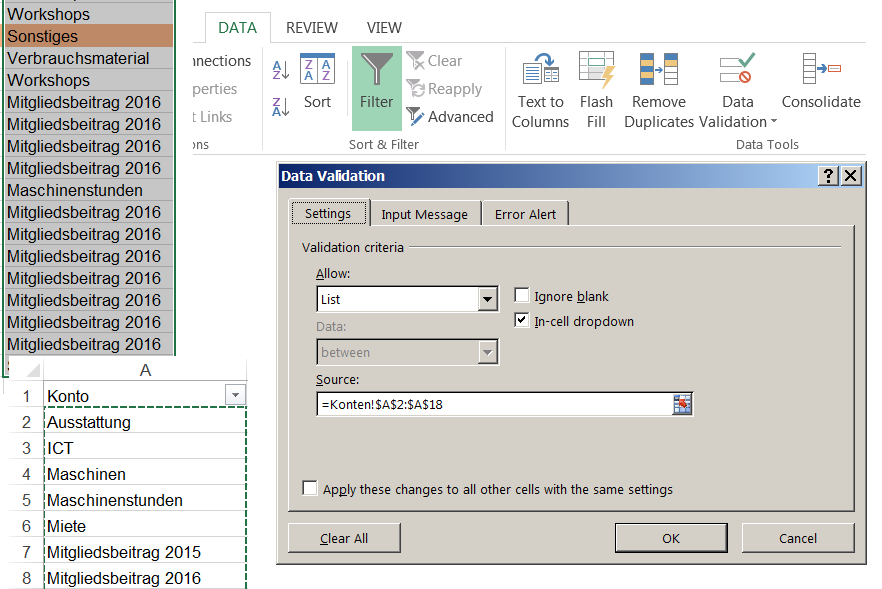
Dropdown Menu / Data Validation
 |
CTRL + SHIFT + ENTER
|
UE = user equipment (= mobile phone)
4G LTE CoMP, Coordinated Multipoint Tutorial
HetNet/Small Cells
Inter-Cell Interference Coordination (ICIC)
Perfect Altera MAX II EPM240 CPLD Development Board Learn Board
1PCS NEW EPM240 Altera MAX II CPLD Development Board
1PCS New MAXII EPM570 CPLD FPGA Mini Development Board Red JTAG
CPLD core board Altera EPM240 EPM570
ALTERA Cyclone FPGA Development Board JTAG AS SPI Flash EP1C3 Quartus II CPLD
EPM570 Core Board ALTERA MAX II CPLD EPM570T100C5N Replace EPM240 FPGA DEV Board
MAX II EPM240 CPLD Development board ALTERA
Core Board ALTERA MAX FPGA CPLD Development Kits Learning Programmable Logic PLD
OpenEPM1270-S EPM1270T144C5N EPM1270 Altera CPLD MAX II Development Board Kit
# apt-get install vlan
# modprobe 8021q
# lsmod | grep 8021q
# vconfig add eth0 1
# vconfig rem eth0.1
# ifconfig {vlan-name} create

To associate the VLAN interface with a physical interface and assign a VLAN ID, IP address, and netmask:
# ifconfig {vlan-name} {ip-address} netmask {subnet-mask} vlan {vlan-id} vlandev {physical-interface}

The following examples, all packets will be marked on egress with 802.1Q VLAN tags, specifying a VLAN ID of 5:
# ifconfig vlan5 10.0.0.1 netmask 255.255.255.0 vlan 5 vlandev em0

To remove a VLAN interface, enter:
# ifconfig {vlan-name} destroy
ostinato – Packet/Traffic Generator and Analyzer
Install Ostinato 0.6 on Ubuntu 14.04
Install package home:pstavirs:ostinato / ostinato
$ sudo sh -c "echo 'deb http://download.opensuse.org/repositories/home:/pstavirs:/ostinato/xUbuntu_15.04/ /' >> /etc/apt/sources.list.d/ostinato.list"

$ wget http://download.opensuse.org/repositories/home:pstavirs:ostinato/xUbuntu_15.04/Release.key
$ sudo apt-key add - < Release.key

or

$ wget http://download.opensuse.org/repositories/home:pstavirs:ostinato/xUbuntu_15.04/Release.key -O- | sudo apt-key add --

$ sudo apt-get update
$ sudo apt-get install ostinato
Install package home:pstavirs:ostinato / ostinato
Fedora 22:
cd /etc/yum.repos.d/
wget http://download.opensuse.org/repositories/home:pstavirs:ostinato/Fedora_22/home:pstavirs:ostinato.repo
yum install ostinato

Fedora 20:
cd /etc/yum.repos.d/
wget http://download.opensuse.org/repositories/home:pstavirs:ostinato/Fedora_20/home:pstavirs:ostinato.repo
yum install ostinato